Guest access should be seamless, but Central Web Authentication (CWA) has many moving parts. If the redirection isn’t hitting or the Change of Understanding the Cisco CWA Guest Flow is essential for a seamless user experience, but Central Web Authentication (CWA) has many moving parts. If the redirection isn’t hitting or the Change of Authorization (CoA) is failing, your guest network is dead in the water. In this guide, we’ll break down exactly how CWA flows between the Cisco Catalyst 9800 WLC and ISE 3.x—and, more importantly, how to fix it when it breaks.
Environment & Lab Specs
The following software and hardware versions were used for the testing and trace captures documented in this guide.
| Component | Hardware / Platform | Software Version |
|---|---|---|
| Wireless Controller | Catalyst 9800-CL | v17.9.x |
| Identity Services | Cisco ISE | v3.4 |
| Access Point | Catalyst 9120AXI | Local Mode |
| Test Client | Windows 11 |
Note: While the core logic of the CWA has remained an industry standard for over a decade, the versions listed below reflect the specific environment used for this guide’s traces and captures. The underlying state machine and protocol exchange remains consistent across most modern Cisco IOS-XE and ISE releases.
Why CWA Matters (The Big Picture)
CWA is the gold standard for guest networks because it keeps the heavy lifting on ISE, not the controller. It allows you to:
Restrict Access: Keep guests away from your internal subnets.
Redirect Smoothly: Send users to a customized portal for AUP acceptance or self-registration.
Dynamic Control: Use RADIUS attributes to change a user’s permissions on the fly once they log in.
The Pre-Flight Checklist: Gathering the Evidence
Before we dive into the logs, we need to make sure we are looking at the right data. In the world of CWA, if you don’t have a Radioactive Trace and a Packet Capture, you’re just guessing.
Here is exactly what you need to collect from the WLC and ISE before you recreate the issue.
1. On the Catalyst 9800: The “Radioactive Trace”
The RA Trace is your best friend. It filters out the “noise” of the entire controller and shows you exactly what is happening to one specific client.
- Navigate to: Troubleshooting > Radioactive Trace
- Action: Add the Client MAC Address, set the condition to Started, and click Apply.
⚠️ Note: Always start the trace before the client attempts to connect to catch the initial MAB request!
2. Capturing the Traffic: WLC Embedded Packet Capture (EPC)
Sometimes logs don’t tell the whole story; you need to see the actual packets (EAPOL, DHCP, HTTP Redirects).
- Navigate to: Troubleshooting > Packet Capture
- Configuration: * Set the Inner Filter MAC to your test client.
- Increase the Buffer Size to 100MB
- Select your Uplink Interface or Port Channel.
⚠️ Note (FlexConnect Users): If you are using FlexConnect Local Switching (where traffic is switched at the AP, not the WLC), the WLC Embedded Packet Capture will not see the redirected traffic. Since the data plane is handled locally by the Access Point, the WLC cannot capture the HTTP/8443 traffic between the Client and ISE.
The Fix: Perform a capture on the AP Switchport (using SPAN/ERSPAN) or run a Wireshark capture directly on the client machine to see the redirect exchange.
3. On the ISE Side: TCP Dump & Live Logs
ISE needs to see the RADIUS exchange and the Portal interaction.
- TCP Dump: Go to Operations > Diagnostic Tools > TCP Dump. Filter for the WLC IP and the Client IP.
- RADIUS Live Logs: Navigate to Operations > Radius > Live Logs.
In a successful CWA session, your ISE Live Logs will show a specific sequence linked by a single Audit-Session-ID. Depending on the portal type, you are looking for:
Hotspot Portal (3 Reports): MAB Redirect → CoA → MAB Auth (Permit Access).
Sponsor / Self-Reg Portal (4 Reports): MAB Redirect → Guest Auth → CoA → MAB Auth (Permit Access).
⚠️ Note: The Hotspot flow has one less report because a simple AUP acceptance is handled at the portal level without a RADIUS event. In contrast, providing credentials via Self-Reg or Sponsor portals triggers an additional Guest Auth report to validate the user.
The CWA “Seven-Step” Dance: How Guest Access Actually Works
Troubleshooting CWA is impossible if you don’t know where the “handoff” is failing. Think of the Guest Flow as a relay race between the Client, the WLC, and ISE.
If the runner drops the baton at Stage 3, it doesn’t matter how perfect your Stage 6 config is. Let’s break down the flow.
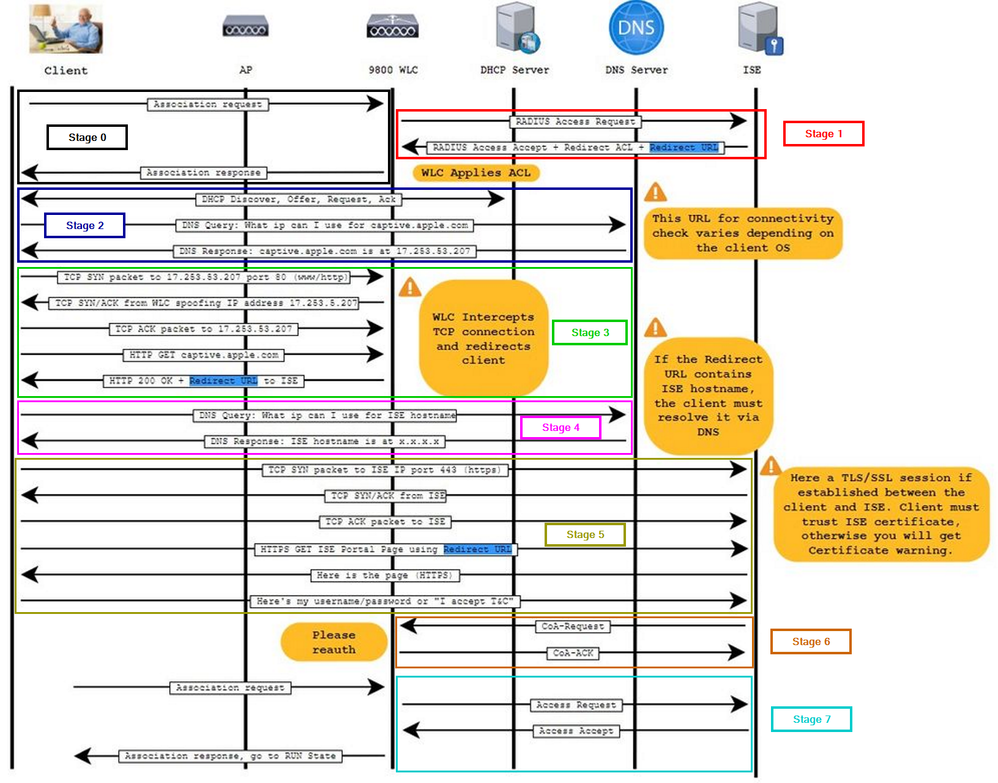
Phase 1: The “Sandbox” Assignment (Stages 0-1)
• Stage 0: Connection: The client associates with the Guest SSID. Since there is no L2 encryption (Open SSID), the handshake is instant.
• Stage 1: The MAB Request: The WLC sends a MAC Authentication Bypass (MAB) request to ISE.
○ The “Sandbox” Result: ISE looks at its database and says: “I don’t know who this is yet. I’m going to place them in a restricted ‘Sandbox’ state. WLC, apply this Redirect ACL to block their access and send them to this Redirect URL so they can identify themselves.“
○ The Goal: The client is now “Connected” but “Quarantined.” They can’t reach your servers or the internet—the only door left open is the one leading to your ISE Portal.
Phase 2: The “Captive” Logic (Stages 2-4)
• Stage 2: IP & DNS: The client gets an IP address. Its OS (iOS, Android, Windows) immediately tries to reach an “Internet Check” URL (like captive.apple.com).
• Stage 3: The Hijack: This is where the magic happens. The WLC intercepts that HTTP request. Instead of letting it go to the internet, the WLC responds on behalf of the website and says: “Hey, actually, you need to go to this ISE URL first.“
• Stage 4: DNS Resolution: The client must be able to resolve the ISE FQDN. If the client can’t “ping” the name of your ISE server, the portal will never load.
Phase 3: Authentication & The “Flip” (Stages 5-7)
• Stage 5: The Portal: The user sees the ISE Guest Page, enters credentials, and hits “Submit.”
• Stage 6: The CoA (Change of Authorization): Once ISE is happy, it sends a CoA-Push to the WLC. It’s ISE’s way of saying: “Okay, they’re good now. Drop the restrictions!“
• Stage 7: Full Access: The WLC “flips” the client’s status. The Redirect ACL is removed, and a new “Permit-All” or “Guest-Only” ACL is applied. The client is now in the RUN state.
Cisco Catalyst 9800 RA Trace Analysis — Decoding the CWA Flow
Phase 1: The “Sandbox” Assignment (Stages 0-1)
In this phase, we look for the transition from a “Unknown Client” to a “Redirected Client.”
Key Log Indicators:
- The MAB Trigger: This is the moment the WLC kicks off the authentication process. In your RA Trace, identify the “Received event ‘MAB_CONTINUE'” for the specific client MAC. Immediately following this, you should see the “RADIUS: Send Access-Request” sent to your AAA server, specifically carrying the “method=mab” Cisco AVpair.
- The Policy Hit: You are looking for an “Access-Accept” packet from ISE that contains the url-redirect and url-redirect-acl attributes. Finally, verify that these attributes are successfully committed to the session under the “Applied User Profile” section of the trace.
View Logs
Phase 1: Raw RA Trace Analysis (Stages 0-1)
2024/06/08 12:27:49.306751807 {wncd_x_R0-0}{1}: [client-orch-sm] [18023]: (note): MAC: f8e4.e3e1.bde2  Association received. BSSID f4db.e657.af0f, WLAN CWA, Slot 1 AP f4db.e657.af00, AP3802I-E-K9, Site tag Dyanev-Site-TAG, Policy tag Dyanev-Policy-TAG, Policy profile CWA-Policy, Switching Central, Socket delay 1ms # C9800 WLC received an 802.11 association request on BSSID "f4db.e657.af0f" (AP: AP3802I-E-K9) for the CWA SSID.

2024/06/08 12:27:49.306811951 {wncd_x_R0-0}{1}: [client-orch-sm] [18023]: (debug): MAC: f8e4.e3e1.bde2  Received Dot11 association request. Processing started, SSID: CWA, Policy profile: CWA-Policy, AP Name: AP3802I-E-K9, Ap Mac Address: f4db.e657.af00BSSID MAC0000.0000.0000 wlan ID: 4 RSSI: -43, SNR: 51 # Captured WLAN ID, RSSI, and SNR metrics for the client association event.

2024/06/08 12:27:49.307064750 {wncd_x_R0-0}{1}: [client-orch-state] [18023]: (note): MAC: f8e4.e3e1.bde2  Client state transition: S_CO_INIT -> S_CO_ASSOCIATING
2024/06/08 12:27:49.307392452 {wncd_x_R0-0}{1}: [dot11-validate] [18023]: (info): MAC: f8e4.e3e1.bde2  Dot11 ie validate ext/supp rates. Validation Passed for Supported rates  radio_type 2
2024/06/08 12:27:49.307395548 {wncd_x_R0-0}{1}: [dot11-validate] [18023]: (info): MAC: f8e4.e3e1.bde2  WiFi direct: Dot11 validate P2P IE. P2P IE not present.
2024/06/08 12:27:49.307646418 {wncd_x_R0-0}{1}: [dot11] [18023]: (info): MAC: f8e4.e3e1.bde2  DOT11 state transition: S_DOT11_INIT -> S_DOT11_MAB_PENDING  # CWA via MAB initiated. Since this is a Guest SSID, the C9800 holds the association response until Layer 2 MAB authentication completes.

2024/06/08 12:27:49.307675734 {wncd_x_R0-0}{1}: [client-orch-state] [18023]: (note): MAC: f8e4.e3e1.bde2  Client state transition: S_CO_ASSOCIATING -> S_CO_MACAUTH_IN_PROGRESS
2024/06/08 12:27:49.307764332 {wncd_x_R0-0}{1}: [client-auth] [18023]: (note): MAC: f8e4.e3e1.bde2  MAB Authentication initiated. Policy VLAN 10, AAA override = 1, NAC = 1  # MAB Authentication process started with AAA Override and NAC (ISE) features enabled on the Policy Profile.

2024/06/08 12:27:49.307797905 {wncd_x_R0-0}{1}: [sanet-shim-translate] [18023]: (ERR): f8e4.e3e1.bde2  wlan_profile Not Found : Device information attributes not populated
2024/06/08 12:27:49.307858120 {wncd_x_R0-0}{1}: [auth-mgr] [18023]: (info): [f8e4.e3e1.bde2:capwap_90000005] Session Start event called from SANET-SHIM, vlan: 0
2024/06/08 12:27:49.307879630 {wncd_x_R0-0}{1}: [auth-mgr] [18023]: (info): [f8e4.e3e1.bde2:capwap_90000005] Wireless session sequence, create context with method MAB
2024/06/08 12:27:49.307904608 {wncd_x_R0-0}{1}: [auth-mgr-feat_wireless] [18023]: (info): [f8e4.e3e1.bde2:capwap_90000005]  - authc_list: ExternalAAA  # RADIUS Authorization method-list name identified for the CWA authentication request.
2024/06/08 12:27:49.307906531 {wncd_x_R0-0}{1}: [auth-mgr-feat_wireless] [18023]: (info): [f8e4.e3e1.bde2:capwap_90000005]  - authz_list: Not present under wlan configuration
2024/06/08 12:27:49.307935787 {wncd_x_R0-0}{1}: [client-auth] [18023]: (info): MAC: f8e4.e3e1.bde2  Client auth-interface state transition: S_AUTHIF_INIT -> S_AUTHIF_AWAIT_MAB_AUTH_START_RESP
***
2024/06/08 12:27:49.308237980 {wncd_x_R0-0}{1}: [auth-mgr] [18023]: (info): [f8e4.e3e1.bde2:capwap_90000005] Allocated audit session id A800A8AC00000010F83F95AA  # Unique Audit-Session-ID created on the WLC to track the client flow across ISE Live Logs.
2024/06/08 12:27:49.308525726 {wncd_x_R0-0}{1}: [auth-mgr] [18023]: (info): [f8e4.e3e1.bde2:capwap_90000005] Applying policy for WlanId: 4, bssid : f4db.e657.af0f, slotid: 1 bssid hdl : 12364632845698728434
2024/06/08 12:27:49.308529613 {wncd_x_R0-0}{1}: [auth-mgr] [18023]: (info): [f8e4.e3e1.bde2:capwap_90000005] Wlan vlan-id from bssid hdl  10
2024/06/08 12:27:49.308551174 {wncd_x_R0-0}{1}: [svm] [18023]: (info): SVM_INFO: Applying Svc Templ wlan_svc_CWA-Policy_local (ML:NONE)
2024/06/08 12:27:49.309050662 {wncd_x_R0-0}{1}: [auth-mgr] [18023]: (info): [f8e4.e3e1.bde2:capwap_90000005] auth mgr attr add/change notification is received for attr vlan-id(965)
2024/06/08 12:27:49.309072112 {wncd_x_R0-0}{1}: [epm] [18023]: (info): [f8e4.e3e1.bde2:capwap_90000005] Vlan tag name is VLAN0010, pref is 1048575 vlan num is 10 # VLAN ID/Name assignment retrieved from the 9800 Policy Profile configuration.
2024/06/08 12:27:49.309121496 {wncd_x_R0-0}{1}: [epm] [18023]: (info): [f8e4.e3e1.bde2:capwap_90000005] Feature (EPM Vlan PLUG-IN) has been started (status Success)
2024/06/08 12:27:49.309148888 {wncd_x_R0-0}{1}: [auth-mgr] [18023]: (info): [f8e4.e3e1.bde2:capwap_90000005] SM Reauth Plugin: Received valid timeout = 36000, effective timeout = 36000 # WLC Session-Timeout timer initialized for the Guest session.
2024/06/08 12:27:49.309172523 {wncd_x_R0-0}{1}: [epm] [18023]: (info): [f8e4.e3e1.bde2:capwap_90000005] Feature (SM Reauth PLUG-IN) has been started (status Success)
2024/06/08 12:27:49.309231404 {wncd_x_R0-0}{1}: [svm] [18023]: (info): SVM_INFO: Response of epm is SYNC with return code Success
2024/06/08 12:27:49.309283724 {wncd_x_R0-0}{1}: [auth-mgr] [18023]: (info): [f8e4.e3e1.bde2:capwap_90000005] Raising ext evt Template Activated (9) on this session, client (unknown) (0)
2024/06/08 12:27:49.309406977 {wncd_x_R0-0}{1}: [llbridge-main] [18023]: (debug): MAC: f8e4.e3e1.bde2  Link-local bridging not enabled for this client, not checking VLAN validity
2024/06/08 12:27:49.309459757 {wncd_x_R0-0}{1}: [svm] [18023]: (info): SVM_INFO: SVM Apply user profile
2024/06/08 12:27:49.309621835 {wncd_x_R0-0}{1}: [mab] [18023]: (info): [f8e4.e3e1.bde2:capwap_90000005] MAB authentication started for f8e4.e3e1.bde2 # RADIUS MAB Authentication process started.
2024/06/08 12:27:49.309639719 {wncd_x_R0-0}{1}: [auth-mgr] [18023]: (info): [f8e4.e3e1.bde2:capwap_90000005] Context changing state from 'Idle' to 'Running'
2024/06/08 12:27:49.309644308 {wncd_x_R0-0}{1}: [auth-mgr] [18023]: (info): [f8e4.e3e1.bde2:capwap_90000005] Method mab changing state from 'Not run' to 'Running'
2024/06/08 12:27:49.309662863 {wncd_x_R0-0}{1}: [auth-mgr] [18023]: (info): [f8e4.e3e1.bde2:capwap_90000005] SM will not send event Template Activated to PRE for 0xE6000006
2024/06/08 12:27:49.309704742 {wncd_x_R0-0}{1}: [client-auth] [18023]: (info): MAC: f8e4.e3e1.bde2  Client auth-interface state transition: S_AUTHIF_AWAIT_MAB_AUTH_START_RESP -> S_AUTHIF_MAB_AUTH_PENDING
2024/06/08 12:27:49.309721223 {wncd_x_R0-0}{1}: [ewlc-infra-evq] [18023]: (note): Authentication Success. Resolved Policy bitmap:11 for client f8e4.e3e1.bde2
2024/06/08 12:27:49.309726533 {wncd_x_R0-0}{1}: [client-auth] [18023]: (info): MAC: f8e4.e3e1.bde2  Client auth-interface state transition: S_AUTHIF_MAB_AUTH_PENDING -> S_AUTHIF_MAB_AUTH_PENDING
2024/06/08 12:27:49.309770938 {wncd_x_R0-0}{1}: [mab] [18023]: (info): [f8e4.e3e1.bde2:capwap_90000005] Received event 'MAB_CONTINUE' on (f8e4.e3e1.bde2)
2024/06/08 12:27:49.310084773 {wncd_x_R0-0}{1}: [caaa-author] [18023]: (info): [CAAA:AUTHOR:e6000006]  NULL ATTR LIST
2024/06/08 12:27:49.310316643 {wncd_x_R0-0}{1}: [radius] [18023]: (info): RADIUS: Send Access-Request to 172.168.0.20:1812 id 0/7, len 374 # Client MAC Address formatted as the calling-station-ID and forwarded to the ISE RADIUS server via MAB.

2024/06/08 12:27:49.310325219 {wncd_x_R0-0}{1}: [radius] [18023]: (info): RADIUS:  authenticator 4c d8 0b c4 98 6f ad 9b - 5c 37 30 d7 0d 38 c2 c1
2024/06/08 12:27:49.310331461 {wncd_x_R0-0}{1}: [radius] [18023]: (info): RADIUS:  User-Name [1] 14 "f8e4e3e1bde2" # RADIUS Access-Request sent: Client MAC address is validated as the RADIUS username.
2024/06/08 12:27:49.310335458 {wncd_x_R0-0}{1}: [radius] [18023]: (info): RADIUS:  User-Password [2] 18 *
2024/06/08 12:27:49.310358472 {wncd_x_R0-0}{1}: [radius] [18023]: (info): RADIUS:  Service-Type [6] 6 Call Check [10]
2024/06/08 12:27:49.310362239 {wncd_x_R0-0}{1}: [radius] [18023]: (info): RADIUS:  Vendor, Cisco [26] 31
2024/06/08 12:27:49.310367599 {wncd_x_R0-0}{1}: [radius] [18023]: (info): RADIUS:   Cisco AVpair [1] 25 "service-type=Call Check"
2024/06/08 12:27:49.310373751 {wncd_x_R0-0}{1}: [radius] [18023]: (info): RADIUS:  Framed-MTU [12] 6 1485
2024/06/08 12:27:49.310377298 {wncd_x_R0-0}{1}: [radius] [18023]: (info): RADIUS:  Message-Authenticator[80] 18 ...
2024/06/08 12:27:49.310402766 {wncd_x_R0-0}{1}: [radius] [18023]: (info): RADIUS:  EAP-Key-Name [102] 2 *
2024/06/08 12:27:49.310409779 {wncd_x_R0-0}{1}: [radius] [18023]: (info): RADIUS:  Vendor, Cisco [26] 49
2024/06/08 12:27:49.310414108 {wncd_x_R0-0}{1}: [radius] [18023]: (info): RADIUS:   Cisco AVpair [1] 43 "audit-session-id=A800A8AC00000010F83F95AA" # Unique Audit-Session-ID recorded for the specific client MAC to correlate C9800 logs with ISE RADIUS events.
2024/06/08 12:27:49.310418256 {wncd_x_R0-0}{1}: [radius] [18023]: (info): RADIUS:  Vendor, Cisco [26] 18
2024/06/08 12:27:49.310422714 {wncd_x_R0-0}{1}: [radius] [18023]: (info): RADIUS:   Cisco AVpair [1] 12 "method=mab"
2024/06/08 12:27:49.310426221 {wncd_x_R0-0}{1}: [radius] [18023]: (info): RADIUS:  Vendor, Cisco [26] 30
2024/06/08 12:27:49.310430459 {wncd_x_R0-0}{1}: [radius] [18023]: (info): RADIUS:   Cisco AVpair [1] 24 "client-iif-id=33555472"
2024/06/08 12:27:49.310434045 {wncd_x_R0-0}{1}: [radius] [18023]: (info): RADIUS:  Vendor, Cisco [26] 18
2024/06/08 12:27:49.310438243 {wncd_x_R0-0}{1}: [radius] [18023]: (info): RADIUS:   Cisco AVpair [1] 12 "vlan-id=10"
2024/06/08 12:27:49.310444525 {wncd_x_R0-0}{1}: [radius] [18023]: (info): RADIUS:  NAS-IP-Address [4] 6 172.168.0.168 # C9800 RADIUS Source Interface identified (Default: Wireless Management Interface / WMI).
2024/06/08 12:27:49.310449475 {wncd_x_R0-0}{1}: [radius] [18023]: (info): RADIUS:  NAS-Port-Type [61] 6 802.11 wireless [19]
2024/06/08 12:27:49.310453713 {wncd_x_R0-0}{1}: [radius] [18023]: (info): RADIUS:  NAS-Port [5] 6 1012
2024/06/08 12:27:49.310456859 {wncd_x_R0-0}{1}: [radius] [18023]: (info): RADIUS:  Vendor, Cisco [26] 27
2024/06/08 12:27:49.310460776 {wncd_x_R0-0}{1}: [radius] [18023]: (info): RADIUS:   Cisco AVpair [1] 21 "cisco-wlan-ssid=CWA"
2024/06/08 12:27:49.310464102 {wncd_x_R0-0}{1}: [radius] [18023]: (info): RADIUS:  Vendor, Cisco [26] 29
2024/06/08 12:27:49.310478059 {wncd_x_R0-0}{1}: [radius] [18023]: (info): RADIUS:   Cisco AVpair [1] 23 "wlan-profile-name=CWA"
2024/06/08 12:27:49.310482467 {wncd_x_R0-0}{1}: [radius] [18023]: (info): RADIUS:  Called-Station-Id [30] 23 "f4-db-e6-57-af-00:CWA" # NAS-Port details included: AP Hardware MAC and Target SSID for policy matching.
2024/06/08 12:27:49.310486595 {wncd_x_R0-0}{1}: [radius] [18023]: (info): RADIUS:  Calling-Station-Id [31] 19 "f8-e4-e3-e1-bd-e2"
2024/06/08 12:27:49.310490282 {wncd_x_R0-0}{1}: [radius] [18023]: (info): RADIUS:  Vendor, Airespace [26] 12
2024/06/08 12:27:49.310494490 {wncd_x_R0-0}{1}: [radius] [18023]: (info): RADIUS:   Airespace-WLAN-ID [1] 6  4 # WLAN ID 4 identified as the ingress point for this Guest CWA session.
2024/06/08 12:27:49.310498698 {wncd_x_R0-0}{1}: [radius] [18023]: (info): RADIUS:  Nas-Identifier [32] 16 "C9800-L_Third" # NAS-Identifier sent to ISE, matching the C9800 Hostname in the AAA configuration.
2024/06/08 12:27:49.310632652 {wncd_x_R0-0}{1}: [radius] [18023]: (info): RADIUS: Started 5 sec timeout

2024/06/08 12:27:49.353594916 {wncd_x_R0-0}{1}: [radius] [18023]: (info): RADIUS: Received from id 1812/7 172.168.0.20:0, Access-Accept, len 351 # AAA Server Response (ISE): Access-Accept granted for the initial MAB phase.
2024/06/08 12:27:49.353607330 {wncd_x_R0-0}{1}: [radius] [18023]: (info): RADIUS:  authenticator 7c ef c0 98 06 70 99 68 - d3 13 b2 4f 6e 94 f4 43
2024/06/08 12:27:49.353613431 {wncd_x_R0-0}{1}: [radius] [18023]: (info): RADIUS:  User-Name [1] 19 "F8-E4-E3-E1-BD-E2"
2024/06/08 12:27:49.353616988 {wncd_x_R0-0}{1}: [radius] [18023]: (info): RADIUS:  Class [25] 53 ...
2024/06/08 12:27:49.353694365 {wncd_x_R0-0}{1}: [radius] [18023]: (info): RADIUS:  Message-Authenticator[80] 18 ...
2024/06/08 12:27:49.353711317 {wncd_x_R0-0}{1}: [radius] [18023]: (info): RADIUS:  Vendor, Cisco [26] 41
2024/06/08 12:27:49.353715675 {wncd_x_R0-0}{1}: [radius] [18023]: (info): RADIUS:   Cisco AVpair [1] 35 "url-redirect-acl=WebAuth-Redirect" # Redirect ACL "WebAuth-Redirect" pushed from ISE to be applied to the C9800 active client session.
2024/06/08 12:27:49.353718210 {wncd_x_R0-0}{1}: [radius] [18023]: (info): RADIUS:  Vendor, Cisco [26] 200
2024/06/08 12:27:49.353721947 {wncd_x_R0-0}{1}: [radius] [18023]: (info): RADIUS:   Cisco AVpair [1] 194 "url-redirect=https://ISE-PAN27.dyanev.local:8443/portal/gateway?sessionId=A800A8AC00000010F83F95AA&portal=deaaa863-1df0-4198-baf1-8d5b690d4361&action=cwa&token=198711cbdb683411b4f892c3c0e93e6e" # CWA Redirect-URL VSA: The destination ISE FQDN portal where the client's HTTP traffic will be intercepted.

2024/06/08 12:27:49.353759879 {wncd_x_R0-0}{1}: [radius] [18023]: (info): Valid Response Packet, Free the identifier
2024/06/08 12:27:49.353989284 {wncd_x_R0-0}{1}: [mab] [18023]: (info): [f8e4.e3e1.bde2:capwap_90000005] MAB received an Access-Accept for (f8e4.e3e1.bde2)
2024/06/08 12:27:49.353999303 {wncd_x_R0-0}{1}: [mab] [18023]: (info): [f8e4.e3e1.bde2:capwap_90000005] Received event 'MAB_RESULT' on (f8e4.e3e1.bde2)
2024/06/08 12:27:49.354038107 {wncd_x_R0-0}{1}: [auth-mgr] [18023]: (info): [f8e4.e3e1.bde2:capwap_90000005] Authc success from MAB, Auth event success
***
2024/06/08 12:27:49.354298922 {wncd_x_R0-0}{1}: [auth-mgr] [18023]: (info): [f8e4.e3e1.bde2:capwap_90000005] Method mab changing state from 'Running' to 'Authc Success'  # MAB Authentication status updated to Successful; client transitioned to Redirect-pending state.
***
2024/06/08 12:27:49.354612526 {wncd_x_R0-0}{1}: [epm-misc] [18023]: (info): [f8e4.e3e1.bde2:capwap_90000005] Username F8-E4-E3-E1-BD-E2 received
***
2024/06/08 12:27:49.354619970 {wncd_x_R0-0}{1}: [epm] [18023]: (info): [f8e4.e3e1.bde2:capwap_90000005] Feature (EPM MISC PLUG-IN) has been started (status Success)
2024/06/08 12:27:49.354635791 {wncd_x_R0-0}{1}: [epm] [18023]: (info): [f8e4.e3e1.bde2:capwap_90000005] Feature (SM ACCOUNTING PLUG-IN) has been started (status Success)
2024/06/08 12:27:49.355022078 {wncd_x_R0-0}{1}: [webauth-dev] [18023]: (info): [ 172.168.30.208]Central Webauth URL Redirect, Received a request to create a CWA session for a mac [f8:e4:e3:e1:bd:e2] # CWA Session Established: Redirect-URL acknowledged by the WLC and applied to the client's datapath.
2024/06/08 12:27:49.355169740 {wncd_x_R0-0}{1}: [auth-mgr-feat_wireless] [18023]: (info): [0000.0000.0000:unknown] Retrieved zone id 0x0 for bssid 12364632845698728434
2024/06/08 12:27:49.355177364 {wncd_x_R0-0}{1}: [webauth-dev] [18023]: (info): [ 172.168.30.208]No parameter map is associated with mac f8e4.e3e1.bde2
2024/06/08 12:27:49.355183856 {wncd_x_R0-0}{1}: [webauth-state] [18023]: (info): [f8e4.e3e1.bde2][ 0.0.0.0]Param-map used: global # Global WebAuth Parameter Map called to define the redirect interception logic and HTTP/HTTPS behavior.

2024/06/08 12:27:49.355222239 {wncd_x_R0-0}{1}: [webauth-state] [18023]: (info): [f8e4.e3e1.bde2][ 0.0.0.0]State Invalid State -> INIT
2024/06/08 12:27:49.355427492 {wncd_x_R0-0}{1}: [epm-redirect] [18023]: (info): [0000.0000.0000:unknown] URL-Redirect = https://ISE-PAN27.dyanev.local:8443/...
2024/06/08 12:27:49.356180650 {wncd_x_R0-0}{1}: [epm] [18023]: (info): [f8e4.e3e1.bde2:capwap_90000005] Feature (EPM URL PLUG-IN) has been started (status Success)
2024/06/08 12:27:49.356251405 {wncd_x_R0-0}{1}: [svm] [18023]: (info): SVM_INFO: Response of epm is SYNC with return code Success
2024/06/08 12:27:49.356317330 {wncd_x_R0-0}{1}: [svm] [18023]: (info): [f8e4.e3e1.bde2] Applied User Profile: : # C9800 Client Session Attributes: Summary of VSAs and policy profiles applied to the session.
2024/06/08 12:27:49.356323241 {wncd_x_R0-0}{1}: [aaa-attr-inf] [18023]: (info): Applied User Profile: method 0 2 [mab]
2024/06/08 12:27:49.356327138 {wncd_x_R0-0}{1}: [aaa-attr-inf] [18023]: (info): Applied User Profile: clid-mac-addr 0 f8 e4 e3 e1 bd e2
2024/06/08 12:27:49.356328872 {wncd_x_R0-0}{1}: [aaa-attr-inf] [18023]: (info): Applied User Profile: intf-id 0 2415919109 (0x90000005)
2024/06/08 12:27:49.356330434 {wncd_x_R0-0}{1}: [aaa-attr-inf] [18023]: (info): Applied User Profile: username 0 "F8-E4-E3-E1-BD-E2"
2024/06/08 12:27:49.356346034 {wncd_x_R0-0}{1}: [aaa-attr-inf] [18023]: (info): Applied User Profile: class 0 43 41 43 53 3a 41 38 30 30 41 38 41 43 30 30 30 30 30 30 31 30 46 38 33 46 39 35 41 41 3a 49 53 45 2d 50 41 4e 32 37 2f 35 30 37 32 31 33 39 33 38 2f 38
2024/06/08 12:27:49.356348238 {wncd_x_R0-0}{1}: [aaa-attr-inf] [18023]: (info): Applied User Profile: url-redirect-acl 0 "WebAuth-Redirect"
2024/06/08 12:27:49.356350302 {wncd_x_R0-0}{1}: [aaa-attr-inf] [18023]: (info): Applied User Profile: url-redirect 0 "https://ISE-PAN27.dyanev.local:8443/..."
2024/06/08 12:27:49.356887490 {wncd_x_R0-0}{1}: [llbridge-main] [18023]: (debug): MAC: f8e4.e3e1.bde2  Link-local bridging not enabled for this client, not checking VLAN validity
2024/06/08 12:27:49.357714992 {wncd_x_R0-0}{1}: [auth-mgr] [18023]: (info): [f8e4.e3e1.bde2:capwap_90000005] User Profile applied successfully - REPLACE
2024/06/08 12:27:49.357856781 {wncd_x_R0-0}{1}: [auth-mgr] [18023]: (info): [f8e4.e3e1.bde2:capwap_90000005] auth mgr attr add/change notification is received for attr method(757)
2024/06/08 12:27:49.357898389 {wncd_x_R0-0}{1}: [auth-mgr] [18023]: (info): [f8e4.e3e1.bde2:capwap_90000005] Raised event AUTHZ_SUCCESS (11)
2024/06/08 12:27:49.357910482 {wncd_x_R0-0}{1}: [auth-mgr] [18023]: (info): [f8e4.e3e1.bde2:capwap_90000005] Context changing state from 'Authc Success' to 'Authz Success' # MAB Authorization Successful: All RADIUS attributes (Redirect ACL/URL) successfully synchronized to the client's data path.
2024/06/08 12:27:49.358218497 {wncd_x_R0-0}{1}: [mm-client] [18023]: (debug): MAC: 0000.0000.0000 Sending pmk_update of XID (0) to (MobilityD[0])
2024/06/08 12:27:49.358252942 {wncd_x_R0-0}{1}: [client-auth] [18023]: (note): MAC: f8e4.e3e1.bde2  MAB Authentication success. # MAB Complete: Initial Authentication and Authorization phases are successfully validated by ISE.
2024/06/08 12:27:49.358307606 {wncd_x_R0-0}{1}: [client-auth] [18023]: (info): MAC: f8e4.e3e1.bde2  Client auth-interface state transition: S_AUTHIF_MAB_AUTH_PENDING -> S_AUTHIF_MAB_AUTH_DONE
2024/06/08 12:27:49.358365787 {mobilityd_R0-0}{1}: [mm-client] [19995]: (debug): MAC: 0000.0000.0000 Received pmk_update, sub type: 0 of XID (0) from (WNCD[0])
2024/06/08 12:27:49.358388469 {wncd_x_R0-0}{1}: [client-orch-sm] [18023]: (debug): MAC: f8e4.e3e1.bde2  Processing MAB authentication result status: 0, CO_AUTH_STATUS_SUCCESS
2024/06/08 12:27:49.358430028 {wncd_x_R0-0}{1}: [client-orch-state] [18023]: (note): MAC: f8e4.e3e1.bde2  Client state transition: S_CO_MACAUTH_IN_PROGRESS -> S_CO_ASSOCIATING # 802.11 Association Resume: The WLC continues the association handshake after a successful MAB trigger.
2024/06/08 12:27:49.358449946 {wncd_x_R0-0}{1}: [dot11] [18023]: (debug): MAC: f8e4.e3e1.bde2  dot11 send association response. Framing association response with resp_status_code: 0
2024/06/08 12:27:49.358462469 {wncd_x_R0-0}{1}: [dot11] [18023]: (debug): MAC: f8e4.e3e1.bde2  Dot11 Capability info byte1 1, byte2: 11
2024/06/08 12:27:49.358472259 {mobilityd_R0-0}{1}: [mm-dgram-io] [19995]: (debug): MAC: 0000.0000.0000 Sending message: pmk_update to group: TAC-3
2024/06/08 12:27:49.358540538 {wncd_x_R0-0}{1}: [dot11-frame] [18023]: (info): MAC: f8e4.e3e1.bde2  WiFi direct: skip build Assoc Resp with P2P IE: Wifi direct policy disabled
2024/06/08 12:27:49.358763410 {wncd_x_R0-0}{1}: [dot11] [18023]: (info): MAC: f8e4.e3e1.bde2  dot11 send association response. Sending assoc response of length: 144 with resp_status_code: 0, DOT11_STATUS: DOT11_STATUS_SUCCESS # WLC Association Response: Sending the 802.11 Success frame to the client station.
2024/06/08 12:27:49.358775032 {wncd_x_R0-0}{1}: [dot11] [18023]: (note): MAC: f8e4.e3e1.bde2  Association success. AID 1, Roaming = False, WGB = False, 11r = False, 11w = False Fast roam = False # Association Process Complete: Client is now physically connected to the CWA SSID.

2024/06/08 12:27:49.358793848 {wncd_x_R0-0}{1}: [dot11] [18023]: (info): MAC: f8e4.e3e1.bde2  DOT11 state transition: S_DOT11_MAB_PENDING -> S_DOT11_ASSOCIATED
2024/06/08 12:27:49.358886574 {wncd_x_R0-0}{1}: [client-orch-sm] [18023]: (debug): MAC: f8e4.e3e1.bde2  Station Dot11 association is successful.
2024/06/08 12:27:49.359024505 {wncd_x_R0-0}{1}: [client-orch-sm] [18023]: (debug): MAC: f8e4.e3e1.bde2  Starting L2 authentication. Bssid in state machine:f4db.e657.af0f  Bssid in request is:f4db.e657.af0f
2024/06/08 12:27:49.359044403 {wncd_x_R0-0}{1}: [client-orch-state] [18023]: (note): MAC: f8e4.e3e1.bde2  Client state transition: S_CO_ASSOCIATING -> S_CO_L2_AUTH_IN_PROGRESS
2024/06/08 12:27:49.359207833 {wncd_x_R0-0}{1}: [client-auth] [18023]: (note): MAC: f8e4.e3e1.bde2  L2 WEBAUTH Authentication Successful  # Layer 2 Security (None): Open SSID configuration detected; transitioning directly to Layer 3 web-auth.
2024/06/08 12:27:49.359232610 {wncd_x_R0-0}{1}: [client-auth] [18023]: (info): MAC: f8e4.e3e1.bde2  Client auth-interface state transition: S_AUTHIF_MAB_AUTH_DONE -> S_AUTHIF_L2_WEBAUTH_DONE
Phase 2: The “Captive” Logic (Stages 2-4)
In this phase, we track the client as it moves from Layer 2 connectivity into the Layer 3 Web-Auth flow. This is where the C9800 intercepts traffic and forces the redirection to the ISE Guest Portal.
IP Learning (DHCP): We verify the transition to
S_CO_IP_LEARN_IN_PROGRESS. The WLC must see the SISF_DHCPACK to bind the client MAC to an IP address (e.g., 172.168.0.201).The Redirect Trigger: Once the IP is learned, the client enters
S_CO_L3_AUTH_IN_PROGRESS. Look for the webauth-io events where the WLC transitions from READING to WRITING, indicating it has successfully intercepted an HTTP GET and is injecting the ISE redirect URL.
View Logs
Phase 2: Raw RA Trace Analysis (Stages 2-4)
2024/06/08 12:27:49.359258119 {wncd_x_R0-0}{1}: [client-orch-sm] [18023]: (debug): MAC: f8e4.e3e1.bde2  L2 Authentication of station is successful., L3 Authentication : 1  # Layer 3 Web-Authentication Available: Proceeding with the CWA Redirect logic.
2024/06/08 12:27:49.359362667 {wncd_x_R0-0}{1}: [client-orch-sm] [18023]: (note): MAC: f8e4.e3e1.bde2  Mobility discovery triggered. Client mode: Flex - Central Switching
2024/06/08 12:27:49.359367987 {wncd_x_R0-0}{1}: [client-orch-state] [18023]: (note): MAC: f8e4.e3e1.bde2  Client state transition: S_CO_L2_AUTH_IN_PROGRESS -> S_CO_MOBILITY_DISCOVERY_IN_PROGRESS  # Mobility Group Validation: Checking for global Cisco Mobility Group configurations and roaming triggers.

2024/06/08 12:27:49.359642147 {wncd_x_R0-0}{1}: [mm-client] [18023]: (debug): MAC: f8e4.e3e1.bde2 Sending mobile_announce of XID (0) to (MobilityD[0])
2024/06/08 12:27:49.361524617 {mobilityd_R0-0}{1}: [mm-dgram-io] [19995]: (debug): MAC: f8e4.e3e1.bde2 Sending message: mobile_announce to group: TAC-2
2024/06/08 12:27:49.361539716 {mobilityd_R0-0}{1}: [mm-dgram-io] [19995]: (debug): MAC: f8e4.e3e1.bde2 Sending message: mobile_announce to group: TAC-3

2024/06/08 12:27:49.362733931 {wncd_x_R0-0}{1}: [mm-client] [18023]: (info): MAC: f8e4.e3e1.bde2 Roam type changed - None -> None
2024/06/08 12:27:49.363452833 {wncd_x_R0-0}{1}: [mm-client] [18023]: (info): MAC: f8e4.e3e1.bde2 Mobility role changed -  Unassoc -> Local  # Local Session Execution: No Auto-Anchor or Inter-Controller roaming detected; session anchored locally on this WLC.
2024/06/08 12:27:49.363689913 {wncd_x_R0-0}{1}: [mm-client] [18023]: (note): MAC: f8e4.e3e1.bde2 Mobility Successful. Roam Type None, Sub Roam Type MM_SUB_ROAM_TYPE_NONE, Client IFID: 0xa0000002, Client Role: Local PoA: 0x90000005 PoP: 0x0

2024/06/08 12:27:49.364963910 {wncd_x_R0-0}{1}: [client-orch-state] [18023]: (note): MAC: f8e4.e3e1.bde2  Client state transition: S_CO_MOBILITY_DISCOVERY_IN_PROGRESS -> S_CO_DPATH_PLUMB_IN_PROGRESS
2024/06/08 12:27:49.365346786 {wncd_x_R0-0}{1}: [dot11] [18023]: (note): MAC: f8e4.e3e1.bde2  Client datapath entry params - ssid:CWA,slot_id:1 bssid ifid: 0x0, radio_ifid: 0x90000003, wlan_ifid: 0xf0400004

2024/06/08 12:27:49.365903953 {wncd_x_R0-0}{1}: [dpath_svc] [18023]: (note): MAC: f8e4.e3e1.bde2 Client datapath entry created for ifid 0xa0000002
2024/06/08 12:27:49.366136574 {wncd_x_R0-0}{1}: [client-orch-state] [18023]: (note): MAC: f8e4.e3e1.bde2  Client state transition: S_CO_DPATH_PLUMB_IN_PROGRESS -> S_CO_IP_LEARN_IN_PROGRESS
2024/06/08 12:27:49.366385236 {wncd_x_R0-0}{1}: [client-iplearn] [18023]: (info): MAC: f8e4.e3e1.bde2  IP-learn state transition: S_IPLEARN_INIT -> S_IPLEARN_IN_PROGRESS  # IP Learn State (DHCP): Transitioning to the DHCP phase to acquire a client IP address.

2024/06/08 12:27:49.616271850 {wncd_x_R0-0}{1}: [sisf-packet] [18023]: (info): RX: DHCPv4 from interface capwap_90000005 on vlan 10 Src MAC: f8e4.e3e1.bde2 Dst MAC: ffff.ffff.ffff src_ip: 0.0.0.0, dst_ip: 255.255.255.255, BOOTPREQUEST, SISF_DHCPREQUEST...
2024/06/08 12:27:49.618945559 {wncd_x_R0-0}{1}: [sisf-packet] [18023]: (info): TX: DHCPv4 from interface Gi1 on vlan 10 Src MAC: b0fa.ebec.7dc3 Dst MAC: f8e4.e3e1.bde2 src_ip: 172.168.0.1, dst_ip: 255.255.255.255, BOOTPREPLY, SISF_DHCPACK, yiaddr: 172.168.0.201, CMAC: f8e4.e3e1.bde2
2024/06/08 12:27:49.619544934 {wncd_x_R0-0}{1}: [client-iplearn] [18023]: (note): MAC: f8e4.e3e1.bde2  Client IP learn successful. Method: DHCP IP: 172.168.0.201

2024/06/08 12:27:49.620521086 {wncd_x_R0-0}{1}: [client-iplearn] [18023]: (info): MAC: f8e4.e3e1.bde2  IP-learn state transition: S_IPLEARN_IN_PROGRESS -> S_IPLEARN_COMPLETE  # DHCP Binding Completed: Client successfully acquired IP address 172.168.0.201 from the scope.
2024/06/08 12:27:49.620672523 {wncd_x_R0-0}{1}: [client-orch-sm] [18023]: (debug): MAC: f8e4.e3e1.bde2  Triggered L3 authentication. status = 0x0, Success
2024/06/08 12:27:49.620693603 {wncd_x_R0-0}{1}: [client-orch-state] [18023]: (note): MAC: f8e4.e3e1.bde2  Client state transition: S_CO_IP_LEARN_IN_PROGRESS -> S_CO_L3_AUTH_IN_PROGRESS  # Transitioning to Layer 3 Authentication: IP address verified; the C9800 is now ready to intercept HTTP traffic.

2024/06/08 12:27:49.620861186 {wncd_x_R0-0}{1}: [client-auth] [18023]: (note): MAC: f8e4.e3e1.bde2  L3 Authentication initiated. CWA

2024/06/08 12:27:49.620878088 {wncd_x_R0-0}{1}: [client-auth] [18023]: (info): MAC: f8e4.e3e1.bde2  Client auth-interface state transition: S_AUTHIF_L2_WEBAUTH_DONE -> S_AUTHIF_WEBAUTH_PENDING  # CWA Flow Initialized: Client placed into WebAuth Pending state; redirection logic is now active.

2024/06/08 12:27:50.089629929 {wncd_x_R0-0}{1}: [webauth-io] [18023]: (info): [f8e4.e3e1.bde2][  172.168.0.201]62487/215 IO state NEW -> READING  # IO traffic received - TCP (HTTP GET) packet
2024/06/08 12:27:50.089767801 {wncd_x_R0-0}{1}: [webauth-state] [18023]: (info): [f8e4.e3e1.bde2][  172.168.0.201]State INIT -> GET_REDIRECT  # Preparing the redirect URL
2024/06/08 12:27:50.089772320 {wncd_x_R0-0}{1}: [webauth-io] [18023]: (info): [f8e4.e3e1.bde2][  172.168.0.201]62487/215 IO state READING -> WRITING  # Writing/inserting the redirect URL in HTTP 200 response
2024/06/08 12:27:50.089845910 {wncd_x_R0-0}{1}: [webauth-io] [18023]: (info): [f8e4.e3e1.bde2][  172.168.0.201]62487/215 IO state WRITING -> END  # Transmitting the HTTP 200 response to client
Phase 3: Authentication & The “Flip” (Stages 5-7)
This final phase represents the “moment of truth” where the Guest Portal communicates back to the C9800. We are looking for the CoA (Change of Authorization) which signals the WLC to stop redirecting and grant full network access.
The CoA Handshake: Look for the “Processing CoA request” and the “Reauthenticate” command. This tells the WLC that the user has successfully logged into the portal and the session needs to be “flipped” from restricted to authorized.
The Final Run State: The ultimate goal is the S_CO_RUN transition. This indicates that all Layer 2 and Layer 3 hurdles are cleared, and the client is now officially “Joined” to the SSID with full traffic privileges.
View Logs
Phase 3: Raw RA Trace Analysis (Stages 5-7)
2024/06/08 12:28:28.719496002 {wncd_x_R0-0}{1}: [caaa-ch] [18023]: (info): [CAAA:COMMAND HANDLER:e6000006] Processing CoA request under Command Handler ctx. # Change of Authorization (CoA) received from ISE
2024/06/08 12:28:28.719616711 {wncd_x_R0-0}{1}: [caaa-ch] [18023]: (info): [CAAA:COMMAND HANDLER:e6000006] Reauthenticate request (0x55cc521c4b48) for f8e4.e3e1.bde2 # CoA type - reauthenticate (association session will remain active / MAB, layer 2 & 3 auth will be restarted)
2024/06/08 12:28:28.719652299 {wncd_x_R0-0}{1}: [sadb-attr] [18023]: (info): Removing ipv6 addresses from the attr list 603980302,sm_ctx = 0x8080648b48, num_ipv6 = 1
2024/06/08 12:28:28.719742832 {wncd_x_R0-0}{1}: [mab] [18023]: (info): [f8e4.e3e1.bde2:capwap_90000005] MAB re-authentication started for (f8e4.e3e1.bde2)
2024/06/08 12:28:28.719755957 {wncd_x_R0-0}{1}: [auth-mgr] [18023]: (info): [f8e4.e3e1.bde2:capwap_90000005] Context changing state from 'Authz Success' to 'Running'
2024/06/08 12:28:28.719763572 {wncd_x_R0-0}{1}: [auth-mgr] [18023]: (info): [f8e4.e3e1.bde2:capwap_90000005] Method mab changing state from 'Authc Success' to 'Running' # Changing the MAB state from Success to Running again - bouncing the MAB auth
2024/06/08 12:28:28.719806173 {wncd_x_R0-0}{1}: [aaa-coa] [18023]: (info): radius coa proxy relay coa resp(wncd)
2024/06/08 12:28:28.719812956 {wncd_x_R0-0}{1}: [aaa-coa] [18023]: (info): CoA Response Details
2024/06/08 12:28:28.719823676 {wncd_x_R0-0}{1}: [aaa-attr-inf] [18023]: (info): << ssg-command-code 0 32 >>
2024/06/08 12:28:28.719827063 {wncd_x_R0-0}{1}: [aaa-attr-inf] [18023]: (info): << formatted-clid 0 "f8e4.e3e1.bde2">>
2024/06/08 12:28:28.719830699 {wncd_x_R0-0}{1}: [aaa-attr-inf] [18023]: (info): << error-cause 0 1 [Success]>>
2024/06/08 12:28:28.719837603 {wncd_x_R0-0}{1}: [aaa-coa] [18023]: (info): server:172.168.0.168 cfg_saddr:172.168.0.168 udpport:49271 sport:0, tableid:0iden:3 rad_code:43 msg_auth_rcvd:TRUE coa_resp:ACK
2024/06/08 12:28:28.719976078 {wncd_x_R0-0}{1}: [caaa-ch] [18023]: (info): [CAAA:COMMAND HANDLER] CoA response sent
2024/06/08 12:28:28.719986658 {wncd_x_R0-0}{1}: [caaa-ch] [18023]: (info): [CAAA:COMMAND HANDLER:e6000006] Identity preserved: mac (f8e4.e3e1.bde2), ip (0), audit_sid (A800A8AC00000010F83F95AA), aaa_session_id (0)
2024/06/08 12:28:28.720003450 {wncd_x_R0-0}{1}: [mab] [18023]: (info): [f8e4.e3e1.bde2:capwap_90000005] Received event 'MAB_REAUTHENTICATE' on (f8e4.e3e1.bde2)
2024/06/08 12:28:28.720381515 {smd_R0-0}{1}: [aaa-coa] [20863]: (info): ++++++ Received CoA response Attribute List ++++++
2024/06/08 12:28:28.720388843 {wncd_x_R0-0}{1}: [sadb-attr] [18023]: (info): Removing ipv6 addresses from the attr list 2080375311,sm_ctx = 0x8080648b48, num_ipv6 = 1
2024/06/08 12:28:28.720524256 {smd_R0-0}{1}: [radius] [20863]: (info): RADIUS(00000000): Send CoA Ack Response to 172.168.0.20:49271 id 3, len 69 # CoA AK response packet - confirming that CoA is received and applied correctly
2024/06/08 12:28:28.720524972 {wncd_x_R0-0}{1}: [caaa-author] [18023]: (info): [CAAA:AUTHOR:e6000006] NULL ATTR LIST
2024/06/08 12:28:28.720531680 {smd_R0-0}{1}: [radius] [20863]: (info): RADIUS: authenticator a1 62 af 5f 4f e9 d9 dd - b5 d2 4d 06 72 59 d8 78
2024/06/08 12:28:28.720537682 {smd_R0-0}{1}: [radius] [20863]: (info): RADIUS: Vendor, Cisco [26] 9
2024/06/08 12:28:28.720541859 {smd_R0-0}{1}: [radius] [20863]: (info): RADIUS: ssg-command-code [252] 3 ...
2024/06/08 12:28:28.720559543 {smd_R0-0}{1}: [radius] [20863]: (info): RADIUS: Calling-Station-Id [31] 16 "f8e4.e3e1.bde2"
2024/06/08 12:28:28.720589660 {smd_R0-0}{1}: [radius] [20863]: (info): RADIUS: Dynamic-Author-Error-Cause[101] 6 Success [200]
2024/06/08 12:28:28.720593297 {smd_R0-0}{1}: [radius] [20863]: (info): RADIUS: Message-Authenticator[80] 18 ...
2024/06/08 12:28:28.720629316 {smd_R0-0}{1}: [aaa-pod] [20863]: (info): CoA response source port = 0, udpport = 49271,
2024/06/08 12:28:28.720960711 {wncd_x_R0-0}{1}: [radius] [18023]: (info): RADIUS: Send Access-Request to 172.168.0.20:1812 id 0/8, len 420 # New MAB request sent to the AAA server
2024/06/08 12:28:28.720973906 {wncd_x_R0-0}{1}: [radius] [18023]: (info): RADIUS: authenticator 9b 46 ec ed 15 d6 11 fe - 00 fe 0a ca ad 02 bb f9
2024/06/08 12:28:28.720982061 {wncd_x_R0-0}{1}: [radius] [18023]: (info): RADIUS: User-Name [1] 14 "f8e4e3e1bde2"
2024/06/08 12:28:28.720988564 {wncd_x_R0-0}{1}: [radius] [18023]: (info): RADIUS: User-Password [2] 18 *
2024/06/08 12:28:28.721004143 {wncd_x_R0-0}{1}: [radius] [18023]: (info): RADIUS: Service-Type [6] 6 Call Check [10]
2024/06/08 12:28:28.721009894 {wncd_x_R0-0}{1}: [radius] [18023]: (info): RADIUS: Vendor, Cisco [26] 31
2024/06/08 12:28:28.721018360 {wncd_x_R0-0}{1}: [radius] [18023]: (info): RADIUS: Cisco AVpair [1] 25 "service-type=Call Check"
2024/06/08 12:28:28.721026866 {wncd_x_R0-0}{1}: [radius] [18023]: (info): RADIUS: Framed-MTU [12] 6 1485
2024/06/08 12:28:28.721032217 {wncd_x_R0-0}{1}: [radius] [18023]: (info): RADIUS: Message-Authenticator[80] 18 ...
2024/06/08 12:28:28.721078124 {wncd_x_R0-0}{1}: [radius] [18023]: (info): RADIUS: EAP-Key-Name [102] 2 *
2024/06/08 12:28:28.721089425 {wncd_x_R0-0}{1}: [radius] [18023]: (info): RADIUS: Vendor, Cisco [26] 49
2024/06/08 12:28:28.721097000 {wncd_x_R0-0}{1}: [radius] [18023]: (info): RADIUS: Cisco AVpair [1] 43 "audit-session-id=A800A8AC00000010F83F95AA" # The Session ID remains unchanged because the CoA action is set to reauthenticate rather than terminate, as expected.
2024/06/08 12:28:28.721102540 {wncd_x_R0-0}{1}: [radius] [18023]: (info): RADIUS: Vendor, Cisco [26] 18
2024/06/08 12:28:28.721109083 {wncd_x_R0-0}{1}: [radius] [18023]: (info): RADIUS: Cisco AVpair [1] 12 "method=mab"
2024/06/08 12:28:28.721117819 {wncd_x_R0-0}{1}: [radius] [18023]: (info): RADIUS: Framed-IP-Address [8] 6 172.168.0.201
2024/06/08 12:28:28.721122849 {wncd_x_R0-0}{1}: [radius] [18023]: (info): RADIUS: Vendor, Cisco [26] 40
2024/06/08 12:28:28.721131435 {wncd_x_R0-0}{1}: [radius] [18023]: (info): RADIUS: Cisco AVpair [1] 34 "addrv6=fe80::4c7f:2388:2ed2:be2f"
2024/06/08 12:28:28.721137657 {wncd_x_R0-0}{1}: [radius] [18023]: (info): RADIUS: Vendor, Cisco [26] 30
2024/06/08 12:28:28.721146023 {wncd_x_R0-0}{1}: [radius] [18023]: (info): RADIUS: Cisco AVpair [1] 24 "client-iif-id=33555472"
2024/06/08 12:28:28.721151684 {wncd_x_R0-0}{1}: [radius] [18023]: (info): RADIUS: Vendor, Cisco [26] 18
2024/06/08 12:28:28.721174417 {wncd_x_R0-0}{1}: [radius] [18023]: (info): RADIUS: Cisco AVpair [1] 12 "vlan-id=10"
2024/06/08 12:28:28.721183865 {wncd_x_R0-0}{1}: [radius] [18023]: (info): RADIUS: NAS-IP-Address [4] 6 172.168.0.168
2024/06/08 12:28:28.721192091 {wncd_x_R0-0}{1}: [radius] [18023]: (info): RADIUS: NAS-Port-Type [61] 6 802.11 wireless [19]
2024/06/08 12:28:28.721199555 {wncd_x_R0-0}{1}: [radius] [18023]: (info): RADIUS: NAS-Port [5] 6 1012
2024/06/08 12:28:28.721204424 {wncd_x_R0-0}{1}: [radius] [18023]: (info): RADIUS: Vendor, Cisco [26] 27
2024/06/08 12:28:28.721211437 {wncd_x_R0-0}{1}: [radius] [18023]: (info): RADIUS: Cisco AVpair [1] 21 "cisco-wlan-ssid=CWA"
2024/06/08 12:28:28.721217249 {wncd_x_R0-0}{1}: [radius] [18023]: (info): RADIUS: Vendor, Cisco [26] 29
2024/06/08 12:28:28.721224332 {wncd_x_R0-0}{1}: [radius] [18023]: (info): RADIUS: Cisco AVpair [1] 23 "wlan-profile-name=CWA"
2024/06/08 12:28:28.721230985 {wncd_x_R0-0}{1}: [radius] [30] 23 "f4-db-e6-57-af-00:CWA"
2024/06/08 12:28:28.721238910 {wncd_x_R0-0}{1}: [radius] [31] 19 "f8-e4-e3-e1-bd-e2"
2024/06/08 12:28:28.721245823 {wncd_x_R0-0}{1}: [radius] [18023]: (info): RADIUS: Vendor, Airespace [26] 12
2024/06/08 12:28:28.721253427 {wncd_x_R0-0}{1}: [radius] [18023]: (info): RADIUS: Airespace-WLAN-ID [1] 6 4
2024/06/08 12:28:28.721261843 {wncd_x_R0-0}{1}: [radius] [18023]: (info): RADIUS: Nas-Identifier [32] 16 "C9800-L_Third"
2024/06/08 12:28:28.721377686 {wncd_x_R0-0}{1}: [radius] [18023]: (info): RADIUS: Started 5 sec timeout
2024/06/08 12:28:28.758268244 {wncd_x_R0-0}{1}: [radius] [18023]: (info): RADIUS: Received from id 1812/8 172.168.0.20:0, Access-Accept, len 155 # AAA server reply with new AVPs - removing the old restrictions and setting new if required
2024/06/08 12:28:28.758283413 {wncd_x_R0-0}{1}: [radius] [18023]: (info): RADIUS: authenticator ff ef f9 33 a5 4a 26 5a - b0 ee 17 b3 28 85 f0 a4
2024/06/08 12:28:28.758290547 {wncd_x_R0-0}{1}: [radius] [18023]: (info): RADIUS: User-Name [1] 9 "dimitar" # Username entered during WebAuth (Layer 3 Auth) process
2024/06/08 12:28:28.758293883 {wncd_x_R0-0}{1}: [radius] [18023]: (info): RADIUS: Class [25] 54 ...
2024/06/08 12:28:28.758360359 {wncd_x_R0-0}{1}: [radius] [18023]: (info): RADIUS: Session-Timeout [27] 6 86388 # Session timeout - when client have to reauthenticate against ISE again
2024/06/08 12:28:28.758363716 {wncd_x_R0-0}{1}: [radius] [18023]: (info): RADIUS: Termination-Action [29] 6 0
2024/06/08 12:28:28.758366140 {wncd_x_R0-0}{1}: [radius] [18023]: (info): RADIUS: Message-Authenticator[80] 18 ...
2024/06/08 12:28:28.758384445 {wncd_x_R0-0}{1}: [radius] [18023]: (info): RADIUS: Vendor, Cisco [26] 42
2024/06/08 12:28:28.758388353 {wncd_x_R0-0}{1}: [radius] [18023]: (info): RADIUS: Cisco AVpair [1] 36 "profile-name=Windows10-Workstation"
2024/06/08 12:28:28.758424822 {wncd_x_R0-0}{1}: [radius] [18023]: (info): Valid Response Packet, Free the identifier
2024/06/08 12:28:28.758597019 {wncd_x_R0-0}{1}: [mab] [18023]: (info): [f8e4.e3e1.bde2:capwap_90000005] MAB received an Access-Accept for (f8e4.e3e1.bde2)
2024/06/08 12:28:28.758607419 {wncd_x_R0-0}{1}: [mab] [18023]: (info): [f8e4.e3e1.bde2:capwap_90000005] Received event 'MAB_RESULT' on (f8e4.e3e1.bde2)
2024/06/08 12:28:28.758639320 {wncd_x_R0-0}{1}: [auth-mgr] [18023]: (info): [f8e4.e3e1.bde2:capwap_90000005] Authc success from MAB, Auth event success
2024/06/08 12:28:28.758649329 {wncd_x_R0-0}{1}: [auth-mgr] [18023]: (info): [f8e4.e3e1.bde2:capwap_90000005] Raised event APPLY_USER_PROFILE (14)
2024/06/08 12:28:28.758653527 {wncd_x_R0-0}{1}: [auth-mgr] [18023]: (info): [f8e4.e3e1.bde2:capwap_90000005] Raised event RX_METHOD_AUTHC_SUCCESS (3)

2024/06/08 12:28:28.759297061 {wncd_x_R0-0}{1}: [auth-mgr-feat_acct] [18023]: (info): [f8e4.e3e1.bde2:capwap_90000005] SM Notified attribute Add/Update username dimitar # Updating the username on WLC end
2024/06/08 12:28:28.759300998 {wncd_x_R0-0}{1}: [auth-mgr] [18023]: (info): [f8e4.e3e1.bde2:capwap_90000005] Received User-Name dimitar for client f8e4.e3e1.bde2
2024/06/08 12:28:28.759312510 {wncd_x_R0-0}{1}: [auth-mgr] [18023]: (info): [f8e4.e3e1.bde2:capwap_90000005] Method mab changing state from 'Running' to 'Authc Success'
2024/06/08 12:28:28.759315736 {wncd_x_R0-0}{1}: [auth-mgr] [18023]: (info): [f8e4.e3e1.bde2:capwap_90000005] Context changing state from 'Running' to 'Authc Success'

2024/06/08 12:28:28.760451271 {wncd_x_R0-0}{1}: [epm-misc] [18023]: (info): [f8e4.e3e1.bde2:capwap_90000005] Username dimitar received
2024/06/08 12:28:28.760498981 {wncd_x_R0-0}{1}: [auth-mgr] [18023]: (info): [f8e4.e3e1.bde2:capwap_90000005] SM Reauth Plugin: Received valid timeout = 86388 # Updating the session timeout timer
2024/06/08 12:28:28.760501356 {wncd_x_R0-0}{1}: [auth-mgr] [18023]: (info): [f8e4.e3e1.bde2:capwap_90000005] SM Reauth Plugin: Received valid Termination-Action = 0
2024/06/08 12:28:28.760621625 {wncd_x_R0-0}{1}: [epm] [18023]: (info): [f8e4.e3e1.bde2:capwap_90000005] Feature (SM Reauth PLUG-IN) has been started (status Success)
2024/06/08 12:28:28.760663625 {wncd_x_R0-0}{1}: [svm] [18023]: (info): SVM_INFO: Response of epm is SYNC with return code Success
2024/06/08 12:28:28.760718930 {wncd_x_R0-0}{1}: [svm] [18023]: (info): [f8e4.e3e1.bde2] Applied User Profile: :
2024/06/08 12:28:28.760723518 {wncd_x_R0-0}{1}: [aaa-attr-inf] [18023]: (info): Applied User Profile: method 0 2 [mab]
2024/06/08 12:28:28.760726023 {wncd_x_R0-0}{1}: [aaa-attr-inf] [18023]: (info): Applied User Profile: clid-mac-addr 0 f8 e4 e3 e1 bd e2
2024/06/08 12:28:28.760727396 {wncd_x_R0-0}{1}: [aaa-attr-inf] [18023]: (info): Applied User Profile: intf-id 0 2415919109 (0x90000005)
2024/06/08 12:28:28.760729249 {wncd_x_R0-0}{1}: [aaa-attr-inf] [18023]: (info): Applied User Profile: username 0 "dimitar"
2024/06/08 12:28:28.760742595 {wncd_x_R0-0}{1}: [aaa-attr-inf] [18023]: (info): Applied User Profile: class 0 43 41 43 53 3a 41 38 30 30 41 38 41 43 30 30 30 30 30 30 31 30 46 38 33 46 39 35 41 41 3a 49 53 45 2d 50 41 4e 32 37 2f 35 30 37 32 31 33 39 33 38 2f 31 30
2024/06/08 12:28:28.760744569 {wncd_x_R0-0}{1}: [aaa-attr-inf] [18023]: (info): Applied User Profile: timeout 0 86388 (0x15174)
2024/06/08 12:28:28.760745580 {wncd_x_R0-0}{1}: [aaa-attr-inf] [18023]: (info): Applied User Profile: Termination-Action 0 False
2024/06/08 12:28:28.761010925 {wncd_x_R0-0}{1}: [llbridge-main] [18023]: (debug): MAC: f8e4.e3e1.bde2 Link-local bridging not enabled for this client, not checking VLAN validity
2024/06/08 12:28:28.761117217 {wncd_x_R0-0}{1}: [auth-mgr] [18023]: (info): [f8e4.e3e1.bde2:capwap_90000005] User Profile applied successfully - REPLACE
2024/06/08 12:28:28.761223439 {wncd_x_R0-0}{1}: [auth-mgr] [18023]: (info): [f8e4.e3e1.bde2:capwap_90000005] Raised event AUTHZ_SUCCESS (11)
2024/06/08 12:28:28.761232486 {wncd_x_R0-0}{1}: [auth-mgr] [18023]: (info): [f8e4.e3e1.bde2:capwap_90000005] Context changing state from 'Authc Success' to 'Authz Success'
2024/06/08 12:28:28.761329280 {wncd_x_R0-0}{1}: [client-auth] [18023]: (note): MAC: f8e4.e3e1.bde2 L3 Authentication Successful. ACL:[]
2024/06/08 12:28:28.761335242 {wncd_x_R0-0}{1}: [client-auth] [18023]: (info): MAC: f8e4.e3e1.bde2 Client auth-interface state transition: S_AUTHIF_WEBAUTH_PENDING -> S_AUTHIF_WEBAUTH_DONE # Layer 3 authen is completed - client is removed from WebAuth pending state
2024/06/08 12:28:28.761993263 {wncd_x_R0-0}{1}: [errmsg] [18023]: (info): %CLIENT_ORCH_LOG-6-CLIENT_ADDED_TO_RUN_STATE: R0/0: wncd: Username entry (dimitar) joined with ssid (CWA) for device with MAC: f8e4.e3e1.bde2 # generating an notification - client entered in RUN state
2024/06/08 12:28:28.762097371 {wncd_x_R0-0}{1}: [aaa-attr-inf] [18023]: (info): [ Applied attribute : username 0 "dimitar" ]
2024/06/08 12:28:28.762109885 {wncd_x_R0-0}{1}: [aaa-attr-inf] [18023]: (info): [ Applied attribute : class 0 43 41 43 53 3a 41 38 30 30 41 38 41 43 30 30 30 30 30 30 31 30 46 38 33 46 39 35 41 41 3a 49 53 45 2d 50 41 4e 32 37 2f 35 30 37 32 31 33 39 33 38 2f 31 30 ]
2024/06/08 12:28:28.762124302 {wncd_x_R0-0}{1}: [aaa-attr-inf] [18023]: (info): [ Applied attribute : timeout 0 86388 (0x15174) ]
2024/06/08 12:28:28.762125755 {wncd_x_R0-0}{1}: [aaa-attr-inf] [18023]: (info): [ Applied attribute : Termination-Action 0 False ]
2024/06/08 12:28:28.762134060 {wncd_x_R0-0}{1}: [aaa-attr-inf] [18023]: (info): [ Applied attribute :bsn-vlan-interface-name 0 "VLAN0010" ]
2024/06/08 12:28:28.762196399 {wncd_x_R0-0}{1}: [ewlc-qos-client] [18023]: (info): MAC: f8e4.e3e1.bde2 Client QoS run state handler
2024/06/08 12:28:28.762236355 {wncd_x_R0-0}{1}: [rog-proxy-capwap] [18023]: (debug): Managed client RUN state notification: f8e4.e3e1.bde2
2024/06/08 12:28:28.762297561 {wncd_x_R0-0}{1}: [client-orch-state] [18023]: (note): MAC: f8e4.e3e1.bde2 Client state transition: S_CO_L3_AUTH_IN_PROGRESS -> S_CO_RUN # state updated to RUN - client is allowed to the internet
Wireshark: Examining the Guest Traffic Flow
To truly understand how a guest session lives and breathes, we need to look at the wire. This analysis breaks down the guest flow across all stages, focusing on the Layer 2 and Layer 3 encapsulations captured at critical junctions in the topology.
Layer 2 Analysis — The Client to WLC Exchange
Capture Points: WLC Embedded Packet Capture (EPC), AP Switchport (via SPAN), Over-the-Air (OTA) sniffer, or local capture on the Client.
This capture serves as our primary lens into Stages 2 through 5. It reveals how the client interacts with the WLC and ISE to receive the redirection instructions and eventually establishes the secure session on port 8443 required for internet access.
Essential Wireshark Filters
The “Quick Check” Filter
Use this to quickly verify if the client is generating DNS/HTTP traffic for the WLC to intercept and whether it is attempting to reach the ISE portal.
ip.addr == <Client-IP-Address> && (tcp.port == 8443 || dns || http)
The “Complete Journey” Filter
This comprehensive filter traces the guest’s entire path—from the initial connectivity check to the ISE portal landing—without missing a single packet.
ip.addr == <Client-IP-Address> && (dns.qry.name == "Connectivity Check FQDN" || ip.addr == <Connectivity Check FQDN IP Address> || dns.qry.name == "ISE-FQDN" || ip.addr == <ISE IP Address>)
Tunnel-Specific Filtering (EPC Only)
When running captures directly on the WLC, you often need to decide whether you want to look inside or outside the CAPWAP tunnel.
To exclude CAPWAP overhead (Clean view):
... && !(udp.port == 5247)To view CAPWAP encapsulated traffic only:
... && (udp.port == 5247)
Identifying Connectivity Check URLs
To successfully filter the initial “Are you a captive portal?” check, you must know what the client’s OS is looking for. Each vendor has a specific FQDN used to trigger the browser pop-up:
| Vendor / Browser | Connectivity Check FQDN |
| Windows | www.msftconnecttest.com, www.msftncsi.com |
| Apple | captive.apple.com |
| Android | connectivitycheck.gstatic.com, connectivitycheck.android.com |
| Chrome | clients1.google.com, clients3.google.com |
| Firefox | detectportal.firefox.com |
| Ubuntu | connectivity-check.ubuntu.com |
| Red Hat | nmcheck.gnome.org |
Step 1: Validating the Initial DNS Connectivity Check (Stage 2)
The Wireshark Strategy
We start by confirming if the client is even attempting to reach the internet. You can use a generic DNS filter or a targeted one if you know the client’s OS.
Recommended Filters:
Basic FQDN Filter:
dns.qry.name == "www.msftconnecttest.com"Client-Specific Filter (if IP is known):
ip.addr == 172.168.0.201 && dns.qry.name == "www.msftconnecttest.com"
Note: If you don’t have access to the client device to check the IP, you can find it in the 9800 RA Traces by looking for the line:
"Client IP learn successful. Method: DHCP IP: 172.168.0.201"

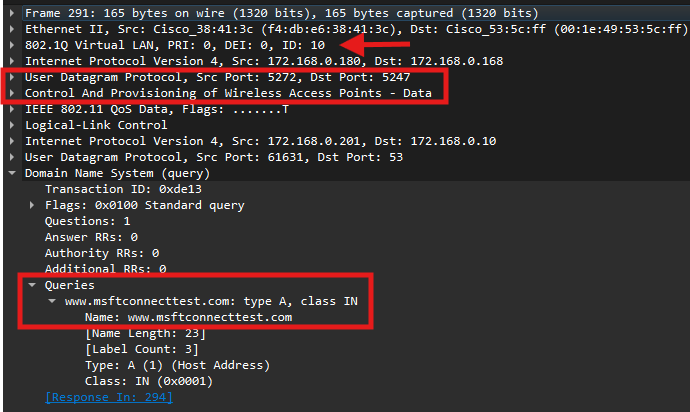

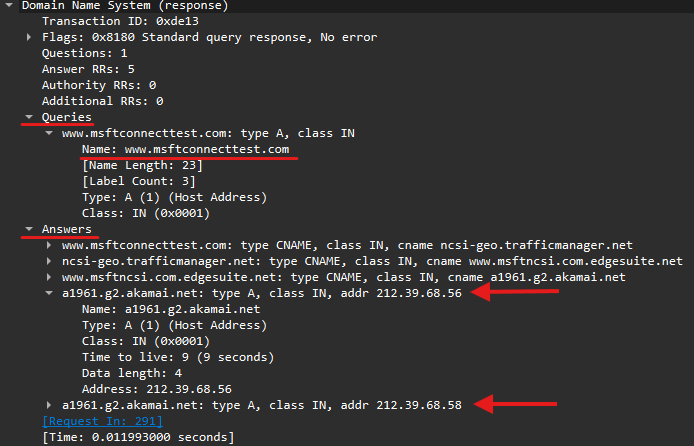
Key Packet Details to Verify:
-
VLAN Tagging: Ensure the traffic is on the correct client VLAN (e.g., VLAN 10).
-
CAPWAP Encapsulation: If capturing on the WLC uplink, verify the traffic is wrapped in CAPWAP (UDP 5247).
-
DNS Resolution: Confirm the client receives a valid IP address in the DNS response (e.g.,
212.39.68.56).
Step 2 & 3: TCP Handshake, HTTP Interception, and Redirect (Stage 3)
Once the client resolves the connectivity test FQDN, it attempts to establish a connection to that IP address. This is where the Catalyst 9800 WLC performs a “Man-in-the-Middle” maneuver to redirect the user to the ISE portal.
The Wireshark Strategy
Update your filter to include the resolved IP address from Step 1 (212.39.68.56). This allows you to witness the WLC intercepting the standard web traffic.
Revised Filters:
Standard View:
ip.addr == 172.168.0.201 && (ip.addr == 212.39.68.56 || dns.qry.name == "www.msftconnecttest.com")WLC EPC (Inside CAPWAP Only): Add
&& (udp.port == 5247)to avoid seeing duplicate packets from the uplink.
What to Look For
1. The 3-Way Handshake You will see the client initiate a TCP SYN to the external IP (212.39.68.56). Even though the destination is an external server, the WLC intercepts this and completes the handshake locally to prepare for the HTTP redirect.

2. The HTTP GET & Redirection Following the handshake, the client sends an HTTP GET request for a specific file (e.g., /connecttest.txt).
User-Agent: Often identifies the OS, such as “Microsoft NCSI” for Windows.
The Interception: The WLC intercepts this GET packet. Instead of forwarding it to the internet, it responds with an HTTP 302 Redirect (or 200 OK with redirection meta-data) containing the ISE Portal URL.



Step 4: ISE FQDN Resolution (Stage 4)
After the WLC intercepts the initial connectivity check and provides a redirect, the client must resolve the ISE Fully Qualified Domain Name (FQDN) to load the actual login page.
The Wireshark Strategy
Recommended Wireshark Filters:
Standard View:
ip.addr == 172.168.0.201 && (ip.addr == 212.39.68.56 || dns.qry.name == "www.msftconnecttest.com" || dns.qry.name == "ISE-PAN27.dyanev.local")WLC EPC (CAPWAP Only):
ip.addr == 172.168.0.201 && ((ip.addr == 212.39.68.56 || dns.qry.name == "www.msftconnecttest.com" || dns.qry.name == "ISE-PAN27.dyanev.local") && (udp.port == 5247))

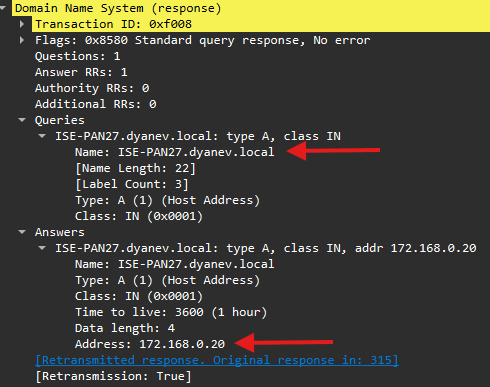
Expected Result: The client sends a DNS query for the ISE FQDN. The DNS server must return the internal IP of the ISE node (e.g., 172.168.0.20). If this resolution fails, the browser will hang, and the guest portal will never load.
Once the client resolves the ISE FQDN, it must establish a secure connection to the ISE guest portal, typically over TCP port 8443.
The Wireshark Strategy
Update your filter to include the ISE IP address (172.168.0.20) to verify the handshake and encrypted exchange.
Standard Filter:
ip.addr == 172.168.0.201 && (ip.addr == 212.39.68.56 || dns.qry.name == "www.msftconnecttest.com" || dns.qry.name == "ISE-PAN27.dyanev.local" || ip.addr == 172.168.0.20)EPC Filter (Inside CAPWAP Only): Append
&& (udp.port == 5247)to the above to isolate tunnel traffic

Key Objectives for Stage 5:
3-Way Handshake: Confirm a successful
SYN,SYN-ACK,ACKsequence between the client and ISE on port 8443.TLS Handshake: Verify the TLS tunnel is established. Look for “Client Key Exchange” or “Change Cipher Spec” messages to confirm the certificate was received and the session is progressing.
Portal Loading: Ensure the client is actually able to load the page once the tunnel is encrypted.
Troubleshooting Fragmentation and MTU
In some wireless environments, the CAPWAP tunnel may fragment large packets (like certificates) passing between the AP and WLC.
The Symptom: Wireshark filters based on IP or MAC address may fail because the data appears only as fragmented CAPWAP traffic

- The Fix: To avoid this, set the TCP MSS (Maximum Segment Size) to 1250 or 1200. This reduces the segment size, preventing fragmentation and ensuring the full certificate can be viewed in the trace without impacting service.

Layer 3 Capture Analysis: Traffic between Catalyst 9800 WLC & ISE
While Layer 2 captures focus on the client-to-WLC interaction, Layer 3 analysis examines the critical backend communication between the WLC and ISE. This primarily involves RADIUS traffic and the final authorization “flip” that grants the guest access.
The Challenge of L3 Captures
Stages 1, 6, and 7 of the guest flow occur exclusively between the WLC and ISE. These stages are often missed if:
The WLC EPC was performed using an inner MAC filter.
The capture was taken from the AP switchport.
To gain full visibility into RADIUS exchanges, it is recommended to perform a packet capture directly on the ISE side using the TCPDump tool.
Recommended RADIUS Filtering Strategy
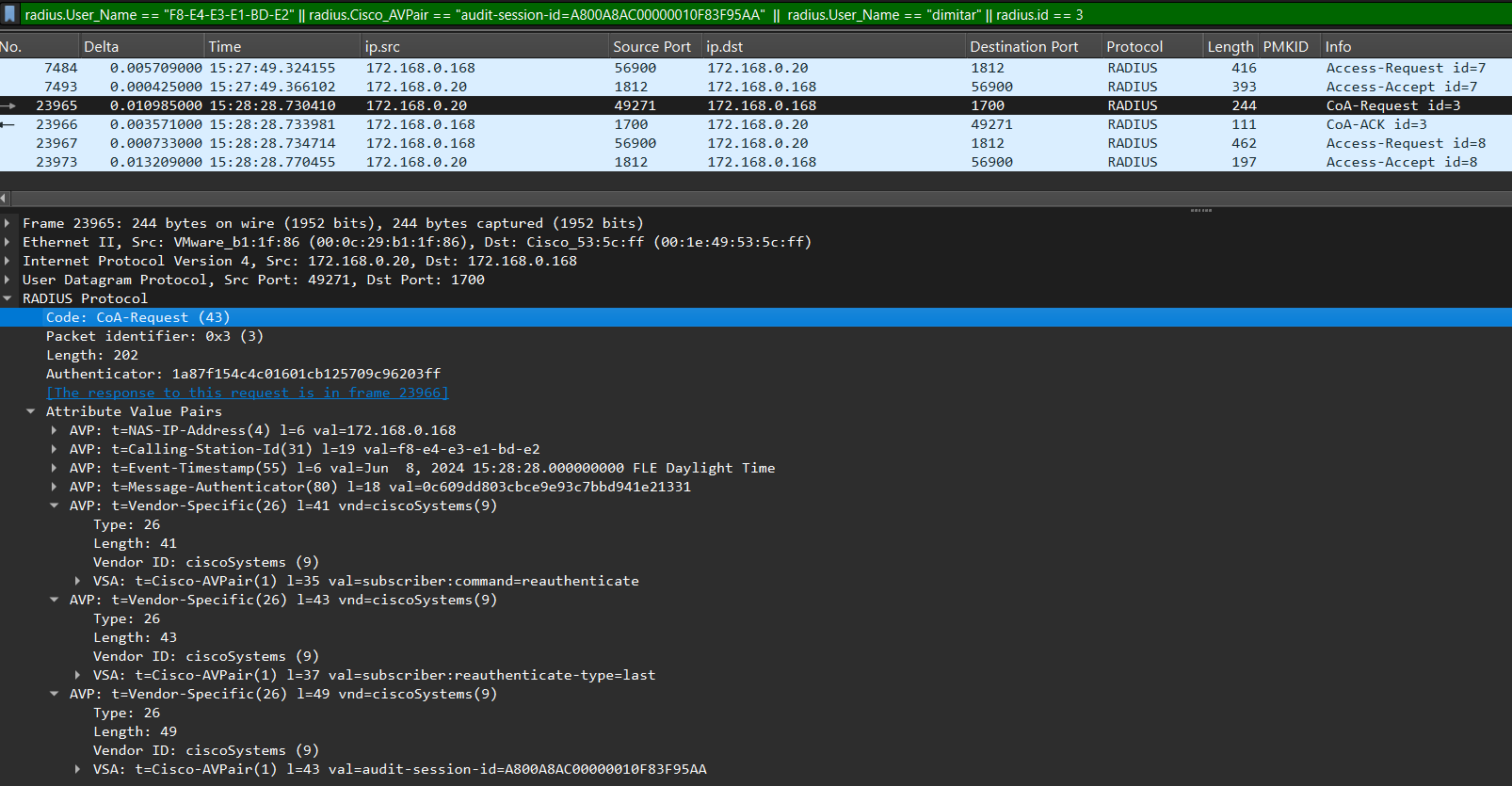
Tracking MAB (MAC Authentication Bypass) flows can be difficult because they lack a single unifying Attribute-Value Pair (AVP). However, the following filter is highly effective for tracing the session via an ISE TCPDump:
ISE TCPDump Filter:
radius.User_Name == "F8-E4-E3-E1-BD-E2" || radius.Cisco_AVPair == "audit-session-id=A800A8AC00000010F83F95AA" || radius.User_Name == "dimitar" || radius.id == 3
What this filter tracks:
Client MAC: Identifies the initial MAB request.
Audit Session ID: A unique identifier obtained from WLC RA traces or ISE RADIUS Live Logs used to track the specific session.
Post-Auth Username: Populated after Stage 5 when the guest authenticates via the web portal (e.g., “dimitar”).
CoA-ACK: Traces the Change of Authorization Acknowledgement by matching the RADIUS ID of the CoA-Request.
Stage 5 Overlap: WLC to ISE (Port 8443)
If you need to diagnose packet loss or latency specifically between the WLC and ISE during the portal loading phase, use this expanded filter:
(radius.User_Name == "F8-E4-E3-E1-BD-E2" || radius.Cisco_AVPair == "audit-session-id=A800A8AC00000010F83F95AA" || radius.User_Name == "dimitar") || (ip.addr == 172.168.0.201 && tcp.port == 8443)


ISE: Examining Guest Flow in RADIUS Live Logs Reports
The ISE RADIUS Live Logs are the heartbeat of the guest authentication process. They allow you to track the session from the initial MAB request to the final portal authentication, ensuring the Audit Session ID matches the one seen in the 9800 RA Traces.
Stage 1: Initial MAB and Redirection
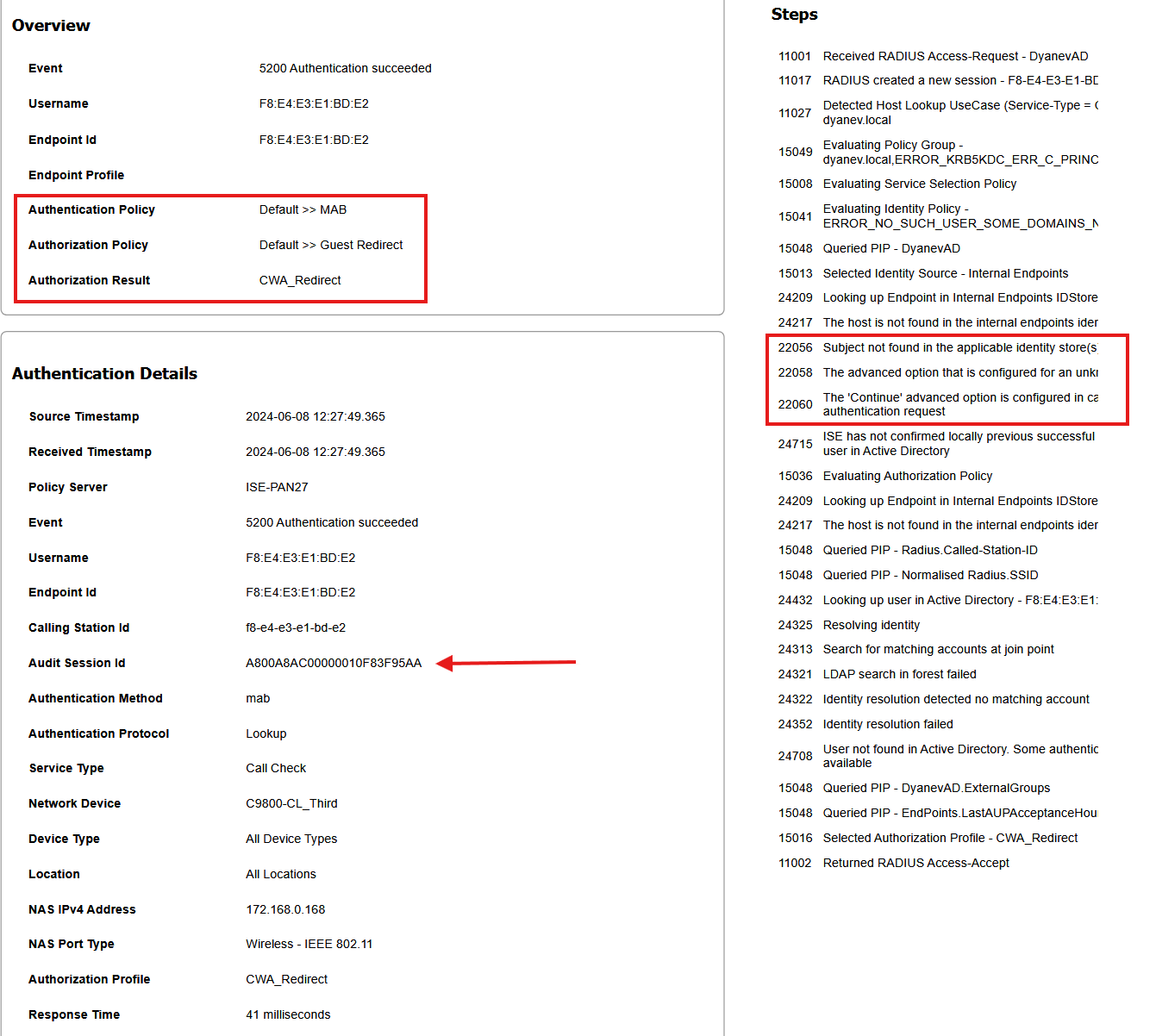
In this stage, the client connects to the Open SSID, and the WLC sends a RADIUS request to ISE. Because this is a guest user not yet found in the identity stores, ISE is configured to “Continue” the authentication process.
Key Log Details to Verify:
Audit Session ID: Ensure this unique identifier matches the WLC RA trace exactly to confirm you are troubleshooting the correct session.
Authentication Policy: Usually matches a default or MAB-specific rule (e.g.,
Default >> MAB).Authorization Policy: Should trigger a “Guest Redirect” profile.
The Redirection Result
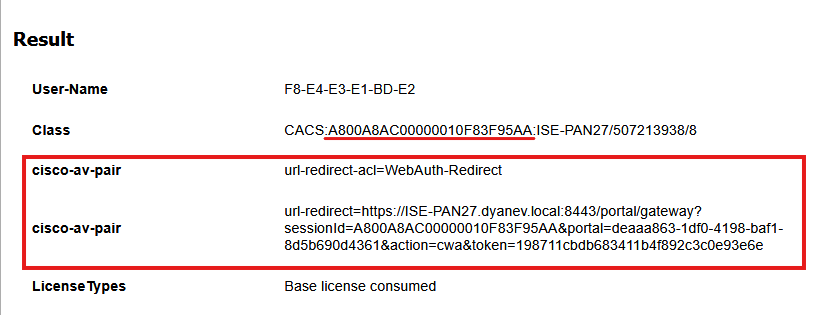
Once the initial MAB is processed, ISE sends a RADIUS Access-Accept containing the specific instructions for the WLC to redirect the client. You can see these in the “Result” section of the live log:
cisco-av-pair (url-redirect): The specific ISE portal URL (e.g.,
https://ISE-PAN27.dyanev.local:8443/portal/...).cisco-av-pair (url-redirect-acl): The name of the local ACL on the WLC that defines which traffic to redirect (e.g.,
WebAuthRedirect).
View ISE Report
ISE MAB Redirect Live Log
ISE Radius Live Log: MAB Authentication succeeded - CWA Redirect:


Stage 5: Portal Authentication and Username Binding
Once the client establishes a secure connection to the ISE guest portal, the user enters their credentials. In this stage, ISE validates the user against the internal identity store and binds the actual username to the session.
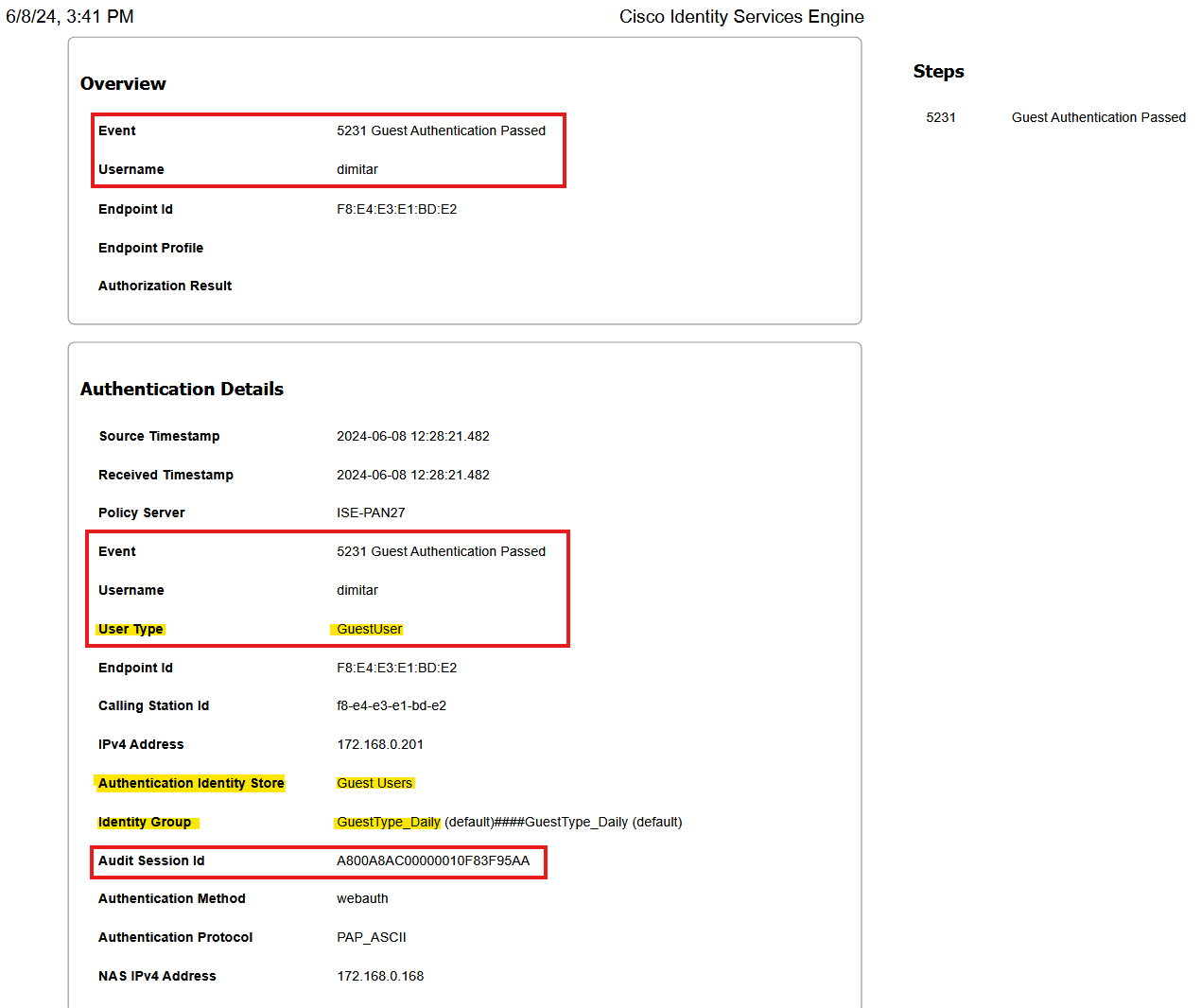
ISE Live Log Validation: Guest Authentication Passed
The RADIUS Live Logs will now show a new entry reflecting the successful portal login.
Critical Attributes to Verify:
Event:
5231 Guest Authentication Passed.Username: The specific user identity (e.g.,
dimitar) now replaces the MAC address in the identification field.User Type: Identified as
GuestUser.Audit Session ID: Must remain consistent with the initial MAB and the WLC RA traces (e.g.,
A800A8AC00000010F83F95AA) to ensure session continuity.Calling Station ID: Confirms the client’s MAC address (
f8-e4-e3-e1-bd-e2) matches the authenticated user.
View ISE Report
ISE Guest Authentication Live Log
ISE Radius Live Log: Guest Authentication > User Details

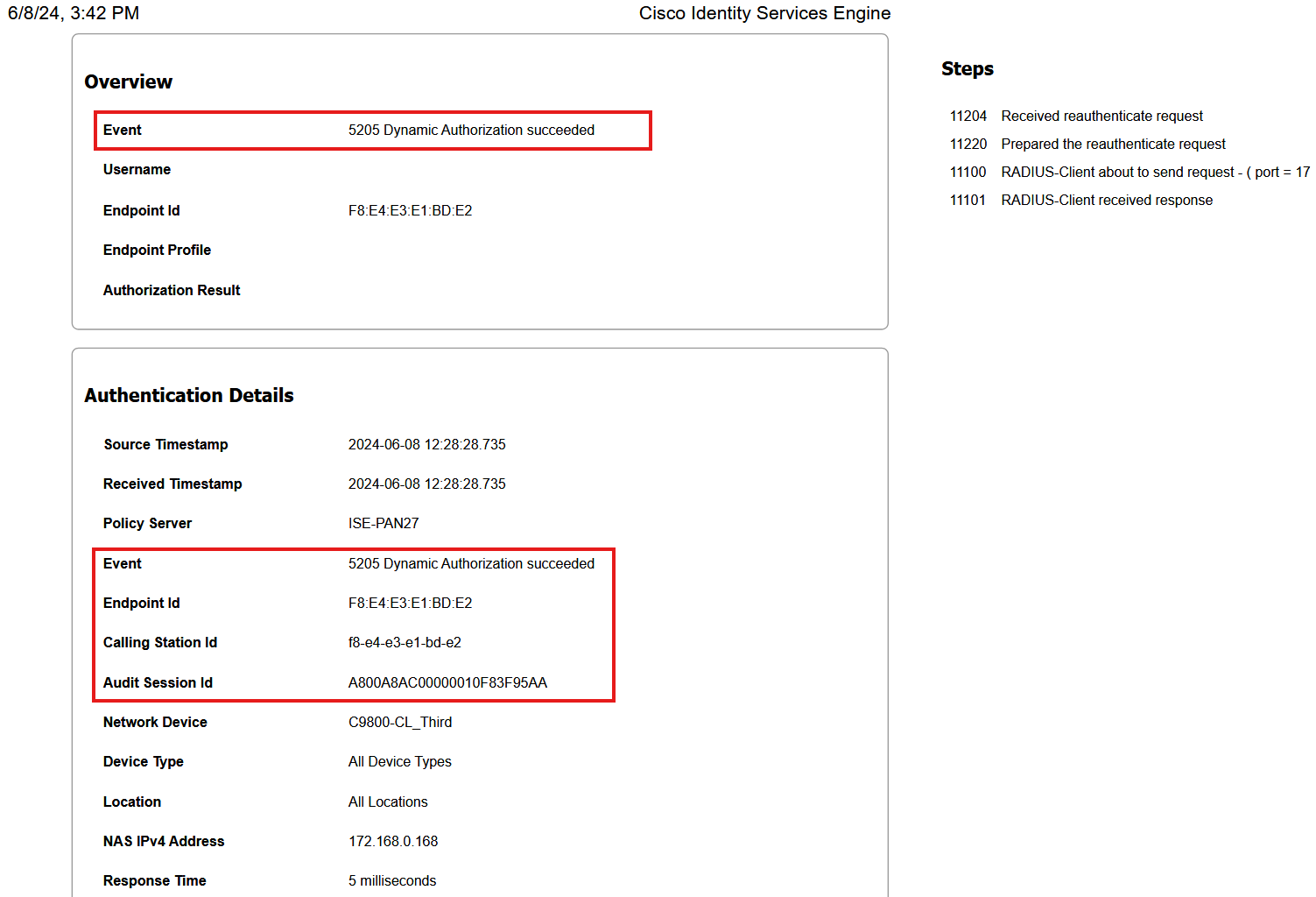
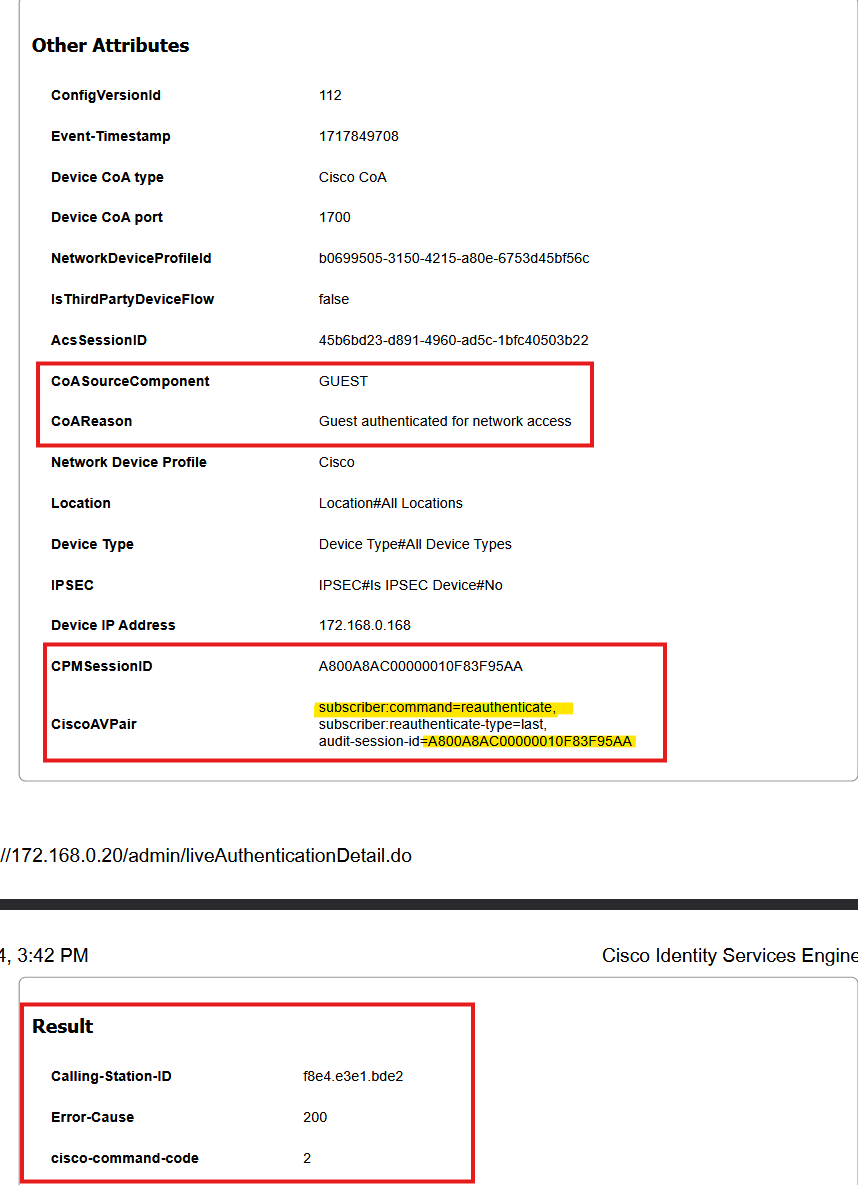
Stage 6: The Change of Authorization (CoA) Event
ISE automatically triggers a CoA (also known as Dynamic Authorization) to the WLC. This forces the WLC to refresh the client’s session without requiring the user to physically reconnect.
Key Log Details to Verify:
Event:
5205 Dynamic Authorization succeeded.CoA Type: Under “Other Attributes,” the type is set to Reauthenticate, which is the standard mode for transitioning a web-auth session.
Audit Session ID: Remains consistent (
A800A8AC00000010F83F95AA) to ensure the correct session is updated.WLC Response: ISE logs a CoA-ACK (Event 5115) from the WLC, confirming the request was received and processed.
View ISE Report
ISE Dynamic Authorization (CoA) Live Log
ISE Radius Live Log: Dynamic Authorization - CoA type and return code:


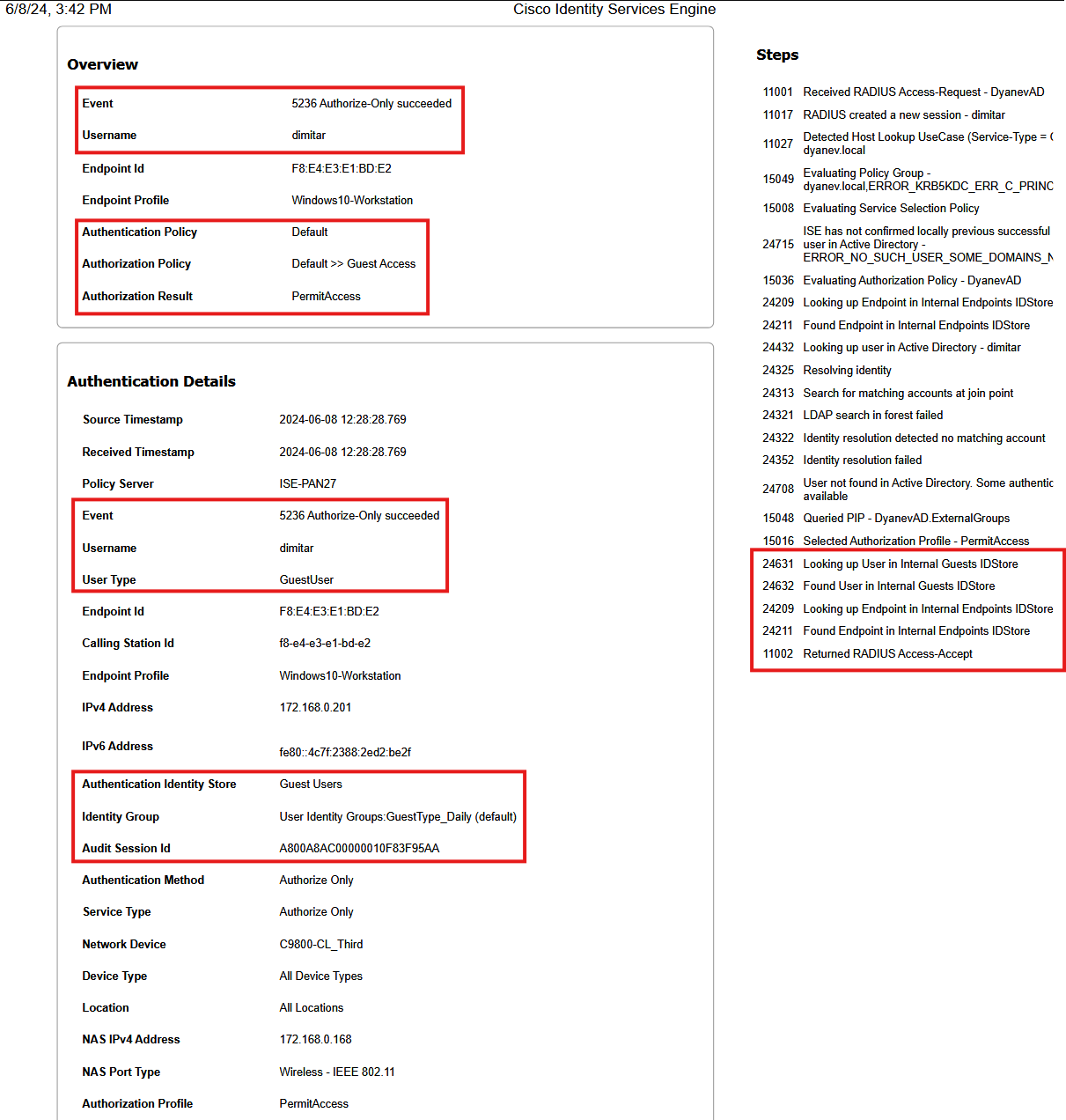
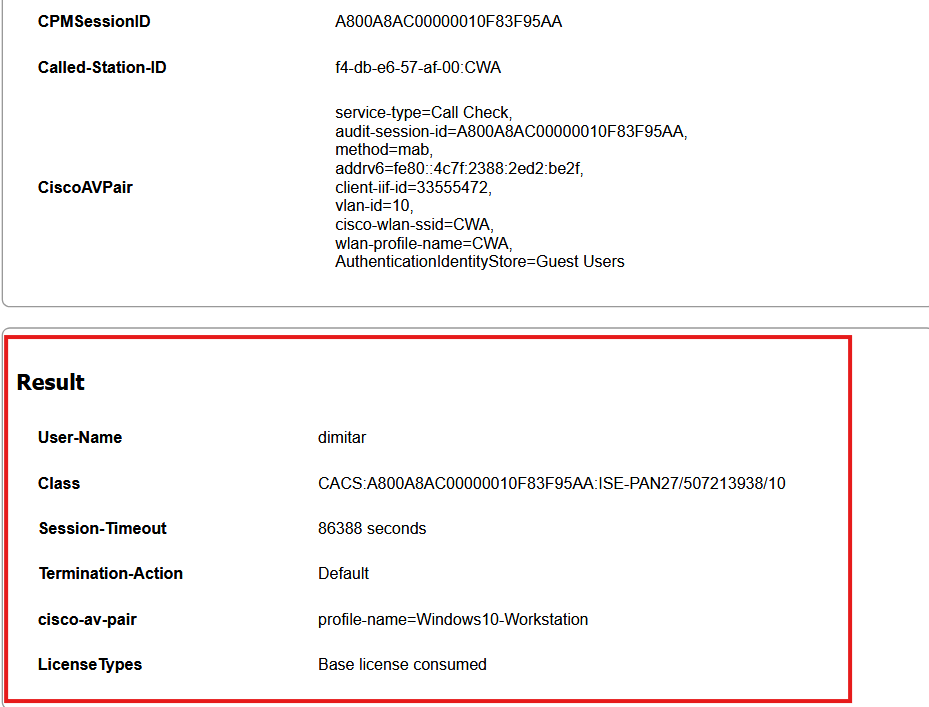
Stage 7: Final MAB and Full Access
Following the CoA, the client undergoes a second MAB authentication. This time, ISE recognizes the endpoint as authenticated and applies the final “PermitAccess” or “Guest Access” policy.
Final Authorization Result:
Authorization Policy: Matches a rule like
Guest AccessorPermitAccess.New Restrictions: The redirect ACL is removed, and new restrictions (such as a session timeout or a specific Guest VLAN) are applied.
User Identification: The User-Name in the final Result field is now the authenticated username (e.g.,
dimitar) rather than the MAC address.
View ISE Report
ISE MAB Re-Auth (Authorize-Only)
ISE Radius Live Log: Authorize-Only: ISE update "Results" section:



Summary: The Guest Journey in a Nutshell
In short, the guest flow is a rapid, multi-step handshake between the client, the WLC, and ISE. It all happens in the blink of an eye:
The Initial Connection: The client joins the guest network, triggering MAB. ISE responds by telling the WLC to apply a Redirect ACL and URL, essentially putting the client in a “waiting room.”
The Probe: The client’s OS sends out a Connectivity Check (DNS/HTTP) to see if it has internet access.
The Interception: The WLC allows the DNS but “hijacks” the HTTP request. Instead of the intended website, the WLC serves the ISE Portal URL to the client.
The Authentication: The user accepts the AUP or enters their credentials (self-signed or sponsor-approved).
The Permission Flip: Once ISE validates the user, it sends a Change of Authorization (CoA) to the WLC. This “flips the switch,” lifting the restrictions and granting the client full access to the internet.