Mastering 802.1X (dot1x) Flow is the definitive skill for any network engineer because, in the world of Enterprise Wireless, 802.1X (dot1x) is our bread and butter—it’s the backbone of secure connectivity. But let’s be honest: when a client fails to authenticate, the finger-pointing starts immediately. Is it a RADIUS timeout? A certificate mismatch? Or did the client just fail the EAP exchange?
During my years in Cisco TAC as a Team Lead for both the AAA and Wireless teams, I’ve seen 802.1X (dot1x) flows break in ways most documentation doesn’t even account for.
Understanding the ‘happy path’ of a packet is the easy part. But when a high-priority site goes ‘dark’ and the client authentication starts failing, the finger-pointing between the Wireless and Security teams begins. Knowing exactly where that packet is dying—and why—is what separates a senior engineer from the rest of the pack.
This guide is designed to move you past the basic ‘is the server up?’ checks. We are going deep into the heart of the Catalyst 9800 WLC and ISE interaction to give you the same diagnostic framework we used at TAC to solve the most complex escalation cases.
The Diagnostic Toolkit: Where to Look
To solve a dot1x issue, you need to see the “Handshake” from three different perspectives: the WLC’s logic, the actual packets on the wire, and the RADIUS server’s decision.
1. Radioactive Trace (RA Trace) | The Control Plane
An RA trace acts as the WLC’s internal narrative, documenting its logic and actions in response to client traffic. It is invaluable for troubleshooting because it identifies the specific state where an issue triggered and provides the context needed to determine the root cause.
Navigate to:
Troubleshooting > Radioactive TraceAction: Set Condition Debug Global State to “Started” and add the Client MAC.
2. Embedded Packet Capture (EPC) | The Data Plane
Think of EPC as the ‘verbose’ counterpart to RA traces for Dot1x. RA traces explain how the WLC interprets a flow, but EPC shows you the actual packets. When troubleshooting complex scenarios, you really need both to get the full picture.
Navigate to:
Troubleshooting > Packet CaptureInner Filter MAC: Set to your test client.
Buffer: Increase to 100MB to ensure the capture doesn’t wrap before you finish the test.
Interface: Select the WLC Uplink (Trunk or Port Channel).
3. (Optional) : Layer 3 EPC for RADIUS Traffic
If you suspect the network is dropping RADIUS traffic between the WLC and ISE, use an Access-List to isolate the traffic:
ip access-list extended PCAP-Filter
 10 permit udp any eq 1812 any
 20 permit udp any eq 1813 any
 30 permit udp any any eq 1812
 40 permit udp any any eq 1813

monitor capture TAC interface <WLC-Uplink> both access-list PCAP-Filter buffer size 100 limit pps 10000
monitor capture TAC start
⚠️ Critical Note: You cannot run two EPCs on the 9800 simultaneously. If you run a Layer 2 (Client MAC) capture on the WLC, run a TCPDump on ISE to see the Layer 3 side. It is rare to need Layer 3 captures on the WLC; 90% of the time, a Layer 2 EPC with an Inner MAC is all you need.
4. ISE TCP Dump & Live Logs | The RADIUS Brain
This is where you see the “Result.” ISE tells you exactly which policy was hit—or why the credentials were rejected.
- TCP Dump: Go to Operations > Diagnostic Tools > TCP Dump. Filter for the WLC IP or just Radius traffic aka udp 1812 and 1813
Navigate to:
Operations > RADIUS > Live LogsDeep Dive: Don’t just look at the red or green icons. Click the Magnifying Glass in the Details column. This report reveals specific certificate mismatches or AD lookup failures.
5. Access Point (AP) CLI | The “Edge” View
If the RA Trace on the WLC is empty, the issue is happening at the AP. You need to see if the client is even completing the 802.11 association.
Commands:
exect-timeout 0
debug client <client mac-addr>
terminal monitor
💡Pro-Tip: Make sure you are debugging the correct AP. In a high-density environment, it’s best to “Span” your debugs across 3–4 neighboring APs to ensure you catch the client if it roams or probes a different AP/channel.
Dot1x Flow: The “Three-Act Play” of Client Onboarding
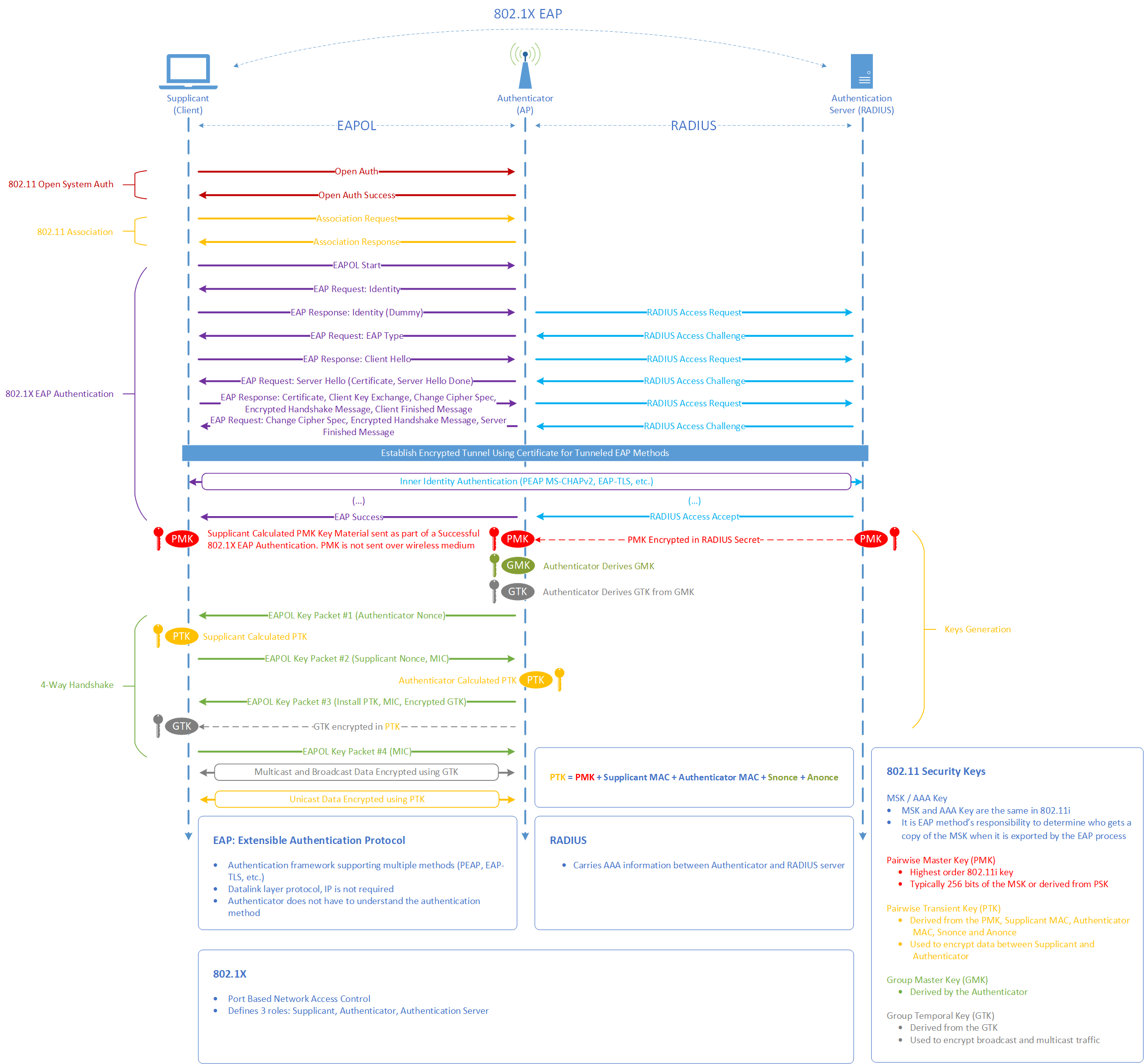
Before a client can send a single byte of data, they must pass through three distinct phases. If you understand these phases, you’ll know exactly which tool to use when things fail.
Act 1: The 802.11 Association (The Handshake)
The Process: The client and AP agree on basic capabilities (Open System Auth & Association).
Where it fails: If this fails, the issue is RF or Driver-related. The WLC RA Trace will likely be empty.
Key Packets:
Association Request / Response.
Act 2: The 802.1X EAP Authentication (The Conversation)
The Process: The WLC/AP acts as a “bridge,” passing EAPOL packets from the client to ISE via RADIUS. This is where certificates are exchanged and credentials are verified.
Where it fails: If ISE shows “Access-Reject,” the problem is in ISE Policies or Client Credentials. If ISE shows nothing, the WLC isn’t reaching ISE.
Key Packets:
EAP Request & Response (Layer 2 Flow)andRADIUS Access-Request & Access-Challenge (Layer 3).
Act 3: The 4-Way Handshake (The Encryption Keys)
The Process: Now that ISE has validated the user, it sends a Pairwise Master Key (PMK) to the WLC. The WLC and Client use this to derive the actual encryption keys (PTK/GTK) without ever sending the password over the air.
Where it fails: If the client “connects” but then immediately disconnects, the 4-Way Handshake usually timed out due to a PMK mismatch or a roaming bug.
Key Packets:
EAPOL Key (Message 1 through 4).
Wireshark: Examining the Layer 2 EAPoL Flow
(Traffic between the Supplicant and the NAD)
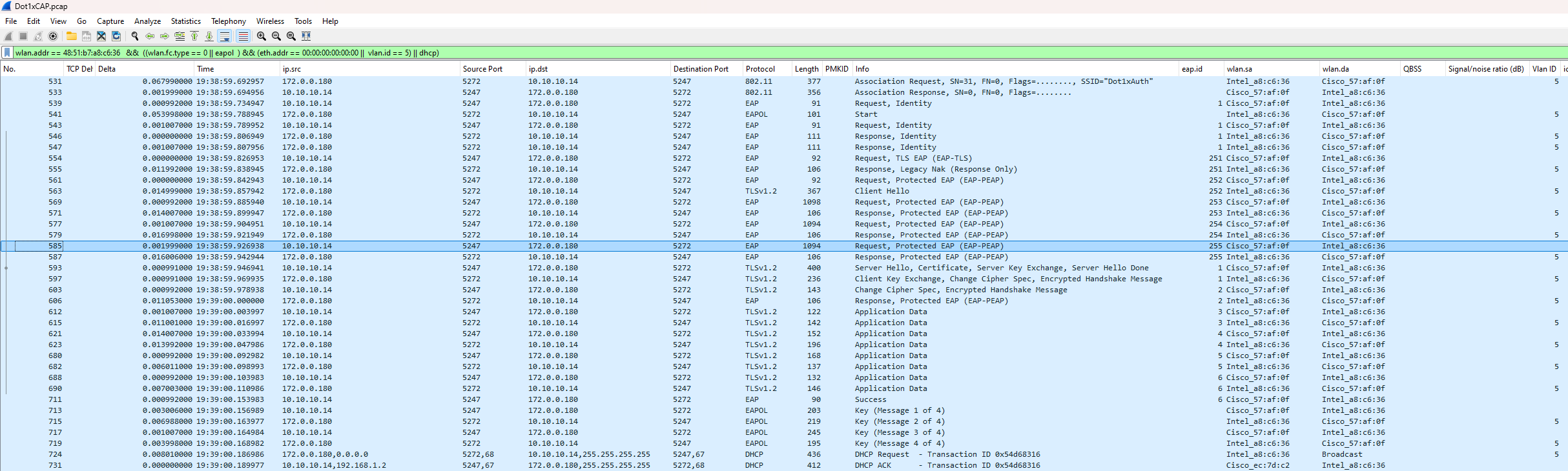
To understand why a client is failing, we first need to look at the ‘Real World’ data. We start with a Layer 2 Analysis, capturing the EAPoL (EAP over LAN) traffic between the client and the Network Access Device aka NAD (the AP/WLC).
Why Start at Layer 2?
Capturing traffic at the edge (Over-the-Air aka OTA, AP Switchport, or WLC EPC with an inner-mac filter) allows us to see the raw exchange before it is encapsulated into RADIUS and sent to ISE.
The Benefits of L2 Captures:
Isolation: It’s much easier to see exactly which step of the EAP handshake fails (e.g., the client stops responding after the Certificate exchange).
Efficiency: Capture files are significantly smaller because we are only looking at one specific client session rather than the entire RADIUS stream.
Clarity: It removes the ‘noise’ of Layer 3 routing/latency, letting you focus on the EAP state machine.”
Essential Wireshark Filters
Standard View:
wlan.addr == <client-mac> && (wlan.fc.type == 0 || eapol || dhcp)WLC EPC Optimized (Recommended):
wlan.addr == <client-mac> && ((wlan.fc.type == 0 || eapol) && (eth.addr == 00:00:00:00:00:00 || vlan.id == <WMI>) || dhcp)> Use this to filter out encrypted data and focus purely on the management and EAP frames.
💡 TAC Lead Note: Avoiding the “Duplicate Packet” Trap
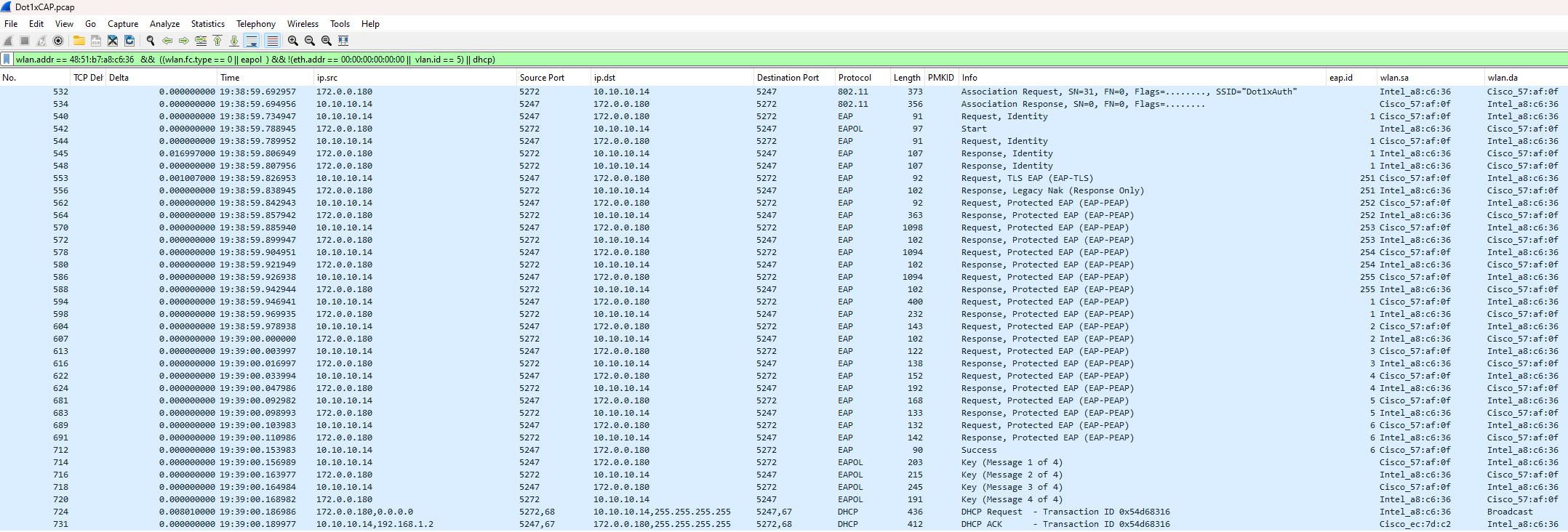
When running an EPC on the Catalyst 9800 with the control-plane option enabled, the WLC captures traffic at two distinct points: the physical interface (Gig or SVI) and the CPU. Without specific filtering, every packet will appear twice in your trace, making the analysis cluttered and confusing.
To achieve a “clean” view that mimics an Over-the-Air (OTA) or client-side capture, you should filter your results to view the control plane exclusively. This is the most efficient method for a rapid review of the EAP handshake.
Note: While interface-level traffic remains in clear text, Wireshark often truncates this data. For deep-dive analysis of EAP payload details, stick to the CPU/Control-plane view to ensure you see the full, non-truncated frame.
Expand
Compare the difference between a Control Plane capture and an Interface-level capture
Catalyst 9800 Interface Captured View:

Interface Captured Data:

Contol Plane Data:


Deep Dive: Analyzing the EAP Flow (Layer 2)
Once you understand the theoretical 802.1X stages—Identity > Negotiation > TLS Tunnel > Credentials (PEAP Only) > Success—you can use Wireshark to verify that the client and server are behaving as expected.
Stage 1: Who Starts First (Identity request) ?
In a standard EAP flow, either the Supplicant (Client) or the Authenticator (WLC) can trigger the session. In this trace, we see a common real-world scenario:
The WLC initiates the session with an
EAP-Request/Identity.The Client, however, sends an
EAPOL-Startsimultaneously.
💡 TAC Lead Secret: When a client sends an
EAPOL-Start, the WLC is obligated to “obey” and restart the session state. This effectively kills any existing old session to ensure a clean start. This is why you see the WLC sending a secondIdentity Requestimmediately after the client’s start packet.
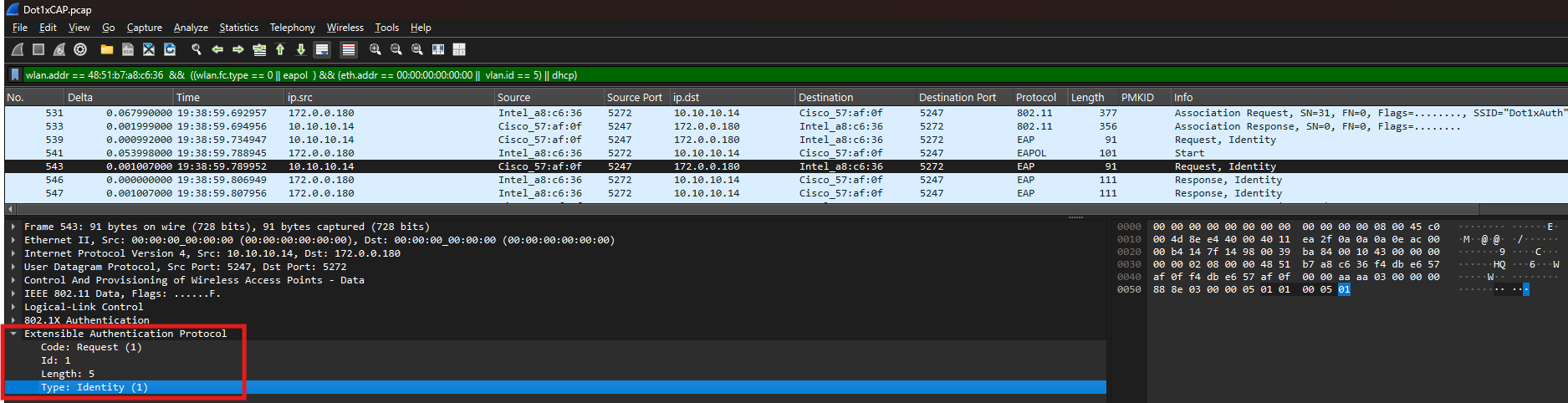
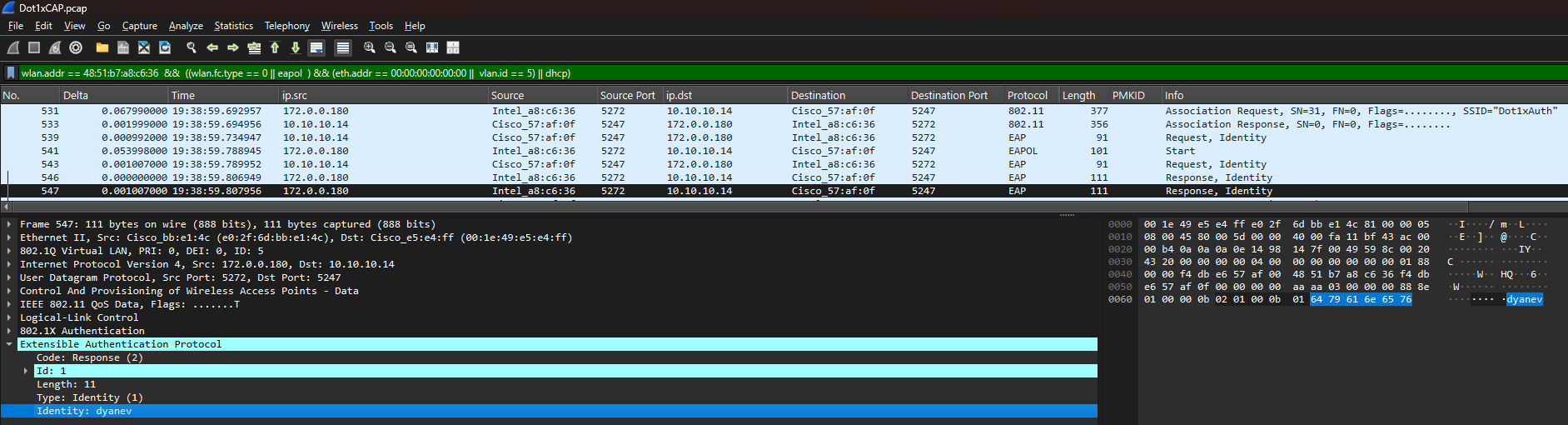
Observation: The Double Identity Response
You may notice the client replying to the Identity Request twice.
The Reason: The client received two requests (the one before its
Startpacket and the one after).The Result: The client “honors” both. While this creates a duplicate in your trace, it is perfectly normal behavior and does not negatively impact the flow. As long as the sequence continues to the next stage, your session is healthy.
Stage 2: Protocol Negotiation (The EAP Method)
Once the identities are exchanged, the server and client must agree on an authentication method (e.g., PEAP, TLS, TEAP, etc.). This is a negotiation process where the server proposes a method, and the client either accepts it or requests a different one.
Observation: The Server Proposal
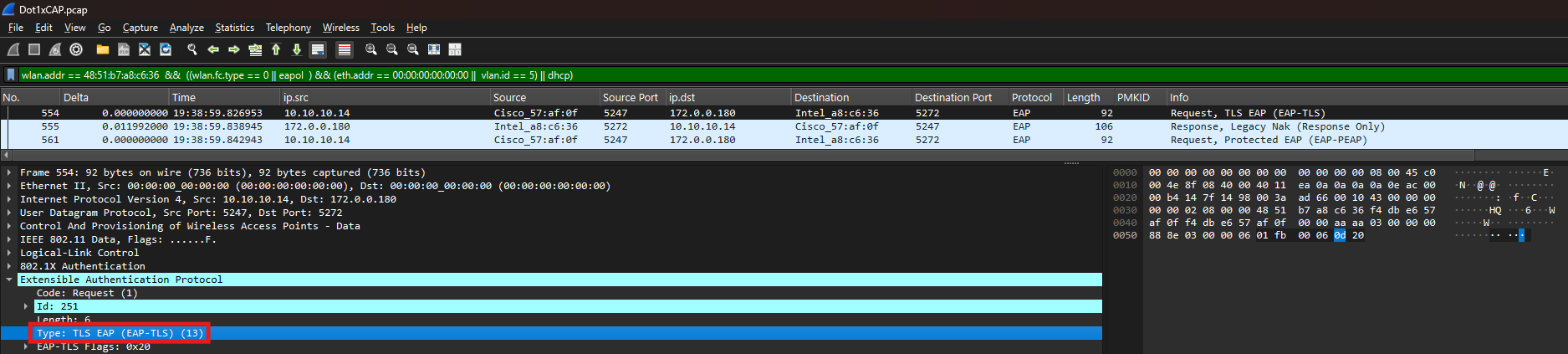
In this trace, the server (ISE) begins by proposing EAP-TLS (certificate-based authentication).
Wireshark View: Look for the
Code: Request, Type <TLS EAP (EAP-TLS)>frame.Technical Detail: While ISE is configured with a preferred EAP protocol, this doesn’t guarantee the client is configured to match. Generally, you should select the preferred method based on the standard most commonly supported across your organization’s device inventory.
Observation: The Client “NAK” (The Pivot)
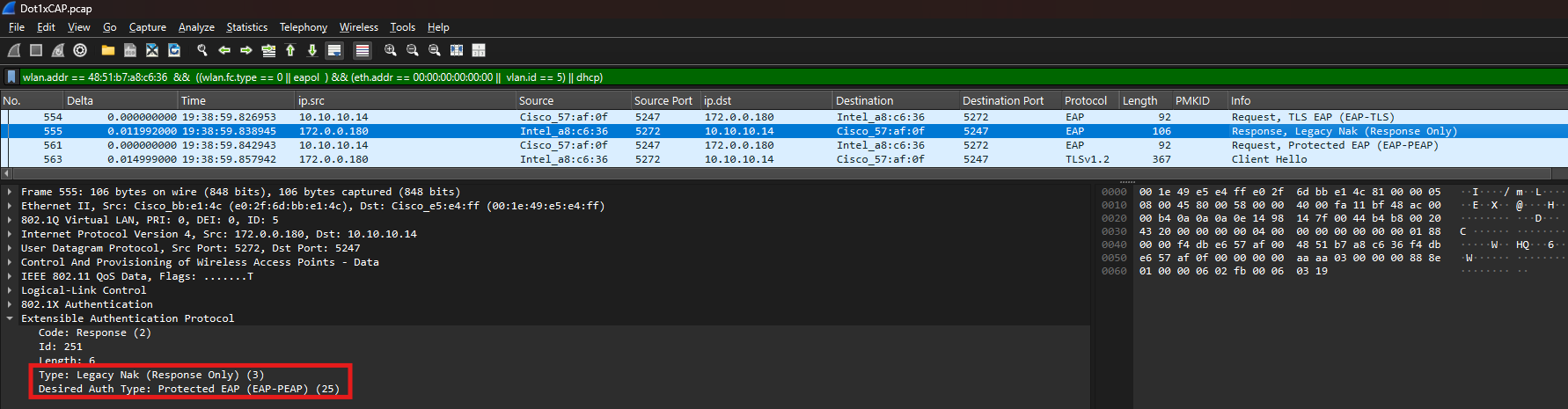
The client in this scenario is not configured for EAP-TLS. Instead of failing, the client sends a Legacy Nak response.
The “NAK” Message: This is the client saying, “I don’t support EAP-TLS. I would prefer to use Protected EAP (PEAP) instead.”
The Desired Auth Type: In the packet details, you will see the client explicitly request
Desired Auth Type: Protected EAP (EAP-PEAP) (25).
💡 Lead’s Perspective: The “NAK” Deadlock
“In a healthy flow, a NAK is just a polite redirection—the client saying, ‘I don’t do EAP-TLS, let’s try PEAP.’ However, if you see the client send a NAK and the server immediately follows with an Access-Reject (or fails to propose the client’s requested method), you are looking at a Protocol Deadlock.
This happens when the Allowed Protocols list on ISE doesn’t match the Supplicant configuration on the client. If ISE is ‘locked’ to only allow EAP-TLS, but your Windows/Android clients are only configured for PEAP-MSCHAPv2, the negotiation has nowhere to go. Always ensure your ISE Policy Set is configured to allow the specific EAP types your client fleet is actually using.”
Observation: Server Updates the Protocol
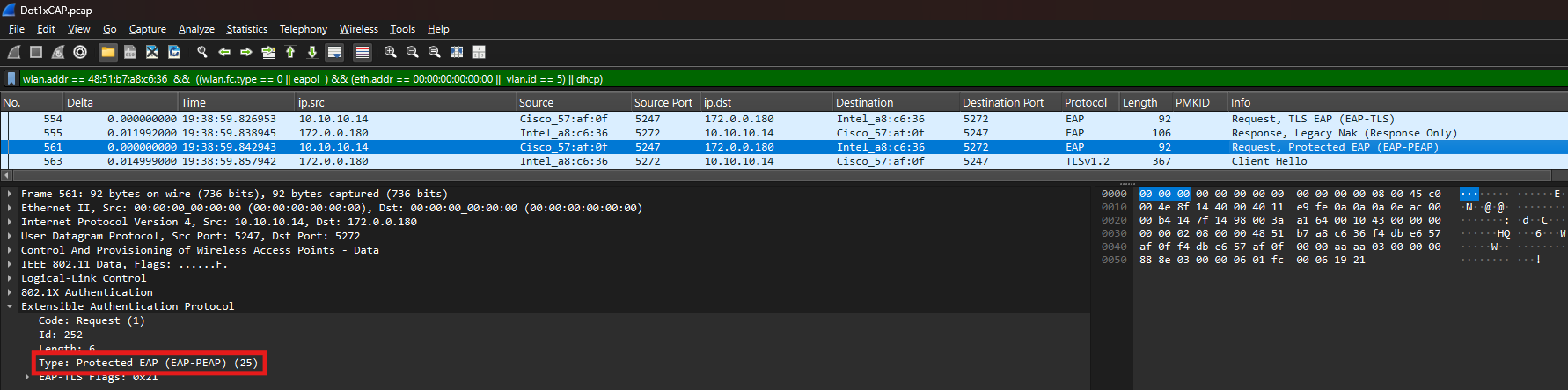
Once the server processes the client’s NAK, it sends a new Request, Protected EAP (EAP-PEAP).
What’s happening: The server is officially acknowledging the pivot. It “kills” the EAP-TLS proposal and restarts the handshake using the PEAP framework.
Stage 3: The TLS Tunnel—Securing the Conversation
After the server and client agree on the EAP method (in this case, EAP-PEAP), the next objective is to build a secure TLS tunnel. This tunnel protects the user’s actual credentials from being intercepted over the air or over the wired network.
Observation: The “Client Hello” (Starting the TLS Handshake)
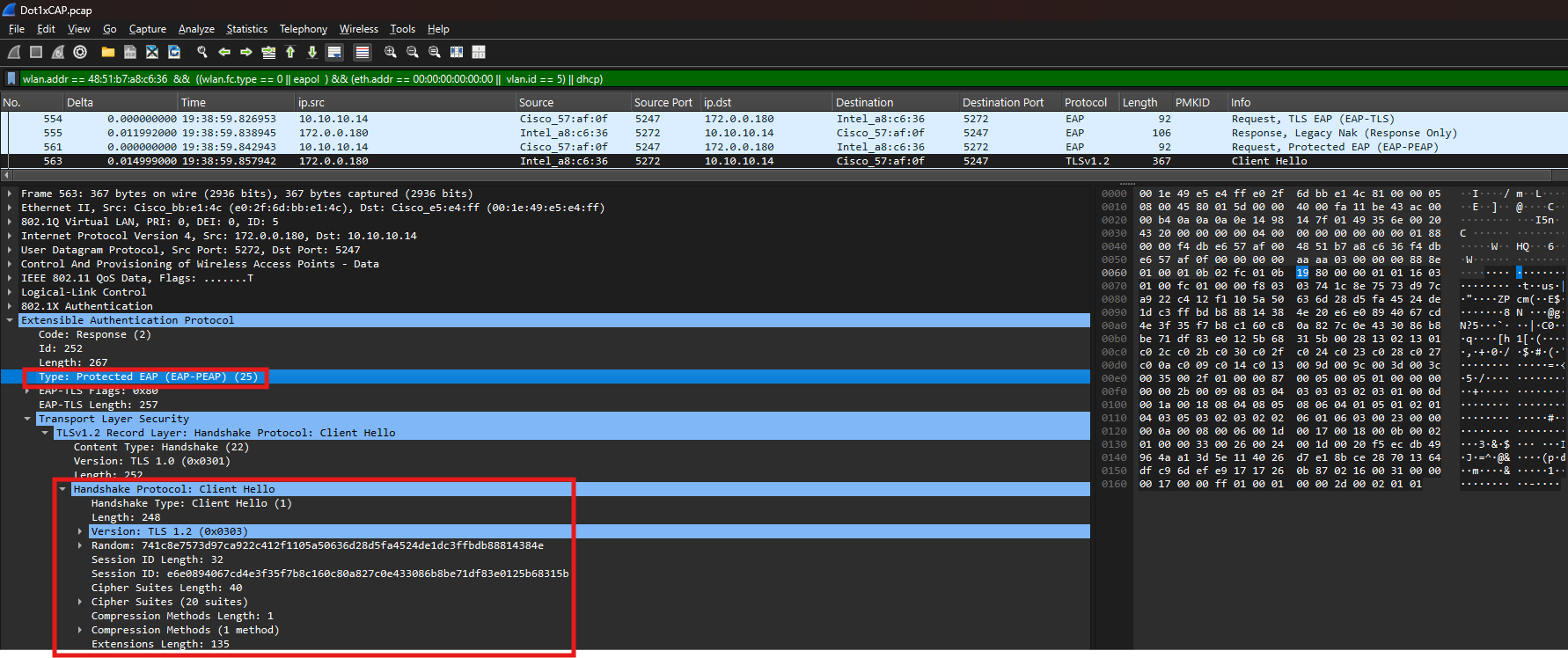
The client now confirm it is ready for PEAP. In the very same packet where the client accepts the protocol, it also sends the TLS Client Hello.
The “Client Hello” contains:
TLS Version: (e.g., TLS 1.2)
Cipher Suites: A list of encryption algorithms the client supports.
Random Number: Used later to generate the session keys.
Why it’s important: This is the first step in the “Outer” authentication. If the client and server cannot agree on a TLS version or cipher suite here, the connection will fail before a username is even checked
After receiving the Client Hello, the server responds with its own parameters and the digital certificate chain. This is the largest and most complex part of the handshake.
Observation: Server Hello & Fragmentation
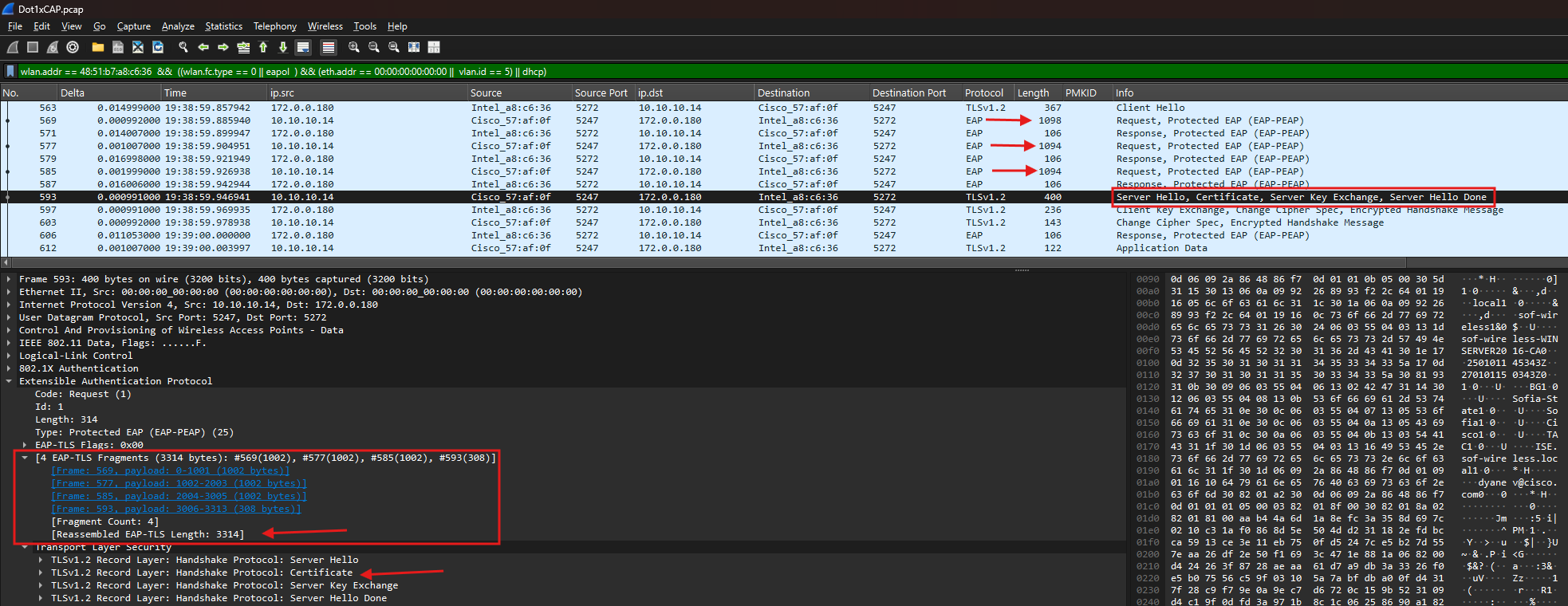
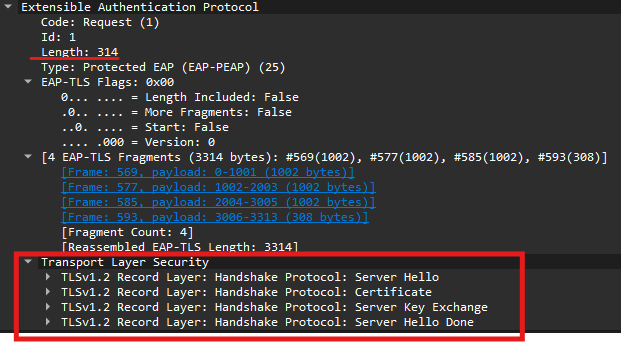
A standard certificate chain is often around 3 to 4 KB. Since the standard MTU is 1500 bytes, the EAP-TLS payload must be fragmented across multiple packets.
Wireshark View: You will see multiple EAP fragments (usually labeled
EAP-TLS Fragments).The “More Fragments” Flag: In the EAP-TLS layer, look for the
L(Length) andM(More) flags. IfMore Fragments: True, the ISE or the source is telling that more certificate data is on the way.
Reliable delivery of server certificate fragments or client’s (if doing EAP-TLS) is a prerequisite for successful RADIUS authentication. In TLS-based protocols, the tunnel is only as strong as its handshake; if the client doesn’t trust the ISE chain or if fragments are dropped in transit, the session will terminate immediately.
Reassembling the Certificate
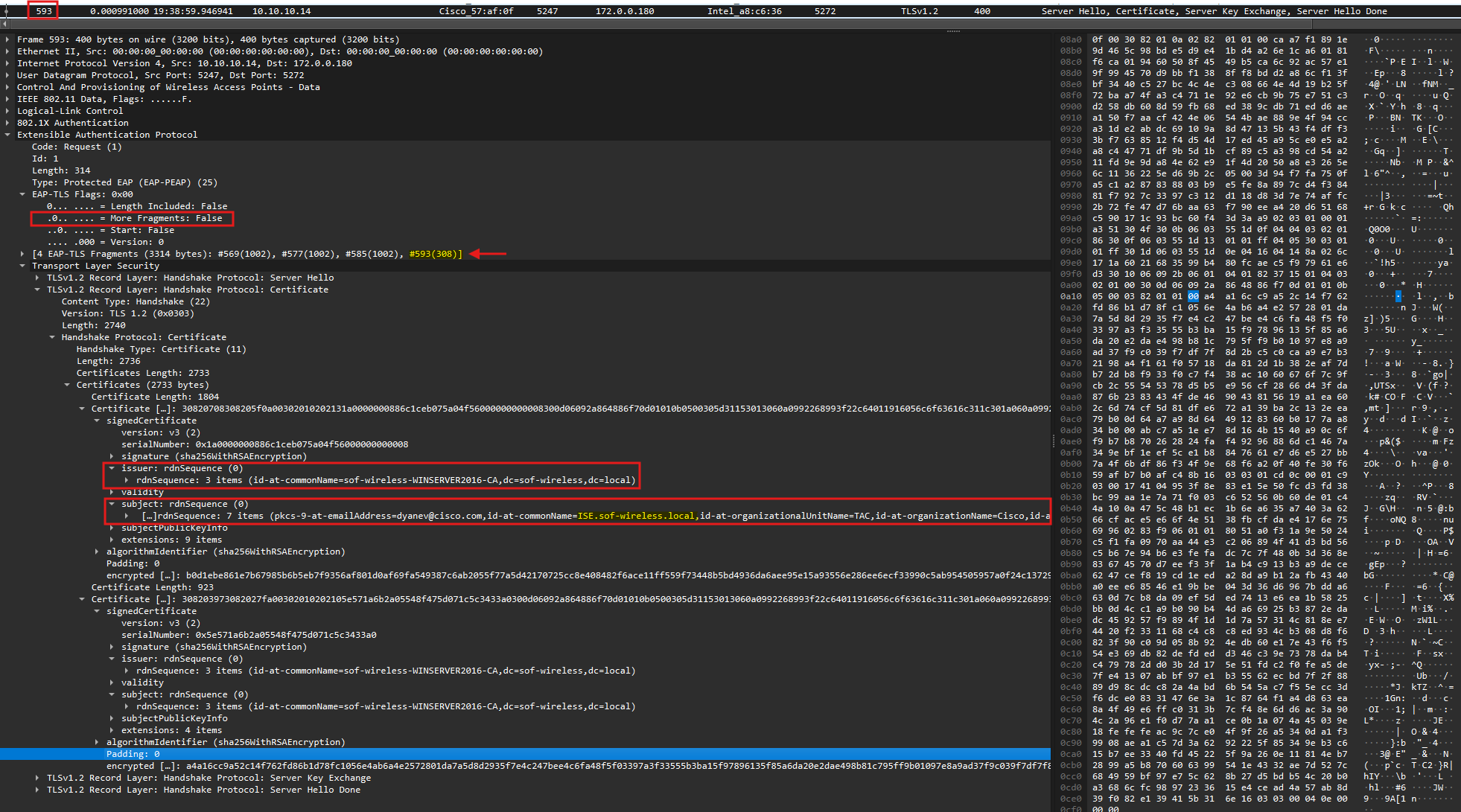
Wireshark is intelligent enough to reassemble these fragments for you. By selecting the last packet in the fragment chain (look for the packet where More Fragments: False), you can expand the Transport Layer Security tab to see the full certificate details.
- Server Hello: ISE’s formal response to the client, establishing the cipher suite and TLS version to be used.
- Certificate: This contains the ISE node’s identity. This is the most critical section for troubleshooting trust issues.
- Server Key Exchange: This contains the ephemeral keys or parameters used to establish a secure channel (standard for modern key exchange methods like Diffie-Hellman).
- Server Hello Done: A simple “flag” packet indicating that ISE has finished its portion of the initial handshake and is waiting for the client’s response.
What to verify in the Certificate section:
We focus primarily on the Issuer and Subject fields to ensure they align with your PKI hierarchy and the ISE node name. Additionally, check the Extensions section for the Subject Alternative Name (SAN); this must contain the correct DNS or IP information that the client uses to verify the server’s identity.
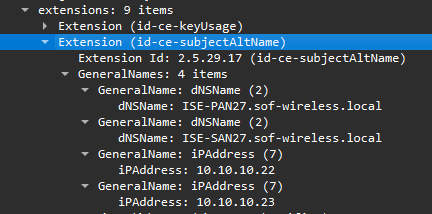
Technical Note: The Certificate Validation Trap
Certificate validation is the primary point of failure in Dot1x. If the client doesn’t trust the CA that signed the ISE certificate—or if the Server Name fails to match the wireless profile—the client will silently drop the connection or trigger a TLS Alert.
Key Troubleshooting Checkpoints:
Trust Chain: Is ISE using a certificate signed by the correct Root or Intermediate CA? More importantly, does the client have that specific CA in its Trusted Root Store?
Subject/SAN: Is the Subject Alternative Name (SAN) accurately defined? The FQDN of the ISE node must match exactly; any typos or mismatches will cause a validation failure.
MTU & Fragmentation: If one side is transmitting fragments that the other side never acknowledges, you likely have an MTU bottleneck between the WLC and ISE. Large RADIUS packets are likely being dropped by the network infrastructure.
How to Deep-Dive: Exporting the Certificate for Review
Sometimes, reviewing a certificate inside Wireshark’s hex view isn’t best way. You may want to export it to compare against your Root CA or to view it in the standard Windows Certificate Manager.
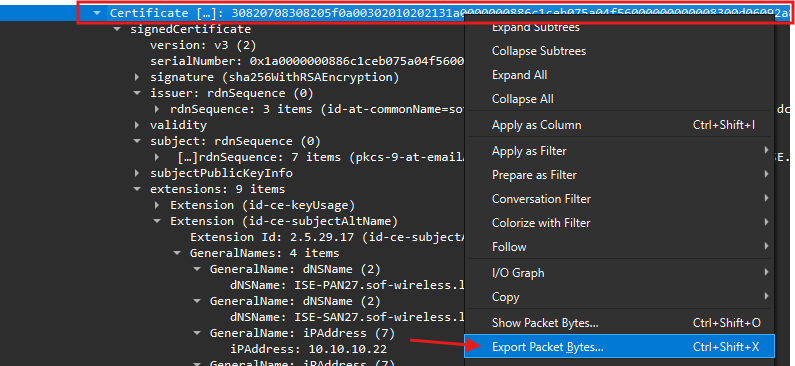
Export from Wireshark: Right-click the
Certificatedata in the packet details pane and select Export Packet Bytes…Save as certificate: Save the file with a
.crtor.cerextension. You can now double-click this file in Windows to see the friendly “Certificate” view, including all the data under “Details” tab and Certification Path.
Once the client validates the ISE certificate, the “Outer” secure tunnel is ready to be finalized. This ensures that all subsequent data—including the user’s actual credentials—is fully encrypted.
Observation: Client Key Exchange & Cipher Change

After trusting the certificate, the client sends the Client Key Exchange and Change Cipher Spec messages.
What’s happening: The client provides the final cryptographic material needed to generate the session keys and ISE replies with same.
The “Switch” to Encryption: The
Change Cipher Specis the signal that every packet from this point forward will be encrypted using the negotiated TLS parameters.The Dummy Response: You may see the client reply with a dummy response (EAP-Flag
0x00). This is simply a confirmation to ISE that the server’s last packet was received and the client is ready to proceed.
Stage 4: Credentials Exchange (PEAP Only)
Now that the TLS tunnel is established, we transition from Outer Authentication (securing the pipe) to Inner Authentication (identifying the user).
Observation: The Shift to “Application Data”

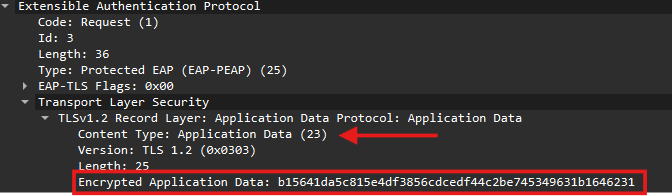
In your Wireshark trace, you will notice the protocol labels change. Instead of seeing clear-text EAP negotiation, you start seeing multiple frames labeled Application Data.
What is inside? This is the MSCHAPv2 exchange (Username/Password challenge).
The “Black Box”: Because this is encrypted by the TLS tunnel, Wireshark cannot show you the username or the password hash. To the network, it just looks like a series of secure data exchanges.
Stage 5: ISE response (Success or Failure)
Observation: EAP-Success
Once ISE verifies the credentials against Active Directory or its internal database, it sends the final “green light.”
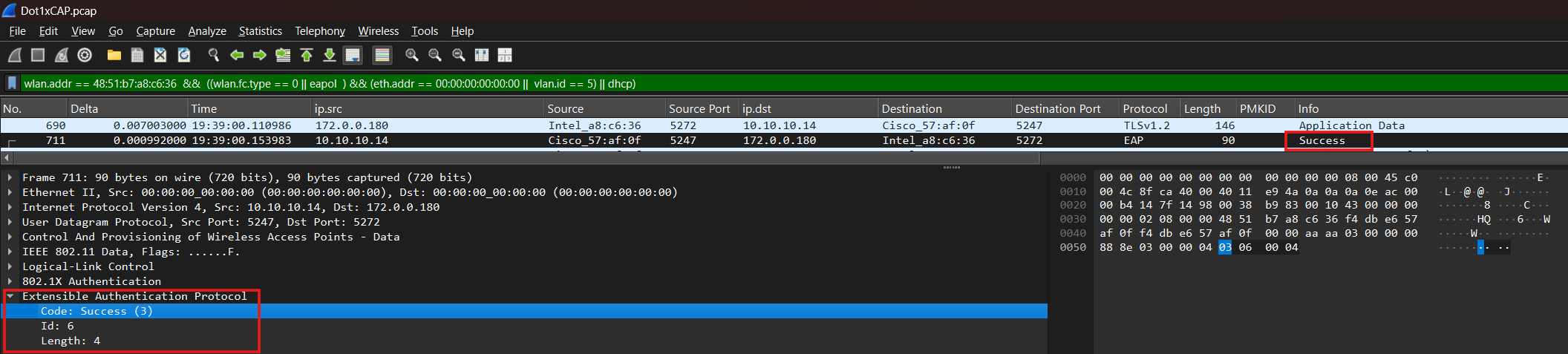
The Packet:
EAP-Success.The Result: This tells the WLC that the user is authorized. The WLC then proceeds to the 4-Way Handshake to generate the unique encryption keys for this specific session.
Inspecting RADIUS Traffic: The Layer 3 Perspective
(WLC EPC with ACL filter | TCPDump on ISE | WLC-to-ISE Uplink Capture)
While Layer 2 captures show the client’s experience, Layer 3 captures show the WLC-to-ISE negotiation. This is essential if you suspect the network is dropping packets between the WLC and the RADIUS server.
In this section, we focus on how to properly trace the Layer 3 flow in Wireshark. Since the RADIUS protocol encapsulates the EAP process, the Layer 3 exchange holds the exact same “inner layer” information as the Layer 2 EAPoL frames.
Note: For a comprehensive, packet-by-packet breakdown of the negotiation logic (Identity, NAKs, and Certificates), please refer back to the Deep Dive: Analyzing the EAP Flow (Layer 2) section. Since the EAP logic remains identical whether it is carried over Ethernet or RADIUS, we will focus here on the infrastructure-level verification.
Hint: Viewing EAP Details over Layer 3
Even if you only have a RADIUS capture, you can still perform a deep-dive into the EAP negotiation.
Where to look: Expand the RADIUS Attribute Value Pairs and locate the “EAP Message (79) – Last Segment” attribute.
What it tells you: This field encapsulates the actual EAP payload (such as the Identity, the NAK, or the TLS Handshake). Because Wireshark can dissect this attribute in both
Access-RequestandAccess-Challengeframes, you can effectively troubleshoot the client’s behavior even without a local wireless sniffer.
Essential Wireshark Filters for RADIUS
To find your specific client in a busy RADIUS stream, use these advanced filters:
By Username:
radius.User_Name == "username"> Note: This attribute only appears in the Access-Request.By Client MAC (Calling Station ID):
radius.Calling_Station_Id == "xx-xx-xx-xx-xx-xx"> Pro-Tip: MAC formats vary by NAS. Check the WLC config forradius-server attribute 31. The default is usually lowercase with dashes (a1-b2-c3-d4-e5-f6).By Audit Session ID:
radius.Cisco_AVPair == "audit-session-id=0E0A0A0A000001122F12ECB"> This is the most accurate way to correlate your Radioactive Trace (RA Trace) directly to a packet capture.
Mastering the RADIUS State: The “Glue” of the Conversation
The RADIUS State (Attribute 24) is your most powerful tool. While the Audit-Session-ID tracks the client session on the WLC/NAC side (remaining the same until the client fully disconnects or the session is terminated), the State attribute is much more granular.
Think of the RADIUS State as a hash composed of: [Audit-Session-ID] + [ISE PSN Name] + [Timestamp]
Because the timestamp is included, even if a client authenticates twice in rapid succession with the same Audit-Session-ID, the resulting State ID hash will be different. This ensures that every individual “authentication attempt” is unique and identifiable.
Side Note: The “State” ID vs. Audit-Session-ID
RADIUS is technically stateless, but the State attribute provides the necessary continuity for the handshake. ISE issues this value in an
Access-Challenge, and the WLC must return the exact same value in the followingAccess-Request. If the State attribute changes or disappears, the session is broken—usually signaling a timeout or a client-side restart.⚠️ Caution from the Field: Be careful when filtering solely by Audit-Session-ID. In wireless environments, a single Audit Session ID can span multiple authentication attempts, each with a different State ID. This often happens during failed roams: the WLC keeps the old session entry alive while the client is forced to restart the L2 authentication from scratch. Because the Audit Session ID persists across these separate “mini-attempts,” filtering by the State Attribute is the only way to see the true, chronological flow of a specific exchange.
How to Use the RADIUS State Filter
Since the State attribute is generated by ISE, it will be missing from the initial Access-Request. You must first find the server’s first response to grab the ID.
1. Locate the Start: Use radius.User_Name == "username" or radius.Cisco_AVPair == "audit-session-id" to find the very first Access-Request.
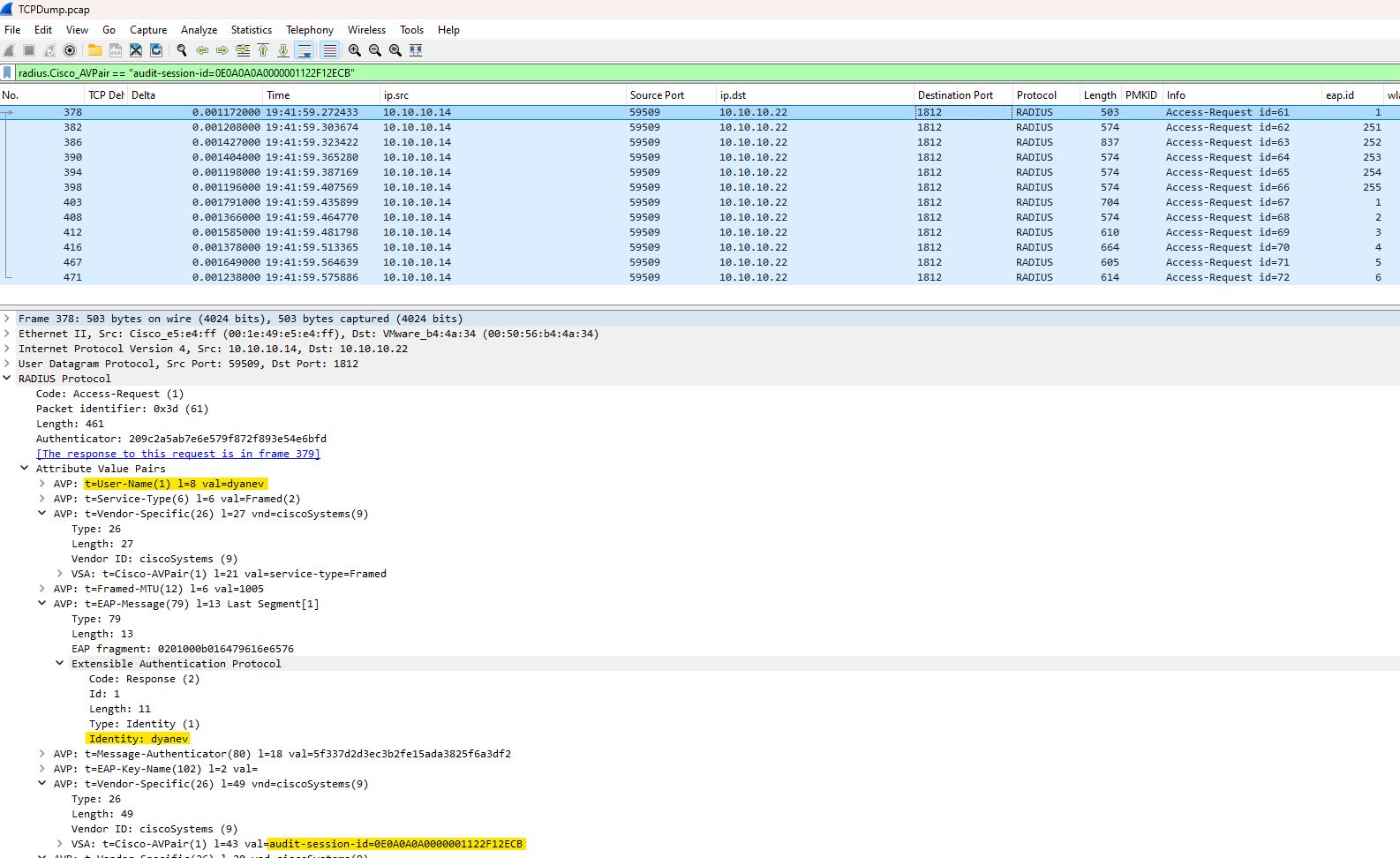
2. Follow the Wireshark Link: Highlight that first packet. In the packet details pane, Wireshark helpfully provides a shortcut: “[The response to this request is in frame XXX]”. Click that link to jump directly to the first Access-Challenge from ISE.
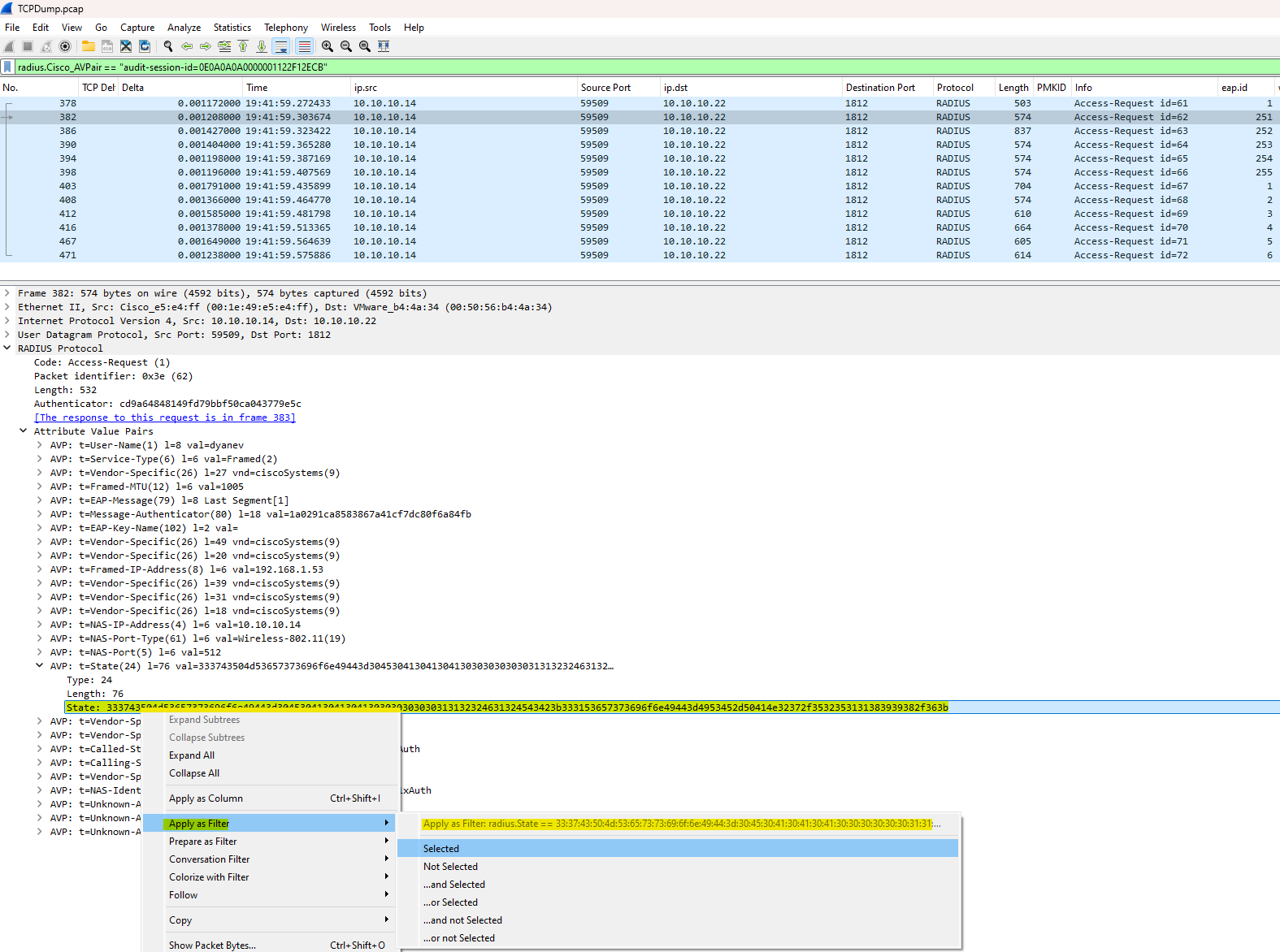
3. Find Attribute 24: In this challenge packet, expand the RADIUS Protocol tree, locate the State field, right-click, and select Apply as Filter > Selected.
Resulting Filter:
radius.State == <Hex-Value>This will now show every subsequent
Access-RequestandAccess-Challengein that specific “thread,” regardless of whether the username is repeated.
Capturing the Full RADIUS Conversation (Bi-Directional)
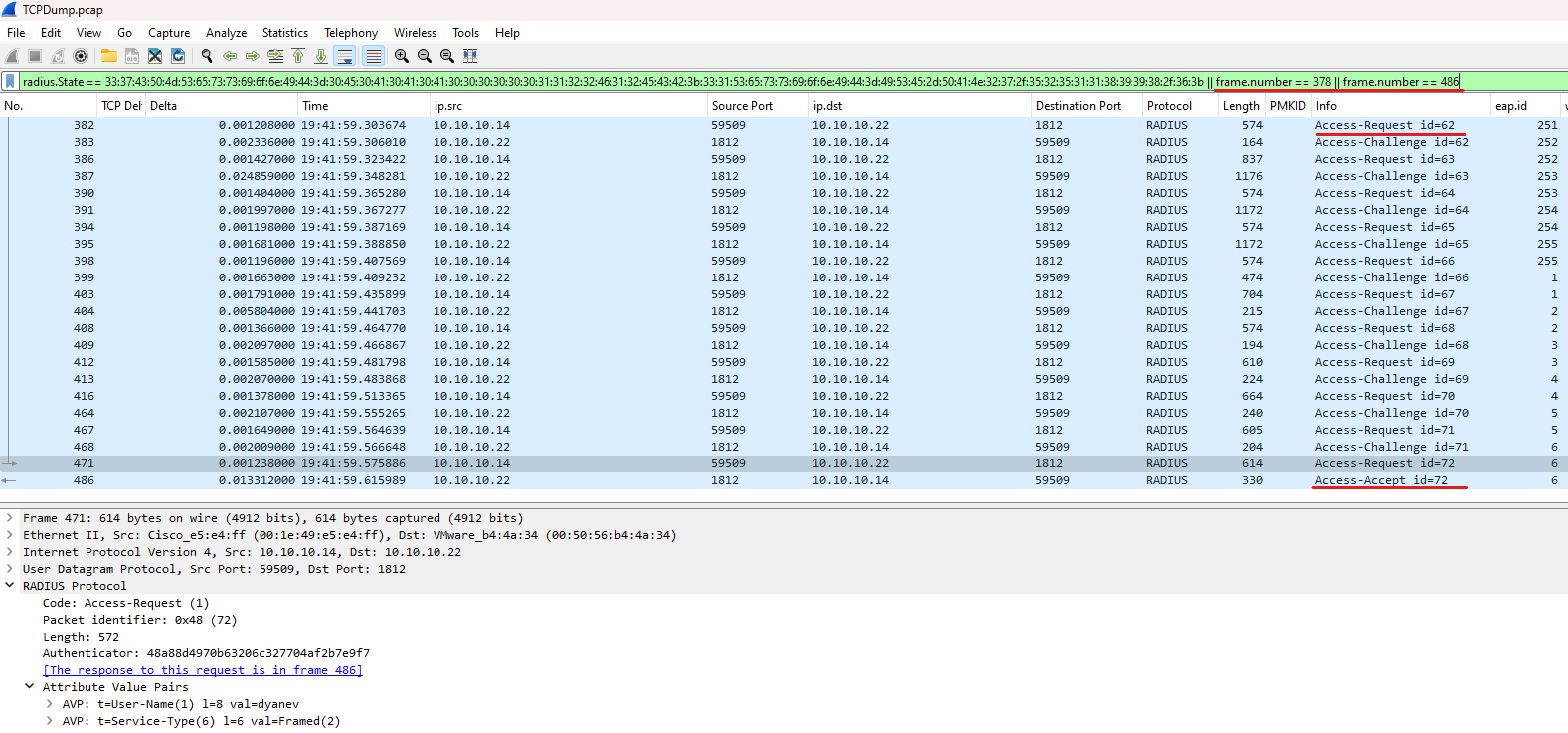
If you want to move beyond single-attribute filtering and view the entire bi-directional “handshake” between the WLC and ISE, you need a filter that tracks the session state. Using the RADIUS State attribute (which stays consistent throughout the exchange) and specific Frame Numbers is the best way to ensure you don’t miss the server’s responses.
Option 1: The Standard Session Filter
Use this to follow the full Layer 3 RADIUS flow from start to finish:
radius.State == XXXX || frame.number == {first-radius-packet} || frame.number == {last-radius-packet}
Option 2: The Fragmentation-Aware Filter (Recommended)
Because RADIUS payloads (especially certificates) often exceed the MTU, they are frequently fragmented at the IP layer. Use this filter to see the handshake plus all associated IP fragments:
(ip.flags.mf == 1) || (ip.frag_offset > 0) || radius.State == XXXXX || frame.number == {first-radius-packet} || frame.number == {last-radius-packet}Note: Why include the First and Last frames? The RADIUS State is a session-tracking “cookie.” It is missing from the very first
Access-Request(since ISE hasn’t issued it yet) and is often missing from the finalAccess-AcceptorAccess-Reject(since the session is completed and tracking is no longer required).By adding
|| frame.number == {X}, you ensure your view includes the “Intro” (initial request) and the “Conclusion” (final result), while the State ID fills in everything in between.
ISE RADIUS Live Logs: Correlating Packet Captures with Authentication Event
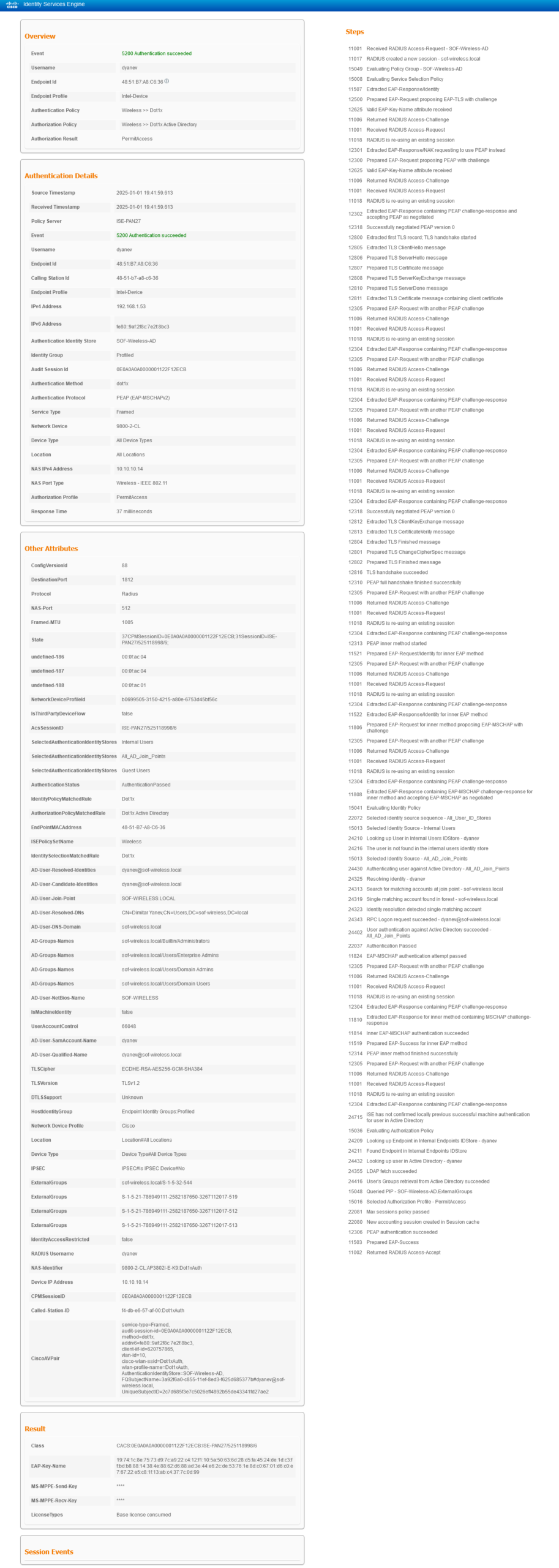
To achieve full visibility, you should compare your Wireshark traces with the ISE RADIUS Live Logs. This allows you to cross-reference the raw network data with the “decision-making” logic of the AAA server.
Step-by-Step Validation: The Live Logs provide a detailed, human-readable breakdown of every step in the authentication process—matching exactly what you see in the Layer 2 and Layer 3 captures. By reviewing the logs side-by-side with the packet capture, you can identify exactly which step ISE is “complaining” about.
Isolating the Fault:
Network Issue: If the ISE logs show a “Timeout” or “Repeat Request,” but your packet capture shows the WLC sending requests that never arrive, the focus should be on the wired network (firewalls, routing, or MTU).
Logic/Client Issue: If the capture shows a clean bi-directional flow until certain point, but ISE logs a specific failure (like “Error 5400 Authentication failed” or “MSCHAPv2 failed”), the focus shifts to the ISE & Client configuration or the Backend Identity Store (Active Directory).
Verification of Result: Once the EAP-MSCHAPv2 inner method succeeds, ISE generates the EAP-Success and issues the final RADIUS Access-Accept. This log entry serves as the “final stamp of approval,” confirming the client session is authorized and instructing the WLC to permit the connection. The same logic applies to an Access-Reject if ISE denies the session. Always verify the “Result” section to ensure the specific attributes ISE is pushing—such as VLANs or ACLs—are being correctly applied on the WLC side.that matches the end of your packet capture flow.
Expand
View Detailed ISE Radius Live Logs
Tracing the Flow on the Wireless Controller (WLC)
Once you are familiar with the RADIUS flow and how to review it from the Layer 2/3 perspective in Wireshark and ISE, the next step is to trace that same flow directly on the Wireless Controller.
The Source of Truth: While packet captures show you what is happening on the wire, the WLC’s internal logs tell you why the controller is making specific decisions. On the Cisco Catalyst 9800, this is primarily done through Radioactive Tracing (RA Trace).
Correlation via Audit-Session-ID: The key to linking these two worlds is the Audit-Session-ID. As we saw in the RADIUS captures, this ID is sent to ISE in the
Cisco-AVPairattribute. By searching for this specific ID in the WLC logs, you can align internal state machine transitions with the external packets you captured.What to Look For: In the WLC traces, you are looking for the transition of the client through the various “Mobility” and “Dot1x” states. A successful trace will show the client moving from
ASSOCIATEDtoAUTHENTICATINGand finally toRUNNINGonce theEAP-Successis received from ISE.Identifying Mismatches: Tracing on the WLC is particularly useful for identifying “silent failures”—situations where the RADIUS exchange looks successful, but the WLC fails to plumb the client’s policy (like a missing VLAN or an unsupported ACL) locally.
- Catching Early Failures: It also catches “pre-RADIUS” issues. If a client is trying to connect but the session fails before a RADIUS session is even generated or started, the RA Trace will reveal if the issue is actually rooted in the initial Association phase (e.g., capability mismatches or 802.11 rejection) rather than the authentication itself.
View Logs
Full WLC Trace Analysis
Quick Reference: RA Trace Logic
Sent EAPOL: Traffic moving from the WLC → Client (Layer 2).
Received EAPOL: Traffic moving from the Client → WLC (Layer 2).
Access-Request: Traffic moving from the WLC → RADIUS Server (Layer 3).
Access-Challenge: Traffic moving from the RADIUS Server → WLC (Layer 3).
Logging display requested on 2025/01/01 19:56:50 (EET) for Hostname: [9800-2-CL], Model: [C9800-CL-K9], Version: [17.12.04], SN: [99Q7C6GX18G], MD_SN: [99Q7C6GX18G]
<<< Association started >>>
2025/01/01 19:38:59.693900871 {wncd_x_R0-0}{1}: [client-orch-sm] [15031]: (note): MAC: 4851.b7a8.c636 Association received. BSSID f4db.e657.af0f, WLAN Dot1xAuth, Slot 1 AP f4db.e657.af00, AP3802I-E-K9, Site tag default-site-tag, Policy tag Dyanev-Policy-Tag, Policy profile Dot1xAuth, Switching Central, old BSSID f4db.e657.af0f, Socket delay 0ms #Client association session has begun, and we can observe the following details: the SSID name, the slot ID (5 GHz radio in our example), and the AP name/BSSID
2025/01/01 19:38:59.694013910 {wncd_x_R0-0}{1}: [client-orch-sm] [15031]: (debug): MAC: 4851.b7a8.c636 Received Dot11 association request. Processing started, SSID: Dot1xAuth, Policy profile: Dot1xAuth, AP Name: AP3802I-E-K9, Ap Mac Address: f4db.e657.af00BSSID MACf4db.e657.af0f wlan ID: 2 RSSI: -57, SNR: 33 #Additional details about the WLAN ID, RSSI, and SNR during the association event
2025/01/01 19:38:59.694987666 {wncd_x_R0-0}{1}: [dot11] [15031]: (info): MAC: 4851.b7a8.c636 dot11 send association response. Sending assoc response of length: 282 with resp_status_code: 0, DOT11_STATUS: DOT11_STATUS_SUCCESS
2025/01/01 19:38:59.695013991 {wncd_x_R0-0}{1}: [dot11] [15031]: (note): MAC: 4851.b7a8.c636 Association success. AID 1, Roaming = False, WGB = False, 11r = False, 11w = False Fast roam = False
2025/01/01 19:38:59.695029787 {wncd_x_R0-0}{1}: [dot11] [15031]: (info): MAC: 4851.b7a8.c636 DOT11 state transition: S_DOT11_ASSOCIATED -> S_DOT11_ASSOCIATED
2025/01/01 19:38:59.695146857 {wncd_x_R0-0}{1}: [client-orch-sm] [15031]: (debug): MAC: 4851.b7a8.c636 Station Dot11 association is successful.
<<< Association completed / Layer 2 authentication started >>>
2025/01/01 19:38:59.695231768 {wncd_x_R0-0}{1}: [client-orch-sm] [15031]: (debug): MAC: 4851.b7a8.c636 Starting L2 authentication. Bssid in state machine:f4db.e657.af0f Bssid in request is:f4db.e657.af0f #In this instance, the Layer 2 authentication process initiated with the Dot1x protocol
2025/01/01 19:38:59.695255807 {wncd_x_R0-0}{1}: [client-orch-state] [15031]: (note): MAC: 4851.b7a8.c636 Client state transition: S_CO_RUN -> S_CO_L2_AUTH_IN_PROGRESS #Client session state is now updated to L2 Auth pending
2025/01/01 19:38:59.734712495 {wncd_x_R0-0}{1}: [auth-mgr] [15031]: (info): [4851.b7a8.c636:capwap_90000005] Wireless session sequence, create context with method Dot1X #Dot1x method has been selected
2025/01/01 19:38:59.734718673 {wncd_x_R0-0}{1}: [auth-mgr-feat_wireless] [15031]: (info): Wireless dot1x configs:
EAPID req max retries = 2 EAP req max retries = 2 EAPID req timeout = 30 Supp Timeout = 30 #EAP timers are set to their default value
2025/01/01 19:38:59.734759581 {wncd_x_R0-0}{1}: [auth-mgr-feat_wireless] [15031]: (info): [4851.b7a8.c636:capwap_90000005] - authc_list: default #Current method list in use is 'aaa authentication dot1x "default"
2025/01/01 19:38:59.734761201 {wncd_x_R0-0}{1}: [auth-mgr-feat_wireless] [15031]: (info): [4851.b7a8.c636:capwap_90000005] - authz_list: Not present under wlan configuration
2025/01/01 19:38:59.734764551 {wncd_x_R0-0}{1}: [auth-mgr-feat_wireless] [15031]: (info): [4851.b7a8.c636:capwap_90000005] Retrieved audit session id : 0E0A0A0A0000001122F12ECB #A client session has been generated and will remain unchanged until it is terminated. In the case of roaming, the same session is maintained.
2025/01/01 19:38:59.734788639 {wncd_x_R0-0}{1}: [client-auth] [15031]: (note): MAC: 4851.b7a8.c636 L2 Authentication initiated. method DOT1X, Policy VLAN 10, AAA override = 1 , NAC = 1 #L2 Authentication is in progress, providing information on the client data VLAN ID and whether AAA override or NAC (CoA) is enabled. A value of 0 indicates disabled, while 1 indicates enabled.
2025/01/01 19:38:59.789902969 {wncd_x_R0-0}{1}: [dot1x] [15031]: (info): [0000.0000.0000:capwap_90000005] Setting EAPOL eth-type to 0x888e, destination mac to 4851.b7a8.c636
2025/01/01 19:38:59.789904346 {wncd_x_R0-0}{1}: [dot1x] [15031]: (info): [0000.0000.0000:capwap_90000005] Sending out EAPOL packet
2025/01/01 19:38:59.790019329 {wncd_x_R0-0}{1}: [dot1x] [15031]: (info): [4851.b7a8.c636:capwap_90000005] Sent EAPOL packet - Version : 3,EAPOL Type : EAP, Payload Length : 5, EAP-Type = Identity #An EAP Identity request is being sent to the client to initiate the Dot1x process (Layer 2).
2025/01/01 19:38:59.790022108 {wncd_x_R0-0}{1}: [dot1x] [15031]: (info): [4851.b7a8.c636:capwap_90000005] EAP Packet - REQUEST, ID : 0x1 #First EAP ID begins with 1 from the NAS side because the AAA/Radius server will later select a unique ID.
2025/01/01 19:38:59.790024357 {wncd_x_R0-0}{1}: [dot1x] [15031]: (info): [0000.0000.0000:unknown] Pkt body: 01 01 00 05 01
2025/01/01 19:38:59.790043230 {wncd_x_R0-0}{1}: [dot1x] [15031]: (info): [4851.b7a8.c636:capwap_90000005] EAPOL packet sent to client
2025/01/01 19:38:59.807894521 {wncd_x_R0-0}{1}: [dot1x] [15031]: (info): [4851.b7a8.c636:capwap_90000005] Received EAPOL packet - Version : 1,EAPOL Type : EAP, Payload Length : 11, EAP-Type = Identity #Client replied with EAP Identity response (Layer 2)
2025/01/01 19:38:59.807898351 {wncd_x_R0-0}{1}: [dot1x] [15031]: (info): [4851.b7a8.c636:capwap_90000005] EAP Packet - RESPONSE, ID : 0x1 #Client will consistently respond with the same EAP ID, as only the AAA/Radius server determines the starting point and increases it incrementally.
2025/01/01 19:38:59.807903602 {wncd_x_R0-0}{1}: [dot1x] [15031]: (info): [0000.0000.0000:unknown] Pkt body: 02 01 00 0b 01 64 79 61 6e 65 76
2025/01/01 19:38:59.808681219 {wncd_x_R0-0}{1}: [radius] [15031]: (info): RADIUS: Send Access-Request to 10.10.10.22:1812 id 0/61, len 461 #Sending the client's EAP response to the AAA/Radius server (Layer 3).
2025/01/01 19:38:59.808690092 {wncd_x_R0-0}{1}: [radius] [15031]: (info): RADIUS: authenticator 20 9c 2a 5a b7 e6 e5 79 - f8 72 f8 93 e5 4e 6b fd
2025/01/01 19:38:59.808696270 {wncd_x_R0-0}{1}: [radius] [15031]: (info): RADIUS: User-Name [1] 8 "dyanev" #Client username, also referred to as EAP-Identity information.
2025/01/01 19:38:59.808701402 {wncd_x_R0-0}{1}: [radius] [15031]: (info): RADIUS: Service-Type [6] 6 Framed [2]
2025/01/01 19:38:59.808704677 {wncd_x_R0-0}{1}: [radius] [15031]: (info): RADIUS: Vendor, Cisco [26] 27
2025/01/01 19:38:59.808708855 {wncd_x_R0-0}{1}: [radius] [15031]: (info): RADIUS: Cisco AVpair [1] 21 "service-type=Framed"
2025/01/01 19:38:59.808714085 {wncd_x_R0-0}{1}: [radius] [15031]: (info): RADIUS: Framed-MTU [12] 6 1005
2025/01/01 19:38:59.808716689 {wncd_x_R0-0}{1}: [radius] [15031]: (info): RADIUS: EAP-Message [79] 13 ...
2025/01/01 19:38:59.808748904 {wncd_x_R0-0}{1}: [radius] [15031]: (info): RADIUS: Message-Authenticator[80] 18 ...
2025/01/01 19:38:59.808768566 {wncd_x_R0-0}{1}: [radius] [15031]: (info): RADIUS: EAP-Key-Name [102] 2 *
2025/01/01 19:38:59.808773972 {wncd_x_R0-0}{1}: [radius] [15031]: (info): RADIUS: Vendor, Cisco [26] 49
2025/01/01 19:38:59.808777310 {wncd_x_R0-0}{1}: [radius] [15031]: (info): RADIUS: Cisco AVpair [1] 43 "audit-session-id=0E0A0A0A0000001122F12ECB" /// Client session ID is shared with the AAA/Radius server.
2025/01/01 19:38:59.808779858 {wncd_x_R0-0}{1}: [radius] [15031]: (info): RADIUS: Vendor, Cisco [26] 20
2025/01/01 19:38:59.808783127 {wncd_x_R0-0}{1}: [radius] [15031]: (info): RADIUS: Cisco AVpair [1] 14 "method=dot1x"
2025/01/01 19:38:59.808787533 {wncd_x_R0-0}{1}: [radius] [15031]: (info): RADIUS: Framed-IP-Address [8] 6 192.168.1.53 #Client's IP address (optional – provided if the client obtained an IP address before association or retained their previous IP address).
2025/01/01 19:38:59.808789744 {wncd_x_R0-0}{1}: [radius] [15031]: (info): RADIUS: Vendor, Cisco [26] 39
2025/01/01 19:38:59.808792666 {wncd_x_R0-0}{1}: [radius] [15031]: (info): RADIUS: Cisco AVpair [1] 33 "addrv6=fe80::9af:2f8c:7e2f:8bc3"
2025/01/01 19:38:59.808795062 {wncd_x_R0-0}{1}: [radius] [15031]: (info): RADIUS: Vendor, Cisco [26] 31
2025/01/01 19:38:59.808797981 {wncd_x_R0-0}{1}: [radius] [15031]: (info): RADIUS: Cisco AVpair [1] 25 "client-iif-id=620757865"
2025/01/01 19:38:59.808800328 {wncd_x_R0-0}{1}: [radius] [15031]: (info): RADIUS: Vendor, Cisco [26] 18
2025/01/01 19:38:59.808803196 {wncd_x_R0-0}{1}: [radius] [15031]: (info): RADIUS: Cisco AVpair [1] 12 "vlan-id=10" #Client DATA Vlan ID
2025/01/01 19:38:59.808807325 {wncd_x_R0-0}{1}: [radius] [15031]: (info): RADIUS: NAS-IP-Address [4] 6 10.10.10.14 #NAS IP address, which in our case is the WLC management IP address.
2025/01/01 19:38:59.808811062 {wncd_x_R0-0}{1}: [radius] [15031]: (info): RADIUS: NAS-Port-Type [61] 6 802.11 wireless [19]
2025/01/01 19:38:59.808814236 {wncd_x_R0-0}{1}: [radius] [15031]: (info): RADIUS: NAS-Port [5] 6 512
2025/01/01 19:38:59.808816404 {wncd_x_R0-0}{1}: [radius] [15031]: (info): RADIUS: Vendor, Cisco [26] 33
2025/01/01 19:38:59.808819286 {wncd_x_R0-0}{1}: [radius] [15031]: (info): RADIUS: Cisco AVpair [1] 27 "cisco-wlan-ssid=Dot1xAuth"
2025/01/01 19:38:59.808821678 {wncd_x_R0-0}{1}: [radius] [15031]: (info): RADIUS: Vendor, Cisco [26] 35
2025/01/01 19:38:59.808824541 {wncd_x_R0-0}{1}: [radius] [15031]: (info): RADIUS: Cisco AVpair [1] 29 "wlan-profile-name=Dot1xAuth"
2025/01/01 19:38:59.808827812 {wncd_x_R0-0}{1}: [radius] [15031]: (info): RADIUS: Called-Station-Id [30] 29 "f4-db-e6-57-af-00:Dot1xAuth" #AP BSSID + SSID information
2025/01/01 19:38:59.808838907 {wncd_x_R0-0}{1}: [radius] [15031]: (info): RADIUS: Calling-Station-Id [31] 19 "48-51-b7-a8-c6-36" #Client MAC address
2025/01/01 19:38:59.808842076 {wncd_x_R0-0}{1}: [radius] [15031]: (info): RADIUS: Vendor, Airespace [26] 12
2025/01/01 19:38:59.808845374 {wncd_x_R0-0}{1}: [radius] [15031]: (info): RADIUS: Airespace-WLAN-ID [1] 6 2 #In our case, the WLAN ID is number '2'
2025/01/01 19:38:59.808848554 {wncd_x_R0-0}{1}: [radius] [15031]: (info): RADIUS: Nas-Identifier [32] 34 "9800-2-CL:AP3802I-E-K9:Dot1xAuth" #WLC Hostname + AP name + SSID name
Note:
The 'Nas-Identifier' AVP is custom and not configured by default, but it is beneficial to share this information with the AAA/Radius server.
Example Config:
Under Configuration > Security > Wireless AAA Policy:
NAS-ID Option 1 > System Name
NAS-ID Option 2 > AP Name
NAS-ID Option 3 > SSID
2025/01/01 19:38:59.826386659 {wncd_x_R0-0}{1}: [radius] [15031]: (info): RADIUS: Received from id 1812/61 10.10.10.22:0, Access-Challenge, len 122 #Response from the AAA/Radius server (Layer 3).
2025/01/01 19:38:59.826398542 {wncd_x_R0-0}{1}: [radius] [15031]: (info): RADIUS: authenticator b2 69 10 9a eb 7c 2c 36 - 48 9d bd 03 dc d9 c7 5d
2025/01/01 19:38:59.826404536 {wncd_x_R0-0}{1}: [radius] [15031]: (info): RADIUS: State [24] 76 ...
2025/01/01 19:38:59.826481095 {wncd_x_R0-0}{1}: [radius] [15031]: (info): RADIUS: EAP-Message [79] 8 ...
2025/01/01 19:38:59.826922890 {wncd_x_R0-0}{1}: [dot1x] [15031]: (info): [4851.b7a8.c636:capwap_90000005] Sent EAPOL packet - Version : 3,EAPOL Type : EAP, Payload Length : 6, EAP-Type = EAP-TLS #Sending the AAA/Radius response to the client - protocol negotiation starting with EAP-TLS.
2025/01/01 19:38:59.826926920 {wncd_x_R0-0}{1}: [dot1x] [15031]: (info): [4851.b7a8.c636:capwap_90000005] EAP Packet - REQUEST, ID : 0xfb #EAP ID updated by the AAA/Radius server to 0xfb, which equals 251.
2025/01/01 19:38:59.826930628 {wncd_x_R0-0}{1}: [dot1x] [15031]: (info): [0000.0000.0000:unknown] Pkt body: 01 fb 00 06 0d 20
2025/01/01 19:38:59.826955869 {wncd_x_R0-0}{1}: [dot1x] [15031]: (info): [4851.b7a8.c636:capwap_90000005] EAPOL packet sent to client
2025/01/01 19:38:59.839402148 {wncd_x_R0-0}{1}: [dot1x] [15031]: (info): [4851.b7a8.c636:capwap_90000005] Received EAPOL packet - Version : 1,EAPOL Type : EAP, Payload Length : 6, EAP-Type = NAK #Client response is a NAK, indicating disagreement or that the client is not configured with EAP-TLS (proposing EAP-PEAP - can be seen only in raw packet capture)
2025/01/01 19:38:59.839405446 {wncd_x_R0-0}{1}: [dot1x] [15031]: (info): [4851.b7a8.c636:capwap_90000005] EAP Packet - RESPONSE, ID : 0xfb #The client is responding with the same EAP ID.
2025/01/01 19:38:59.839409083 {wncd_x_R0-0}{1}: [dot1x] [15031]: (info): [0000.0000.0000:unknown] Pkt body: 02 fb 00 06 03 19
2025/01/01 19:38:59.839906822 {wncd_x_R0-0}{1}: [radius] [15031]: (info): RADIUS: Send Access-Request to 10.10.10.22:1812 id 0/62, len 532
2025/01/01 19:38:59.839913677 {wncd_x_R0-0}{1}: [radius] [15031]: (info): RADIUS: authenticator cd 9a 64 84 81 49 fd 79 - bb f5 0c a0 43 77 9e 5c
2025/01/01 19:38:59.839918646 {wncd_x_R0-0}{1}: [radius] [15031]: (info): RADIUS: User-Name [1] 8 "dyanev"
2025/01/01 19:38:59.843089246 {wncd_x_R0-0}{1}: [radius] [15031]: (info): RADIUS: Received from id 1812/62 10.10.10.22:0, Access-Challenge, len 122
2025/01/01 19:38:59.843098107 {wncd_x_R0-0}{1}: [radius] [15031]: (info): RADIUS: authenticator 13 c1 a1 a5 13 0b 3f ea - ac 2b 41 6d 6d 1b dd ec
2025/01/01 19:38:59.843102868 {wncd_x_R0-0}{1}: [radius] [15031]: (info): RADIUS: State [24] 76 ...
2025/01/01 19:38:59.843148602 {wncd_x_R0-0}{1}: [radius] [15031]: (info): RADIUS: EAP-Message [79] 8 ...
2025/01/01 19:38:59.843542698 {wncd_x_R0-0}{1}: [dot1x] [15031]: (info): [4851.b7a8.c636:capwap_90000005] Sent EAPOL packet - Version : 3,EAPOL Type : EAP, Payload Length : 6, EAP-Type = PEAP #AAA server is switching to the EAP-PEAP authentication method.
2025/01/01 19:38:59.843545582 {wncd_x_R0-0}{1}: [dot1x] [15031]: (info): [4851.b7a8.c636:capwap_90000005] EAP Packet - REQUEST, ID : 0xfc #The EAP ID is incremented by 1
2025/01/01 19:38:59.843547985 {wncd_x_R0-0}{1}: [dot1x] [15031]: (info): [0000.0000.0000:unknown] Pkt body: 01 fc 00 06 19 21
2025/01/01 19:38:59.843551976 {wncd_x_R0-0}{1}: [dot1x] [15031]: (info): [4851.b7a8.c636:capwap_90000005] EAPOL packet sent to client
2025/01/01 19:38:59.858986541 {wncd_x_R0-0}{1}: [dot1x] [15031]: (info): [4851.b7a8.c636:capwap_90000005] Received EAPOL packet - Version : 1,EAPOL Type : EAP, Payload Length : 267, EAP-Type = PEAP #Client response indicates agreement on the EAP-PEAP authentication method with a client hello frame, and communication continues.
2025/01/01 19:38:59.858988853 {wncd_x_R0-0}{1}: [dot1x] [15031]: (info): [4851.b7a8.c636:capwap_90000005] EAP Packet - RESPONSE, ID : 0xfc #The client's EAP ID matches the AAA server's EAPol request.
2025/01/01 19:38:59.859003748 {wncd_x_R0-0}{1}: [dot1x] [15031]: (info): [0000.0000.0000:unknown] Pkt body: 02 fc 01 0b 19 80 00 00 01 01 16 03 01 00 fc 01 00 00 f8 03 03 74 1c 8e 75 73 d9 7c a9 22 c4 12 f1 10 5a 50 63 6d 28 d5 fa 45 24 de 1d c3 ff bd b8 88 14 38 4e 20 e6 e0 89 40 67 cd 4e 3f 35 f7
2025/01/01 19:38:59.859460294 {wncd_x_R0-0}{1}: [radius] [15031]: (info): RADIUS: Send Access-Request to 10.10.10.22:1812 id 0/63, len 795
2025/01/01 19:38:59.859467721 {wncd_x_R0-0}{1}: [radius] [15031]: (info): RADIUS: authenticator 01 c5 5a 82 0f 57 fb ca - 4c 07 6b 90 7e 09 ec 01
2025/01/01 19:38:59.859485618 {wncd_x_R0-0}{1}: [radius] [15031]: (info): RADIUS: User-Name [1] 8 "dyanev"
2025/01/01 19:38:59.885347233 {wncd_x_R0-0}{1}: [radius] [15031]: (info): RADIUS: Received from id 1812/63 10.10.10.22:0, Access-Challenge, len 1134
2025/01/01 19:38:59.885357314 {wncd_x_R0-0}{1}: [radius] [15031]: (info): RADIUS: authenticator 99 56 03 7c 74 e3 20 f0 - 91 75 e9 d2 54 8e 0a 0c
2025/01/01 19:38:59.885362869 {wncd_x_R0-0}{1}: [radius] [15031]: (info): RADIUS: State [24] 76 ...
2025/01/01 19:38:59.885427702 {wncd_x_R0-0}{1}: [radius] [15031]: (info): RADIUS: EAP-Message [79] 255 ...
2025/01/01 19:38:59.886021233 {wncd_x_R0-0}{1}: [radius] [15031]: (info): RADIUS: EAP-Message [79] 255 ...
2025/01/01 19:38:59.886530204 {wncd_x_R0-0}{1}: [dot1x] [15031]: (info): [4851.b7a8.c636:capwap_90000005] Sent EAPOL packet - Version : 3,EAPOL Type : EAP, Payload Length : 1012, EAP-Type = PEAP #AAA server response includes the AAA Server Hello, which is 1 of 4 packets containing server certificate information (total server certificate size: 2733 bytes).
2025/01/01 19:38:59.886532980 {wncd_x_R0-0}{1}: [dot1x] [15031]: (info): [4851.b7a8.c636:capwap_90000005] EAP Packet - REQUEST, ID : 0xfd
2025/01/01 19:38:59.886564833 {wncd_x_R0-0}{1}: [dot1x] [15031]: (info): [0000.0000.0000:unknown] Pkt body: 01 fd 03 f4 19 c0 00 00 0c f2 16 03 03 00 59 02 00 00 55 03 03 88 62 d6 88 ad 3e 44 e6 2c de 53 76 1e 8d c0 67 01 d6 c0 e7 67 22 e5 c8 1f 13 ab c4 37 7c 0d 99 20 a3 cf c9 88 24 1a be 23 4a a1
2025/01/01 19:38:59.901021696 {wncd_x_R0-0}{1}: [dot1x] [15031]: (info): [4851.b7a8.c636:capwap_90000005] Received EAPOL packet - Version : 1,EAPOL Type : EAP, Payload Length : 6, EAP-Type = PEAP #EAP-Type is set to PEAP. The client replies, confirming receipt of the previous EAP ID packet, and communication continues.
2025/01/01 19:38:59.901476895 {wncd_x_R0-0}{1}: [radius] [15031]: (info): RADIUS: Send Access-Request to 10.10.10.22:1812 id 0/64, len 532
2025/01/01 19:38:59.901483927 {wncd_x_R0-0}{1}: [radius] [15031]: (info): RADIUS: authenticator a8 13 08 b7 6b 03 81 b7 - 0a ec 47 89 f5 34 8a de
2025/01/01 19:38:59.901488925 {wncd_x_R0-0}{1}: [radius] [15031]: (info): RADIUS: User-Name [1] 8 "dyanev"
2025/01/01 19:38:59.904390171 {wncd_x_R0-0}{1}: [radius] [15031]: (info): RADIUS: Received from id 1812/64 10.10.10.22:0, Access-Challenge, len 1130
2025/01/01 19:38:59.904401897 {wncd_x_R0-0}{1}: [radius] [15031]: (info): RADIUS: authenticator 74 38 28 5f b9 6a 4d 9f - af 34 39 7c 05 9f 5f 8f
2025/01/01 19:38:59.904408691 {wncd_x_R0-0}{1}: [radius] [15031]: (info): RADIUS: State [24] 76 ...
2025/01/01 19:38:59.904498443 {wncd_x_R0-0}{1}: [radius] [15031]: (info): RADIUS: EAP-Message [79] 255 ...
2025/01/01 19:38:59.904639705 {wncd_x_R0-0}{1}: [radius] [15031]: (info): RADIUS: EAP-Message [79] 255 ...
2025/01/01 19:38:59.904784947 {wncd_x_R0-0}{1}: [radius] [15031]: (info): RADIUS: EAP-Message [79] 255 ...
2025/01/01 19:38:59.905006910 {wncd_x_R0-0}{1}: [radius] [15031]: (info): RADIUS: EAP-Message [79] 251 ...
2025/01/01 19:38:59.905543069 {wncd_x_R0-0}{1}: [dot1x] [15031]: (info): [4851.b7a8.c636:capwap_90000005] Sent EAPOL packet - Version : 3,EAPOL Type : EAP, Payload Length : 1008, EAP-Type = PEAP #Exchange of the AAA server certificate, packet 2 of 4.
2025/01/01 19:38:59.905545780 {wncd_x_R0-0}{1}: [dot1x] [15031]: (info): [4851.b7a8.c636:capwap_90000005] EAP Packet - REQUEST, ID : 0xfe
2025/01/01 19:38:59.922945259 {wncd_x_R0-0}{1}: [dot1x] [15031]: (info): [4851.b7a8.c636:capwap_90000005] Received EAPOL packet - Version : 1,EAPOL Type : EAP, Payload Length : 6, EAP-Type = PEAP
2025/01/01 19:38:59.923346163 {wncd_x_R0-0}{1}: [radius] [15031]: (info): RADIUS: Send Access-Request to 10.10.10.22:1812 id 0/65, len 532
2025/01/01 19:38:59.923352963 {wncd_x_R0-0}{1}: [radius] [15031]: (info): RADIUS: authenticator 73 ba d0 de be 51 96 c8 - 3e dd 51 33 11 dc 11 36
2025/01/01 19:38:59.923358195 {wncd_x_R0-0}{1}: [radius] [15031]: (info): RADIUS: User-Name [1] 8 "dyanev"
2025/01/01 19:38:59.925894048 {wncd_x_R0-0}{1}: [radius] [15031]: (info): RADIUS: Received from id 1812/65 10.10.10.22:0, Access-Challenge, len 1130
2025/01/01 19:38:59.925902925 {wncd_x_R0-0}{1}: [radius] [15031]: (info): RADIUS: authenticator d2 21 76 ac dd 67 73 4b - 58 42 ea 3d 42 cc 06 40
2025/01/01 19:38:59.925907482 {wncd_x_R0-0}{1}: [radius] [15031]: (info): RADIUS: State [24] 76 ...
2025/01/01 19:38:59.925972301 {wncd_x_R0-0}{1}: [radius] [15031]: (info): RADIUS: EAP-Message [79] 255 ...
2025/01/01 19:38:59.926148334 {wncd_x_R0-0}{1}: [radius] [15031]: (info): RADIUS: EAP-Message [79] 255 ...
2025/01/01 19:38:59.926304743 {wncd_x_R0-0}{1}: [radius] [15031]: (info): RADIUS: EAP-Message [79] 255 ...
2025/01/01 19:38:59.926535384 {wncd_x_R0-0}{1}: [radius] [15031]: (info): RADIUS: EAP-Message [79] 251 ...
2025/01/01 19:38:59.927063332 {wncd_x_R0-0}{1}: [dot1x] [15031]: (info): [4851.b7a8.c636:capwap_90000005] Sent EAPOL packet - Version : 3,EAPOL Type : EAP, Payload Length : 1008, EAP-Type = PEAP #Exchange of the AAA server certificate, packet 3 of 4.
2025/01/01 19:38:59.927067121 {wncd_x_R0-0}{1}: [dot1x] [15031]: (info): [4851.b7a8.c636:capwap_90000005] EAP Packet - REQUEST, ID : 0xff
2025/01/01 19:38:59.927111960 {wncd_x_R0-0}{1}: [dot1x] [15031]: (info): [0000.0000.0000:unknown] Pkt body: 01 ff 03 f0 19 40 0c 73 6f 66 2d 77 69 72 65 6c 65 73 73 31 26 30 24 06 03 55 04 03 13 1d 73 6f 66 2d 77 69 72 65 6c 65 73 73 2d 57 49 4e 53 45 52 56 45 52 32 30 31 36 2d 43 41 30 20 17 0d 32
2025/01/01 19:38:59.927119862 {wncd_x_R0-0}{1}: [dot1x] [15031]: (info): [4851.b7a8.c636:capwap_90000005] EAPOL packet sent to client
2025/01/01 19:38:59.943293962 {wncd_x_R0-0}{1}: [dot1x] [15031]: (info): [4851.b7a8.c636:capwap_90000005] Received EAPOL packet - Version : 1,EAPOL Type : EAP, Payload Length : 6, EAP-Type = PEAP
2025/01/01 19:38:59.943312233 {wncd_x_R0-0}{1}: [dot1x] [15031]: (info): [4851.b7a8.c636:capwap_90000005] EAP Packet - RESPONSE, ID : 0xff
2025/01/01 19:38:59.943314747 {wncd_x_R0-0}{1}: [dot1x] [15031]: (info): [0000.0000.0000:unknown] Pkt body: 02 ff 00 06 19 00
2025/01/01 19:38:59.943772971 {wncd_x_R0-0}{1}: [radius] [15031]: (info): RADIUS: Send Access-Request to 10.10.10.22:1812 id 0/66, len 532
2025/01/01 19:38:59.943780159 {wncd_x_R0-0}{1}: [radius] [15031]: (info): RADIUS: authenticator 35 0e d0 f3 60 66 bb 9e - 43 0d d1 55 e9 e3 8b b0
2025/01/01 19:38:59.943787434 {wncd_x_R0-0}{1}: [radius] [15031]: (info): RADIUS: User-Name [1] 8 "dyanev"
2025/01/01 19:38:59.946248614 {wncd_x_R0-0}{1}: [radius] [15031]: (info): RADIUS: Received from id 1812/66 10.10.10.22:0, Access-Challenge, len 432
2025/01/01 19:38:59.946257160 {wncd_x_R0-0}{1}: [radius] [15031]: (info): RADIUS: authenticator fb fe d5 51 62 de 52 f0 - 48 6a fb 62 3f ed ef 79
2025/01/01 19:38:59.946261735 {wncd_x_R0-0}{1}: [radius] [15031]: (info): RADIUS: State [24] 76 ...
2025/01/01 19:38:59.946323245 {wncd_x_R0-0}{1}: [radius] [15031]: (info): RADIUS: EAP-Message [79] 255 ...
2025/01/01 19:38:59.946496530 {wncd_x_R0-0}{1}: [radius] [15031]: (info): RADIUS: EAP-Message [79] 63 ...
2025/01/01 19:38:59.946904450 {wncd_x_R0-0}{1}: [dot1x] [15031]: (info): [4851.b7a8.c636:capwap_90000005] Sent EAPOL packet - Version : 3,EAPOL Type : EAP, Payload Length : 314, EAP-Type = PEAP #AAA server certificate exchange concludes with packet 4 of 4, marking the 'Server Hello Done' + Server Key exchange
2025/01/01 19:38:59.946907053 {wncd_x_R0-0}{1}: [dot1x] [15031]: (info): [4851.b7a8.c636:capwap_90000005] EAP Packet - REQUEST, ID : 0x1
2025/01/01 19:38:59.946937809 {wncd_x_R0-0}{1}: [dot1x] [15031]: (info): [0000.0000.0000:unknown] Pkt body: 01 01 01 3a 19 00 dd a6 63 0d 7c b8 da 09 ef 5d ed 74 13 e6 ea 1b 58 25 bb 0d 4c c1 a9 b0 90 b4 4d a6 69 25 b3 87 2e da dc 45 92 57 f9 89 4f 1d 1d 7a 57 31 4c 81 8e e7 44 20 f2 33 11 68 c4 c8
2025/01/01 19:38:59.946942050 {wncd_x_R0-0}{1}: [dot1x] [15031]: (info): [4851.b7a8.c636:capwap_90000005] EAPOL packet sent to client
2025/01/01 19:38:59.971490709 {wncd_x_R0-0}{1}: [dot1x] [15031]: (info): [4851.b7a8.c636:capwap_90000005] Received EAPOL packet - Version : 1,EAPOL Type : EAP, Payload Length : 136, EAP-Type = PEAP #Client key exchange occurs, confirming receipt of the server certificate data and proceeding with TLS tunnel finalization.
Note: With EAP-PEAP (MSCHAPv2), the client authenticates using a username and password, without needing to present a certificate. The password information is securely transmitted within the TLS tunnel. In contrast, EAP-TLS involves the client sharing its certificate during the key exchange process, which, like the ISE certificate, can be sent in multiple fragments to the ISE. Once the client certificate exchange is complete, further traffic does not continue within the TLS tunnel, as it is unnecessary, allowing the ISE to automatically authenticate the client. In this situation, we address the EAP-PEAP scenario. However, once we understand how EAP-TLS operates, the same logic can be applied there.
2025/01/01 19:38:59.971492858 {wncd_x_R0-0}{1}: [dot1x] [15031]: (info): [4851.b7a8.c636:capwap_90000005] EAP Packet - RESPONSE, ID : 0x1
2025/01/01 19:38:59.971507369 {wncd_x_R0-0}{1}: [dot1x] [15031]: (info): [0000.0000.0000:unknown] Pkt body: 02 01 00 88 19 80 00 00 00 7e 16 03 03 00 46 10 00 00 42 41 04 4e 22 96 c8 32 6b 8a 3f 92 24 db 4f ae 10 12 d8 23 a9 4f f2 4f 5b 20 2d 82 87 bd 20 b0 8a f3 14 2c d2 69 bb e4 5d 12 7b 80 94 17
2025/01/01 19:38:59.971993327 {wncd_x_R0-0}{1}: [radius] [15031]: (info): RADIUS: Send Access-Request to 10.10.10.22:1812 id 0/67, len 662
2025/01/01 19:38:59.972000421 {wncd_x_R0-0}{1}: [radius] [15031]: (info): RADIUS: authenticator f1 37 52 51 9d 0d ef e0 - 1a c1 35 03 a4 c1 b3 f7
2025/01/01 19:38:59.972005331 {wncd_x_R0-0}{1}: [radius] [15031]: (info): RADIUS: User-Name [1] 8 "dyanev"
2025/01/01 19:38:59.978771929 {wncd_x_R0-0}{1}: [radius] [15031]: (info): RADIUS: Received from id 1812/67 10.10.10.22:0, Access-Challenge, len 173
2025/01/01 19:38:59.978781370 {wncd_x_R0-0}{1}: [radius] [15031]: (info): RADIUS: authenticator fb a6 bf 3f be 9e 30 84 - 70 25 0b 56 57 e9 3c f1
2025/01/01 19:38:59.978788290 {wncd_x_R0-0}{1}: [radius] [15031]: (info): RADIUS: State [24] 76 ...
2025/01/01 19:38:59.978849738 {wncd_x_R0-0}{1}: [radius] [15031]: (info): RADIUS: EAP-Message [79] 59 ...
2025/01/01 19:38:59.979334664 {wncd_x_R0-0}{1}: [dot1x] [15031]: (info): [4851.b7a8.c636:capwap_90000005] Sent EAPOL packet - Version : 3,EAPOL Type : EAP, Payload Length : 57, EAP-Type = PEAP #Change Cipher Spec indicates that the TLS tunnel is completed.
2025/01/01 19:38:59.979337240 {wncd_x_R0-0}{1}: [dot1x] [15031]: (info): [4851.b7a8.c636:capwap_90000005] EAP Packet - REQUEST, ID : 0x2
2025/01/01 19:38:59.979367271 {wncd_x_R0-0}{1}: [dot1x] [15031]: (info): [0000.0000.0000:unknown] Pkt body: 01 02 00 39 19 00 14 03 03 00 01 01 16 03 03 00 28 b1 56 41 da 5c 81 5e 4c ab e5 9d 34 97 d0 23 70 93 14 01 f5 be 78 28 97 cd 1a 44 04 5d 8a 91 3e 40 32 14 e9 69 0d e0 ff
2025/01/01 19:38:59.979371736 {wncd_x_R0-0}{1}: [dot1x] [15031]: (info): [4851.b7a8.c636:capwap_90000005] EAPOL packet sent to client
2025/01/01 19:39:00.000415033 {wncd_x_R0-0}{1}: [dot1x] [15031]: (info): [4851.b7a8.c636:capwap_90000005] Received EAPOL packet - Version : 1,EAPOL Type : EAP, Payload Length : 6, EAP-Type = PEAP
2025/01/01 19:39:00.000417409 {wncd_x_R0-0}{1}: [dot1x] [15031]: (info): [4851.b7a8.c636:capwap_90000005] EAP Packet - RESPONSE, ID : 0x2
2025/01/01 19:39:00.000419852 {wncd_x_R0-0}{1}: [dot1x] [15031]: (info): [0000.0000.0000:unknown] Pkt body: 02 02 00 06 19 00
2025/01/01 19:39:00.000913848 {wncd_x_R0-0}{1}: [radius] [15031]: (info): RADIUS: Send Access-Request to 10.10.10.22:1812 id 0/68, len 532
2025/01/01 19:39:00.000920442 {wncd_x_R0-0}{1}: [radius] [15031]: (info): RADIUS: authenticator fa b2 79 97 c0 69 78 da - 2a ad de ce 6e 91 c5 d4
2025/01/01 19:39:00.000925461 {wncd_x_R0-0}{1}: [radius] [15031]: (info): RADIUS: User-Name [1] 8 "dyanev"
#The TLS tunnel has been established, and the EAP-PEAP inner method begins from this point. ///
Note: The subsequent phase involves the inner EAP-PEAP method, usually EAP-MSCHAP, within the encrypted TLS tunnel. Detailed tracing of this process is feasible only from the AAA/Radius server perspective. On the WLC/AP side or when observing the traffic between the AAA server and the client, only the continuity and latency of communication can be confirmed. Nonetheless, the packet exchange pattern typical of EAP-MSCHAP can provide insights into the ongoing processes despite encryption.
2025/01/01 19:39:00.003868545 {wncd_x_R0-0}{1}: [radius] [15031]: (info): RADIUS: Received from id 1812/68 10.10.10.22:0, Access-Challenge, len 152
2025/01/01 19:39:00.003879720 {wncd_x_R0-0}{1}: [radius] [15031]: (info): RADIUS: authenticator 00 75 6b 95 e3 95 c5 c3 - 8f 3e 43 ad 5c 26 3a b8
2025/01/01 19:39:00.003885860 {wncd_x_R0-0}{1}: [radius] [15031]: (info): RADIUS: State [24] 76 ...
2025/01/01 19:39:00.003962476 {wncd_x_R0-0}{1}: [radius] [15031]: (info): RADIUS: EAP-Message [79] 38 ...
22025/01/01 19:39:00.004312092 {wncd_x_R0-0}{1}: [dot1x] [15031]: (info): [4851.b7a8.c636:capwap_90000005] Sent EAPOL packet - Version : 3,EAPOL Type : EAP, Payload Length : 36, EAP-Type = PEAP
2025/01/01 19:39:00.004342559 {wncd_x_R0-0}{1}: [dot1x] [15031]: (info): [4851.b7a8.c636:capwap_90000005] EAP Packet - REQUEST, ID : 0x3
2025/01/01 19:39:00.004351670 {wncd_x_R0-0}{1}: [dot1x] [15031]: (info): [0000.0000.0000:unknown] Pkt body: 01 03 00 24 19 00 17 03 03 00 19 b1 56 41 da 5c 81 5e 4d f3 85 6c dc ed f4 4c 2b e7 45 34 96 31 b1 64 62 31
2025/01/01 19:39:00.004355695 {wncd_x_R0-0}{1}: [dot1x] [15031]: (info): [4851.b7a8.c636:capwap_90000005] EAPOL packet sent to client
2025/01/01 19:39:00.017200295 {wncd_x_R0-0}{1}: [dot1x] [15031]: (info): [4851.b7a8.c636:capwap_90000005] Received EAPOL packet - Version : 1,EAPOL Type : EAP, Payload Length : 42, EAP-Type = PEAP
2025/01/01 19:39:00.017204108 {wncd_x_R0-0}{1}: [dot1x] [15031]: (info): [4851.b7a8.c636:capwap_90000005] EAP Packet - RESPONSE, ID : 0x3
2025/01/01 19:39:00.017223428 {wncd_x_R0-0}{1}: [dot1x] [15031]: (info): [0000.0000.0000:unknown] Pkt body: 02 03 00 2a 19 00 17 03 03 00 1f 00 00 00 00 00 00 00 01 15 b2 91 30 a8 63 6a b5 a6 1d 04 46 62 d4 19 73 d6 ec 96 4f da af b6
2025/01/01 19:39:00.017833430 {wncd_x_R0-0}{1}: [radius] [15031]: (info): RADIUS: Send Access-Request to 10.10.10.22:1812 id 0/69, len 568
2025/01/01 19:39:00.017856568 {wncd_x_R0-0}{1}: [radius] [15031]: (info): RADIUS: authenticator 1a de 30 da 47 a8 b4 71 - 55 92 3f c4 24 04 98 cb
2025/01/01 19:39:00.017864942 {wncd_x_R0-0}{1}: [radius] [15031]: (info): RADIUS: User-Name [1] 8 "dyanev"
2025/01/01 19:39:00.020880967 {wncd_x_R0-0}{1}: [radius] [15031]: (info): RADIUS: Received from id 1812/69 10.10.10.22:0, Access-Challenge, len 182
2025/01/01 19:39:00.020894137 {wncd_x_R0-0}{1}: [radius] [15031]: (info): RADIUS: authenticator 5b 02 11 13 05 db 32 19 - 3d 88 2f 03 00 0d 7f 59
2025/01/01 19:39:00.020901510 {wncd_x_R0-0}{1}: [radius] [15031]: (info): RADIUS: State [24] 76 ...
2025/01/01 19:39:00.020978891 {wncd_x_R0-0}{1}: [radius] [15031]: (info): RADIUS: EAP-Message [79] 68 …
2025/01/01 19:39:00.021583746 {wncd_x_R0-0}{1}: [dot1x] [15031]: (info): [4851.b7a8.c636:capwap_90000005] Sent EAPOL packet - Version : 3,EAPOL Type : EAP, Payload Length : 66, EAP-Type = PEAP
2025/01/01 19:39:00.021588711 {wncd_x_R0-0}{1}: [dot1x] [15031]: (info): [4851.b7a8.c636:capwap_90000005] EAP Packet - REQUEST, ID : 0x4
2025/01/01 19:39:00.021614434 {wncd_x_R0-0}{1}: [dot1x] [15031]: (info): [0000.0000.0000:unknown] Pkt body: 01 04 00 42 19 00 17 03 03 00 37 b1 56 41 da 5c 81 5e 4e 35 49 60 ea 47 a4 29 5a 31 fd a9 c0 72 8c d8 f8 1a bd dd 2e 66 89 94 b0 2f 15 7e be 8c 70 5a 0b fb 7f b8 6c 5a 92 d5 29 6c 8f bd 7d 11
2025/01/01 19:39:00.021620894 {wncd_x_R0-0}{1}: [dot1x] [15031]: (info): [4851.b7a8.c636:capwap_90000005] EAPOL packet sent to client
2025/01/01 19:39:00.048944586 {wncd_x_R0-0}{1}: [dot1x] [15031]: (info): [4851.b7a8.c636:capwap_90000005] Received EAPOL packet - Version : 1,EAPOL Type : EAP, Payload Length : 96, EAP-Type = PEAP
2025/01/01 19:39:00.048946910 {wncd_x_R0-0}{1}: [dot1x] [15031]: (info): [4851.b7a8.c636:capwap_90000005] EAP Packet - RESPONSE, ID : 0x4
2025/01/01 19:39:00.048961598 {wncd_x_R0-0}{1}: [dot1x] [15031]: (info): [0000.0000.0000:unknown] Pkt body: 02 04 00 60 19 00 17 03 03 00 55 00 00 00 00 00 00 00 02 e0 be 5f cb ae b9 11 10 e8 88 d0 11 d2 8f 5b 47 d1 60 17 5e 08 05 dc 24 39 3c ec 5d 80 42 4b 14 a3 25 64 3e 5a a7 59 39 53 ea 21 88 22
2025/01/01 19:39:00.049451975 {wncd_x_R0-0}{1}: [radius] [15031]: (info): RADIUS: Send Access-Request to 10.10.10.22:1812 id 0/70, len 622
2025/01/01 19:39:00.049464831 {wncd_x_R0-0}{1}: [radius] [15031]: (info): RADIUS: authenticator d6 21 a0 1d c9 55 8f 1f - e7 ce e3 0b d3 7b d7 dd
2025/01/01 19:39:00.049472463 {wncd_x_R0-0}{1}: [radius] [15031]: (info): RADIUS: User-Name [1] 8 "dyanev"
2025/01/01 19:39:00.092313355 {wncd_x_R0-0}{1}: [radius] [15031]: (info): RADIUS: Received from id 1812/70 10.10.10.22:0, Access-Challenge, len 198
2025/01/01 19:39:00.092326941 {wncd_x_R0-0}{1}: [radius] [15031]: (info): RADIUS: authenticator 87 cb ce f7 6b 43 47 4b - c2 d6 6f 6c e0 f2 2d 99
2025/01/01 19:39:00.092334007 {wncd_x_R0-0}{1}: [radius] [15031]: (info): RADIUS: State [24] 76 ...
2025/01/01 19:39:00.092406152 {wncd_x_R0-0}{1}: [radius] [15031]: (info): RADIUS: EAP-Message [79] 84 ...
2025/01/01 19:39:00.092945471 {wncd_x_R0-0}{1}: [dot1x] [15031]: (info): [4851.b7a8.c636:capwap_90000005] Sent EAPOL packet - Version : 3,EAPOL Type : EAP, Payload Length : 82, EAP-Type = PEAP
2025/01/01 19:39:00.092983987 {wncd_x_R0-0}{1}: [dot1x] [15031]: (info): [4851.b7a8.c636:capwap_90000005] EAP Packet - REQUEST, ID : 0x5
2025/01/01 19:39:00.093008563 {wncd_x_R0-0}{1}: [dot1x] [15031]: (info): [0000.0000.0000:unknown] Pkt body: 01 05 00 52 19 00 17 03 03 00 47 b1 56 41 da 5c 81 5e 4f c7 2c 78 b4 76 54 70 bc 5d 98 39 6f ac 8c 39 c3 f4 02 3f 1d ae 98 53 f7 5a 0b 02 3e cf ff 05 cc 6a 6a f8 89 41 4a 6f 89 44 f1 25 39 37
2025/01/01 19:39:00.093016509 {wncd_x_R0-0}{1}: [dot1x] [15031]: (info): [4851.b7a8.c636:capwap_90000005] EAPOL packet sent to client
2025/01/01 19:39:00.100188739 {wncd_x_R0-0}{1}: [dot1x] [15031]: (info): [4851.b7a8.c636:capwap_90000005] Received EAPOL packet - Version : 1,EAPOL Type : EAP, Payload Length : 37, EAP-Type = PEAP
2025/01/01 19:39:00.100191099 {wncd_x_R0-0}{1}: [dot1x] [15031]: (info): [4851.b7a8.c636:capwap_90000005] EAP Packet - RESPONSE, ID : 0x5
2025/01/01 19:39:00.100200320 {wncd_x_R0-0}{1}: [dot1x] [15031]: (info): [0000.0000.0000:unknown] Pkt body: 02 05 00 25 19 00 17 03 03 00 1a 00 00 00 00 00 00 00 03 db 71 f1 ce 6c 8f 66 e9 7d 4a ec d1 a3 4e 04 08 b4 e1
2025/01/01 19:39:00.100785454 {wncd_x_R0-0}{1}: [radius] [15031]: (info): RADIUS: Send Access-Request to 10.10.10.22:1812 id 0/71, len 563
2025/01/01 19:39:00.100792562 {wncd_x_R0-0}{1}: [radius] [15031]: (info): RADIUS: authenticator 41 ac 39 0a 01 c8 29 e9 - 96 0c f4 69 87 cb 47 9e
2025/01/01 19:39:00.100799449 {wncd_x_R0-0}{1}: [radius] [15031]: (info): RADIUS: User-Name [1] 8 "dyanev"
2025/01/01 19:39:00.103727446 {wncd_x_R0-0}{1}: [radius] [15031]: (info): RADIUS: Received from id 1812/71 10.10.10.22:0, Access-Challenge, len 162
2025/01/01 19:39:00.103739686 {wncd_x_R0-0}{1}: [radius] [15031]: (info): RADIUS: authenticator d9 00 cd a8 f8 3b 37 12 - 9f 0f f6 d1 a5 8f fb 03
2025/01/01 19:39:00.103746986 {wncd_x_R0-0}{1}: [radius] [15031]: (info): RADIUS: State [24] 76 ...
2025/01/01 19:39:00.103810649 {wncd_x_R0-0}{1}: [radius] [15031]: (info): RADIUS: EAP-Message [79] 48 ...
2025/01/01 19:39:00.103855099 {wncd_x_R0-0}{1}: [radius] [15031]: (info): RADIUS: Message-Authenticator[80] 18 ...
2025/01/01 19:39:00.104195311 {wncd_x_R0-0}{1}: [dot1x] [15031]: (info): [4851.b7a8.c636:capwap_90000005] Sent EAPOL packet - Version : 3,EAPOL Type : EAP, Payload Length : 46, EAP-Type = PEAP
2025/01/01 19:39:00.104199375 {wncd_x_R0-0}{1}: [dot1x] [15031]: (info): [4851.b7a8.c636:capwap_90000005] EAP Packet - REQUEST, ID : 0x6
2025/01/01 19:39:00.104233963 {wncd_x_R0-0}{1}: [dot1x] [15031]: (info): [0000.0000.0000:unknown] Pkt body: 01 06 00 2e 19 00 17 03 03 00 23 b1 56 41 da 5c 81 5e 50 49 a5 99 82 3c 2e b7 1f ec 85 b9 13 80 1b d2 c2 4f 37 ff 54 21 0d 1e 43 f3 d2 83
2025/01/01 19:39:00.104240440 {wncd_x_R0-0}{1}: [dot1x] [15031]: (info): [4851.b7a8.c636:capwap_90000005] EAPOL packet sent to client
2025/01/01 19:39:00.111613878 {wncd_x_R0-0}{1}: [dot1x] [15031]: (info): [4851.b7a8.c636:capwap_90000005] Received EAPOL packet - Version : 1,EAPOL Type : EAP, Payload Length : 46, EAP-Type = PEAP
2025/01/01 19:39:00.111616202 {wncd_x_R0-0}{1}: [dot1x] [15031]: (info): [4851.b7a8.c636:capwap_90000005] EAP Packet - RESPONSE, ID : 0x6
2025/01/01 19:39:00.111627233 {wncd_x_R0-0}{1}: [dot1x] [15031]: (info): [0000.0000.0000:unknown] Pkt body: 02 06 00 2e 19 00 17 03 03 00 23 00 00 00 00 00 00 00 04 39 77 87 d6 41 fc 2a 19 37 4a 68 a7 f4 f1 39 98 0a 87 b6 95 cd bc 5a f0 f4 40 7c
2025/01/01 19:39:00.112088348 {wncd_x_R0-0}{1}: [radius] [15031]: (info): RADIUS: Send Access-Request to 10.10.10.22:1812 id 0/72, len 572
2025/01/01 19:39:00.112099484 {wncd_x_R0-0}{1}: [radius] [15031]: (info): RADIUS: authenticator 48 a8 8d 49 70 b6 32 06 - c3 27 70 4a f2 b7 e9 f7
2025/01/01 19:39:00.112107363 {wncd_x_R0-0}{1}: [radius] [15031]: (info): RADIUS: User-Name [1] 8 "dyanev"
2025/01/01 19:39:00.153043552 {wncd_x_R0-0}{1}: [radius] [15031]: (info): RADIUS: Received from id 1812/72 10.10.10.22:0, Access-Accept, len 288 #AAA server's final response permits the client to access the network and sends the necessary AVP attributes to complete the 4-way handshake.
2025/01/01 19:39:00.153053985 {wncd_x_R0-0}{1}: [radius] [15031]: (info): RADIUS: authenticator de 34 59 01 88 c3 55 5c - 8b ea 28 50 c1 fc 08 a9
2025/01/01 19:39:00.153059957 {wncd_x_R0-0}{1}: [radius] [15031]: (info): RADIUS: User-Name [1] 8 "dyanev"
2025/01/01 19:39:00.153063281 {wncd_x_R0-0}{1}: [radius] [15031]: (info): RADIUS: Class [25] 53 ...
2025/01/01 19:39:00.153100585 {wncd_x_R0-0}{1}: [radius] [15031]: (info): RADIUS: EAP-Message [79] 6 ...
2025/01/01 19:39:00.153129281 {wncd_x_R0-0}{1}: [radius] [15031]: (info): RADIUS: Message-Authenticator[80] 18 ...
2025/01/01 19:39:00.153148313 {wncd_x_R0-0}{1}: [radius] [15031]: (info): RADIUS: EAP-Key-Name [102] 67 *
2025/01/01 19:39:00.153154387 {wncd_x_R0-0}{1}: [radius] [15031]: (info): RADIUS: Vendor, Microsoft [26] 58
2025/01/01 19:39:00.153157133 {wncd_x_R0-0}{1}: [radius] [15031]: (info): RADIUS: MS-MPPE-Send-Key [16] 52 *
2025/01/01 19:39:00.153162367 {wncd_x_R0-0}{1}: [radius] [15031]: (info): RADIUS: Vendor, Microsoft [26] 58
2025/01/01 19:39:00.153164675 {wncd_x_R0-0}{1}: [radius] [15031]: (info): RADIUS: MS-MPPE-Recv-Key [17] 52 *
2025/01/01 19:39:00.153563966 {wncd_x_R0-0}{1}: [dot1x] [15031]: (info): [4851.b7a8.c636:capwap_90000005] Received an EAP Success
2025/01/01 19:39:00.153590239 {wncd_x_R0-0}{1}: [dot1x] [15031]: (info): [4851.b7a8.c636:capwap_90000005] Entering idle state
2025/01/01 19:39:00.153597489 {wncd_x_R0-0}{1}: [dot1x] [15031]: (info): [4851.b7a8.c636:capwap_90000005] Posting AUTH_SUCCESS on Client
2025/01/01 19:39:00.153639702 {wncd_x_R0-0}{1}: [dot1x] [15031]: (info): [0000.0000.0000:capwap_90000005] Setting EAPOL eth-type to 0x888e, destination mac to 4851.b7a8.c636
2025/01/01 19:39:00.153641156 {wncd_x_R0-0}{1}: [dot1x] [15031]: (info): [0000.0000.0000:capwap_90000005] Sending out EAPOL packet
2025/01/01 19:39:00.153790891 {wncd_x_R0-0}{1}: [dot1x] [15031]: (info): [4851.b7a8.c636:capwap_90000005] Sent EAPOL packet - Version : 3,EAPOL Type : EAP, Payload Length : 4, EAP-Type = 0 #An EAP-Success packet is sent to the client, informing them of the status of their session.
2025/01/01 19:39:00.153796980 {wncd_x_R0-0}{1}: [dot1x] [15031]: (info): [4851.b7a8.c636:capwap_90000005] EAP Packet - SUCCESS, ID : 0x6
2025/01/01 19:39:00.153799904 {wncd_x_R0-0}{1}: [dot1x] [15031]: (info): [0000.0000.0000:unknown] Pkt body: 03 06 00 04
2025/01/01 19:39:00.153805183 {wncd_x_R0-0}{1}: [dot1x] [15031]: (info): [4851.b7a8.c636:capwap_90000005] EAPOL packet sent to client
2025/01/01 19:39:00.154106603 {wncd_x_R0-0}{1}: [auth-mgr] [15031]: (info): [4851.b7a8.c636:capwap_90000005] Method dot1x changing state from 'Running' to 'Authc Success'
2025/01/01 19:39:00.154112473 {wncd_x_R0-0}{1}: [auth-mgr] [15031]: (info): [4851.b7a8.c636:capwap_90000005] Context changing state from 'Running' to 'Authc Success'
2025/01/01 19:39:00.154247825 {wncd_x_R0-0}{1}: [svm] [15031]: (info): SVM_INFO: SVM Apply user profile
2025/01/01 19:39:00.154845791 {wncd_x_R0-0}{1}: [svm] [15031]: (info): SVM_INFO: Activating EPM features with UP
2025/01/01 19:39:00.154971547 {wncd_x_R0-0}{1}: [epm-misc] [15031]: (info): [4851.b7a8.c636:capwap_90000005] Username dyanev received
2025/01/01 19:39:00.155066610 {wncd_x_R0-0}{1}: [svm] [15031]: (info): SVM_INFO: Response of epm is SYNC with return code Success
2025/01/01 19:39:00.155143656 {wncd_x_R0-0}{1}: [svm] [15031]: (info): [4851.b7a8.c636] Applied User Profile: :
2025/01/01 19:39:00.155153679 {wncd_x_R0-0}{1}: [aaa-attr-inf] [15031]: (info): Applied User Profile: MS-MPPE-Send-Key 0 56 3e 06 df 77 98 da 29 38 15 8e 52 78 36 ae e6 e5 ec 6d cb b2 94 f6 84 49 4c b6 ca 28 42 92 af #Authenticator to Peer Encryption Key
2025/01/01 19:39:00.155161462 {wncd_x_R0-0}{1}: [aaa-attr-inf] [15031]: (info): Applied User Profile: MS-MPPE-Recv-Key 0 55 03 57 07 c2 e2 dd 94 e6 35 8b 64 fb 05 44 24 c1 a6 34 10 c2 f7 f6 72 0c 99 37 49 73 5a 6e 64 #Peer to Authenticator Encryption Key | PMK
2025/01/01 19:39:00.155162541 {wncd_x_R0-0}{1}: [aaa-attr-inf] [15031]: (info): Applied User Profile: eap-emsk 0
2025/01/01 19:39:00.155163912 {wncd_x_R0-0}{1}: [aaa-attr-inf] [15031]: (info): Applied User Profile: method 0 0 [dot1x]
2025/01/01 19:39:00.155166168 {wncd_x_R0-0}{1}: [aaa-attr-inf] [15031]: (info): Applied User Profile: clid-mac-addr 0 48 51 b7 a8 c6 36
2025/01/01 19:39:00.155167502 {wncd_x_R0-0}{1}: [aaa-attr-inf] [15031]: (info): Applied User Profile: intf-id 0 2415919109 (0x90000005)
2025/01/01 19:39:00.155168730 {wncd_x_R0-0}{1}: [aaa-attr-inf] [15031]: (info): Applied User Profile: username 0 "dyanev"
2025/01/01 19:39:00.155180215 {wncd_x_R0-0}{1}: [aaa-attr-inf] [15031]: (info): Applied User Profile: class 0 43 41 43 53 3a 30 45 30 41 30 41 30 41 30 30 30 30 30 30 31 31 32 32 46 31 32 45 43 42 3a 49 53 45 2d 50 41 4e 32 37 2f 35 32 35 31 31 38 39 39 38 2f 36
2025/01/01 19:39:00.155181450 {wncd_x_R0-0}{1}: [aaa-attr-inf] [15031]: (info): Applied User Profile: EAP-session-id 0 "t
ŽusÙ|©"ÄñZPcm(ÕúE$ÞÃÿ½¸ˆ8NˆbÖˆ>Dæ,ÞSv‑ÀgÖÀçg"åÈ«Ä7|
™"
2025/01/01 19:39:00.155195674 {wncd_x_R0-0}{1}: [aaa-attr-inf] [15031]: (info): Applied User Profile: eap-msk 0 55 03 57 07 c2 e2 dd 94 e6 35 8b 64 fb 05 44 24 c1 a6 34 10 c2 f7 f6 72 0c 99 37 49 73 5a 6e 64 56 3e 06 df 77 98 da 29 38 15 8e 52 78 36 ae e6 e5 ec 6d cb b2 94 f6 84 49 4c b6 ca 28 42 92 af
Tip:
Master Session Key (MSK):
Keying material that is derived between the EAP peer and server and exported by the EAP method.
MSK = Key_Material(0,63)
Enc-RECV-Key = MSK(0,31) = Peer to Authenticator Encryption Key (MS-MPPE-Recv-Key in [RFC2548]). Also known as the PMK in [IEEE-802.11].
Enc-SEND-Key = MSK(32,63) = Authenticator to Peer Encryption Key (MS-MPPE-Send-Key in [RFC2548])
MSK key can be utilized to decrypt client traffic if an over-the-air (OTA) packet capture is performed and there is a need to examine the client traffic in plain text rather than in an encrypted format.
Source:
The EAP-TLS Authentication Protocol
https://www.rfc-editor.org/rfc/rfc5216.html
How to: Decrypt 802.1X Traffic:
https://mrncciew.com/2022/08/31/9800-decrypt-802-1x-traffic/
2025/01/01 19:39:00.155288697 {wncd_x_R0-0}{1}: [sanet-shim-miscellaneous] [15031]: (ERR): authc policy update from SANet vlan 10 #The final VLAN 'X' is applied, depending on whether the AAA overrides it
2025/01/01 19:39:00.155512894 {wncd_x_R0-0}{1}: [auth-mgr] [15031]: (info): [4851.b7a8.c636:capwap_90000005] Raised event AUTHZ_SUCCESS (11)
2025/01/01 19:39:00.154112473 {wncd_x_R0-0}{1}: [auth-mgr] [15031]: (info): [4851.b7a8.c636:capwap_90000005] Context changing state from 'Authc Success' to 'Authz Success'
2025/01/01 19:39:00.155578844 {wncd_x_R0-0}{1}: [client-auth] [15031]: (note): MAC: 4851.b7a8.c636 L2 Authentication Key Exchange Start. Resolved VLAN: 10, Audit Session id: 0E0A0A0A0000001122F12ECB #4-way handshake process starts.
<<< Layer 2 authentication completed // Started 4-way handshake >>>
2025/01/01 19:39:00.156736196 {wncd_x_R0-0}{1}: [client-auth] [15031]: (info): MAC: 4851.b7a8.c636 Client auth-interface state transition: S_AUTHIF_DOT1XAUTH_PENDING -> S_AUTHIF_DOT1XAUTH_KEY_XCHNG_PENDING
2025/01/01 19:39:00.156929250 {wncd_x_R0-0}{1}: [client-keymgmt] [15031]: (info): MAC: 4851.b7a8.c636 EAP key M1 Sent successfully #Message 1
2025/01/01 19:39:00.156948561 {wncd_x_R0-0}{1}: [client-keymgmt] [15031]: (info): MAC: 4851.b7a8.c636 Client key-mgmt state transition: S_PTKINITDONE -> S_PTK_START
2025/01/01 19:39:00.156961731 {wncd_x_R0-0}{1}: [dot1x] [15031]: (info): [4851.b7a8.c636:capwap_90000005] Posting AUTHZ_SUCCESS on Client
2025/01/01 19:39:00.164741676 {wncd_x_R0-0}{1}: [client-keymgmt] [15031]: (info): MAC: 4851.b7a8.c636 M2 Status: EAP key M2 validation success #Message 2
2025/01/01 19:39:00.164910678 {wncd_x_R0-0}{1}: [client-keymgmt] [15031]: (info): MAC: 4851.b7a8.c636 EAP key M3 Sent successfully #Message 3
2025/01/01 19:39:00.164913084 {wncd_x_R0-0}{1}: [client-keymgmt] [15031]: (info): MAC: 4851.b7a8.c636 Client key-mgmt state transition: S_PTK_START -> S_PTKINITNEGOTIATING
2025/01/01 19:39:00.169821564 {wncd_x_R0-0}{1}: [client-keymgmt] [15031]: (info): MAC: 4851.b7a8.c636 M4 Status: EAP key M4 validation is successful #Message 4
2025/01/01 19:39:00.169825747 {wncd_x_R0-0}{1}: [client-keymgmt] [15031]: (note): MAC: 4851.b7a8.c636 EAP Key management successful. AKM:DOT1X Cipher:CCMP WPA Version: WPA2
2025/01/01 19:39:00.170227927 {wncd_x_R0-0}{1}: [client-keymgmt] [15031]: (info): MAC: 4851.b7a8.c636 Client key-mgmt state transition: S_PTKINITNEGOTIATING -> S_PTKINITDONE
2025/01/01 19:39:00.170361526 {wncd_x_R0-0}{1}: [client-auth] [15031]: (info): MAC: 4851.b7a8.c636 Client auth-interface state transition: S_AUTHIF_DOT1XAUTH_KEY_XCHNG_PENDING -> S_AUTHIF_DOT1XAUTH_DONE #4-way handshake is finished.
<<< 4-way handshake completed >>>
2025/01/01 19:39:00.170410970 {wncd_x_R0-0}{1}: [client-orch-sm] [15031]: (debug): MAC: 4851.b7a8.c636 L2 Authentication of station is successful., L3 Authentication : 0 #Layer 2 authentication is complete.
2025/01/01 19:39:00.170563525 {wncd_x_R0-0}{1}: [client-orch-sm] [15031]: (note): MAC: 4851.b7a8.c636 Mobility discovery triggered. Client mode: Local
2025/01/01 19:39:00.170596507 {wncd_x_R0-0}{1}: [mm-client] [15031]: (debug): MAC: 4851.b7a8.c636 Mobility Role is known. Responding to CO with mobility complete
2025/01/01 19:39:00.170597357 {wncd_x_R0-0}{1}: [mm-client] [15031]: (info): MAC: 4851.b7a8.c636 Mobility role changed - Local -> Local #Mobility role status indicates that traffic will be processed locally, with no auto-anchor setup or other configurations used in this example.
2025/01/01 19:39:00.171520118 {wncd_x_R0-0}{1}: [client-orch-state] [15031]: (note): MAC: 4851.b7a8.c636 Client state transition: S_CO_MOBILITY_DISCOVERY_IN_PROGRESS -> S_CO_DPATH_PLUMB_IN_PROGRESS #Client data traffic is permitted.
2025/01/01 19:39:00.171777990 {wncd_x_R0-0}{1}: [client-orch-state] [15031]: (note): MAC: 4851.b7a8.c636 Client state transition: S_CO_DPATH_PLUMB_IN_PROGRESS -> S_CO_IP_LEARN_IN_PROGRESS #Proceed with determining IP learning status.
2025/01/01 19:39:00.171864436 {wncd_x_R0-0}{1}: [client-iplearn] [15031]: (info): MAC: 4851.b7a8.c636 IP-learn state transition: S_IPLEARN_COMPLETE -> S_IPLEARN_COMPLETE
2025/01/01 19:39:00.171914166 {wncd_x_R0-0}{1}: [client-orch-sm] [15031]: (debug): MAC: 4851.b7a8.c636 Received ip learn response. method: IPLEARN_METHOD_DHCP
2025/01/01 19:39:00.172136810 {wncd_x_R0-0}{1}: [errmsg] [15031]: (info): %CLIENT_ORCH_LOG-6-CLIENT_ADDED_TO_RUN_STATE: R0/0: wncd: Username entry (dyanev) joined with ssid (Dot1xAuth) for device with MAC: 4851.b7a8.c636 on channel (52)
2025/01/01 19:39:00.172206432 {wncd_x_R0-0}{1}: [aaa-attr-inf] [15031]: (info): [ Applied attribute : username 0 "dyanev" ]
2025/01/01 19:39:00.172225943 {wncd_x_R0-0}{1}: [aaa-attr-inf] [15031]: (info): [ Applied attribute : class 0 43 41 43 53 3a 30 45 30 41 30 41 30 41 30 30 30 30 30 30 31 31 32 32 46 31 32 45 43 42 3a 49 53 45 2d 50 41 4e 32 37 2f 35 32 35 31 31 38 39 39 38 2f 36 ]
2025/01/01 19:39:00.172265329 {wncd_x_R0-0}{1}: [aaa-attr-inf] [15031]: (info): [ Applied attribute : bsn-vlan-interface-name 0 "Vlan10" ]
2025/01/01 19:39:00.172268454 {wncd_x_R0-0}{1}: [aaa-attr-inf] [15031]: (info): [ Applied attribute : timeout 0 28800 (0x7080) ]
2025/01/01 19:39:00.172496128 {wncd_x_R0-0}{1}: [client-orch-state] [15031]: (note): MAC: 4851.b7a8.c636 Client state transition: S_CO_IP_LEARN_IN_PROGRESS -> S_CO_RUN #IP learning status is complete—the client is in RUN/FWD status.
<<< client in RUN state - proceed with DHCP DORA process >>>
2025/01/01 19:39:00.187547594 {wncd_x_R0-0}{1}: [sisf-packet] [15031]: (info): RX: DHCPv4 from interface capwap_90000005 on vlan 10 Src MAC: 4851.b7a8.c636 Dst MAC: ffff.ffff.ffff src_ip: 0.0.0.0, dst_ip: 255.255.255.255, BOOTPREQUEST, SISF_DHCPREQUEST, giaddr: 0.0.0.0, yiaddr: 0.0.0.0, CMAC: 4851.b7a8.c636
2025/01/01 19:39:00.187680712 {wncd_x_R0-0}{1}: [sisf-packet] [15031]: (info): TX: DHCPv4 from interface capwap_90000005 on vlan 10 Src MAC: 4851.b7a8.c636 Dst MAC: ffff.ffff.ffff src_ip: 0.0.0.0, dst_ip: 255.255.255.255, BOOTPREQUEST, SISF_DHCPREQUEST, giaddr: 0.0.0.0, yiaddr: 0.0.0.0, CMAC: 4851.b7a8.c636
2025/01/01 19:39:00.189728463 {wncd_x_R0-0}{1}: [sisf-packet] [15031]: (info): RX: DHCPv4 from interface Gi1 on vlan 10 Src MAC: b0fa.ebec.7dc2 Dst MAC: ffff.ffff.ffff src_ip: 192.168.1.2, dst_ip: 255.255.255.255, BOOTPREPLY, SISF_DHCPACK, giaddr: 0.0.0.0, yiaddr: 192.168.1.53, CMAC: 4851.b7a8.c636
2025/01/01 19:39:00.190076515 {wncd_x_R0-0}{1}: [sisf-packet] [15031]: (info): TX: DHCPv4 from interface Gi1 on vlan 10 Src MAC: b0fa.ebec.7dc2 Dst MAC: 4851.b7a8.c636 src_ip: 192.168.1.2, dst_ip: 255.255.255.255, BOOTPREPLY, SISF_DHCPACK, giaddr: 0.0.0.0, yiaddr: 192.168.1.53, CMAC: 4851.b7a8.c636
<<< DHCP DORA process completed >>>
Note: After the IP Learn status, DHCP Request/ACK traffic is typically observed. If the client retains an old IP address from the DHCP server, it may request to retain or obtain a new one, while still probing the gateway with the old address to complete the IP Learn status before the full DORA process. If the DHCP server issues a new ACK with a 'yiaddr: x.x.x.x' IP address, the WLC will update this information accordingly.
Tracing the Flow on the Access Point (AP)
While the WLC acts as the brain of the network, the Access Point (AP) is the true first hop for every client. If the WLC logs suggest a client isn’t responding, don’t immediately assume a client-side fault. Instead, verify the traffic at the AP level to confirm whether packets are actually leaving the AP driver or if the AP is successfully processing and forwarding client uplink traffic. Remember: the AP is a critical link in the chain and can occasionally be the source of packet loss itself.
View Logs
In-Depth AP Log Analysis
  AP Packet Trace Legend: Understanding the Flow

  To read AP logs correctly, identify the Interface, Direction, and Driver using this syntax: [Direction:Module]

      Directions:
        U (Uplink): Packet traveling from the Client → AP.
        D (Downlink): Packet traveling from the AP → Client.

      Modules:

        W (Wireless): Handled by the wireless driver/radio.
        E (Ethernet): Handled by the physical wired switch port.

      Interfaces:

        wired0: The physical Ethernet uplink.
        apr1v0 / wifi1: The internal wireless radio interfaces.

      Special Marker:

        A (Air): Confirms the packet was successfully transmitted over the air (Available in 17.12.1+).

  Apr'X'v'Y' = [apr'X'] equal to AP [Slot 'X'] where [v'Y'] indicating the [VAP ID - 'Y']

  AP3802I-E-K9# debug client 48:51:b7:a8:c6:36
  AP3802I-E-K9# terminal monitor

 Jan 1 17:38:59 AP3802I-E-K9 kernel: [*01/01/2025 17:38:59.3572] [1735753139:357232] [AP3802I-E-K9] [48:51:b7:a8:c6:36] <apr1v0> [U:W] DOT11_ASSOC_REQUEST : (.) # Client is requesting to connect to the "apr1", also known as "Slot 1", with "v0" indicating the "VAP ID - 0", which corresponds to the SSID "Dot1xAuth"

  Note: The "VAP ID" is not the same as the WLC "WLAN ID". APs has its own unique VAP ID, which is different from the WLC. It is recommended to validate this by using the command "show controllers dot11Radio [0/1/2] wlan" before initiating client debugging.

  AP3802I-E-K9# show controllers dot11Radio 1 wlan
  wifi1 Link encap:Ethernet HWaddr F4:DB:E6:57:AF:00
  UP BROADCAST RUNNING MULTICAST MTU:1500 Metric:1
  RX packets:2538408 errors:0 dropped:10 overruns:0 frame:0
  TX packets:5462 errors:0 dropped:0 overruns:0 carrier:0
  collisions:0 txqueuelen:1000
  RX bytes:592159433 (564.7 MiB) TX bytes:432219 (422.0 KiB)
  Interrupt:102 Memory:f8400000-f8600000

  radio vap id mac ssid state
  1 0 F4:DB:E6:57:AF:0F Dot1xAuth UP

  intf TxData TxUC TxMBC TxBytes TxFail TxDcrd RxData RxUC RxMBC RxBytes RxErr stats_ago
  apr1v0 4053 869 3184 273958 125 2 594 288 306 76661 0 4.178000

  Vlan BSSID Pri/U/M EncryPolicy Key0 Key1 Key2 Key3 iGTK SSIDs MFP
  - AFF 6 6 6 AES_CCM128 x128 DIS Dot1xAuth 0

  VAP-ID SSID Bridging Type
  0 Dot1xAuth CAPWAP-Tunneled

  <<< Open Auth - Layer 1 >>>

  Jan 1 17:38:59 AP3802I-E-K9 kernel: [*01/01/2025 17:38:59.3575] CLSM[48:51:B7:A8:C6:36]: US Assoc Req(0) seq 367 IF 29 slot 1 vap 0 len 298 state AUTH
  Jan 1 17:38:59 AP3802I-E-K9 kernel: [*01/01/2025 17:38:59.3578] CLSM[48:51:B7:A8:C6:36]: Populate client capability: cap_from_click=true, max_cap_found=4, assoc_cap=4, max_cap=4, ht=true, vht=true, he=false, he6e=false
  Jan 1 17:38:59 AP3802I-E-K9 kernel: [*01/01/2025 17:38:59.3692] CLSM[48:51:B7:A8:C6:36]: DS Assoc Resp(10) IF 16 slot 1 vap 0 state AUTH, generated by WLC
  Jan 1 17:38:59 AP3802I-E-K9 kernel: [*01/01/2025 17:38:59.3757] [1735753139:375740] [AP3802I-E-K9] [48:51:b7:a8:c6:36] < wifi1> [D:A] DOT11_ACTION : Block Ack - ADDBA Request, TID: 1 [Tx Success] tag:1197
  Jan 1 17:38:59 AP3802I-E-K9 kernel: [*01/01/2025 17:38:59.3757] [1735753139:375767] [AP3802I-E-K9] [48:51:b7:a8:c6:36] < wifi1> [D:A] DOT11_ACTION : Block Ack - ADDBA Request, TID: 1 [Tx Success] tag:1198
  Jan 1 17:38:59 AP3802I-E-K9 kernel: [*01/01/2025 17:38:59.3757] [1735753139:375784] [AP3802I-E-K9] [48:51:b7:a8:c6:36] < wifi1> [D:A] DOT11_AUTHENTICATION : (.) [Tx Success] tag:1208

  <<< Open Auth Sucess / Association Started >>>

  Jan 1 17:38:59 AP3802I-E-K9 kernel: [*01/01/2025 17:38:59.3952]
  Jan 1 17:38:59 AP3802I-E-K9 kernel: [*01/01/2025 17:38:59.3952] *** RSN ERROR: Received a data frame when no keys are plumbed
  Jan 1 17:38:59 AP3802I-E-K9 kernel: [*01/01/2025 17:38:59.3954] [1735753139:395467] [AP3802I-E-K9] [48:51:b7:a8:c6:36] <apr1v0> [D:W] DOT11_ASSOC_RESPONSE : (.) tag:1209 # Access Point responded to the client's association request.
  Jan 1 17:38:59 AP3802I-E-K9 kernel: [*01/01/2025 17:38:59.3960] CLSM[48:51:B7:A8:C6:36]: Driver send mgmt frame success Radio 1 Vap 0
  Jan 1 17:38:59 AP3802I-E-K9 kernel: [*01/01/2025 17:38:59.3962] CLSM[48:51:B7:A8:C6:36]: client moved from AUTH to ASSOC
  Jan 1 17:38:59 AP3802I-E-K9 kernel: [*01/01/2025 17:38:59.3966] CLSM[48:51:B7:A8:C6:36]: ADD_MOBILE AID 1
  Jan 1 17:38:59 AP3802I-E-K9 kernel: [*01/01/2025 17:38:59.3971] CLSM[48:51:B7:A8:C6:36]: Driver Add Client success AID 1 Radio 1 Vap 0 Enc 1
  Jan 1 17:38:59 AP3802I-E-K9 kernel: [*01/01/2025 17:38:59.3973]
  Jan 1 17:38:59 AP3802I-E-K9 kernel: [*01/01/2025 17:38:59.3973] *** RSN ERROR: Received a data frame when no keys are plumbedCLSM[48:51:B7:A8:C6:36]: Added to ClientIPTable on apr1v0
  Jan 1 17:38:59 AP3802I-E-K9 kernel: [*01/01/2025 17:38:59.3976] [1735753139:397631] [AP3802I-E-K9] [48:51:b7:a8:c6:36] <apr1v0> [U:W] DOT11_ACTION : Category Code: 0, Action Code: 27

  <<< Association Completed / Layer 2 authentication started >>>

  Jan 1 17:38:59 AP3802I-E-K9 kernel: [*01/01/2025 17:38:59.3980] CLSM[48:51:B7:A8:C6:36]: client moved from ASSOC to 8021X # Initiating the 802.1x (Dot1x) Layer 2 authentication process.
  Jan 1 17:38:59 AP3802I-E-K9 kernel: [*01/01/2025 17:38:59.3981] CLSM[48:51:B7:A8:C6:36]: Added to WCP client table AID 1 Radio 1 Vap 0 Enc 1
  Jan 1 17:38:59 AP3802I-E-K9 kernel: [*01/01/2025 17:38:59.3984] CLSM[48:51:B7:A8:C6:36]: Decoding TLV_CLIENTCAPABILITYPAYLOAD: capbaility: 0 Apple Client: No
  Jan 1 17:38:59 AP3802I-E-K9 kernel: [*01/01/2025 17:38:59.4094] [1735753139:409489] [AP3802I-E-K9] [48:51:b7:a8:c6:36] <wired0> [D:E] EAP_PACKET.Request : Id 0x01 type 1 Identity # Receiving an EAP Identity request from the wired network (WLC over CAPWAP tunnel); EAP ID begins with 1, as expected at the start of the flow

  Jan 1 17:38:59 AP3802I-E-K9 kernel: [*01/01/2025 17:38:59.4095] chatter: eap_to_cli: 23 | 4851b7a8 c636f4db e657af0f 888e0300 00050101 000501
  Jan 1 17:38:59 AP3802I-E-K9 kernel: [*01/01/2025 17:38:59.4096] [1735753139:409612] [AP3802I-E-K9] [48:51:b7:a8:c6:36] <apr1v0> [D:W] EAP_PACKET.Request : Id 0x01 type 1 Identity tag:1210 # Sending the EAP Identity request to the client over the air.
  Jan 1 17:38:59 AP3802I-E-K9 kernel: [*01/01/2025 17:38:59.4209] [1735753139:420983] [AP3802I-E-K9] [48:51:b7:a8:c6:36] < wifi1> [D:A] DOT11_ASSOC_RESPONSE : (.) [Tx Success] tag:1209
  Jan 1 17:38:59 AP3802I-E-K9 kernel: [*01/01/2025 17:38:59.4210] [1735753139:421009] [AP3802I-E-K9] [48:51:b7:a8:c6:36] < wifi1> [D:A] EAP_PACKET.Request : Id 0x01 type 1 Identity [Tx Success] tag:1210 # Verification shows that the first EAP Identity request was sent over the air.

  Jan 1 17:38:59 AP3802I-E-K9 kernel: [*01/01/2025 17:38:59.4539] [1735753139:453926] [AP3802I-E-K9] [48:51:b7:a8:c6:36] < wifi1> [U:W] EAPOL_START # The client sends an "EAPOL_START", restarting the process and prompting a new "EAP Identity" request.

  Jan 1 17:38:59 AP3802I-E-K9 kernel: [*01/01/2025 17:38:59.4539] chatter: eap_from_cli: 19 | f4dbe657 af0f4851 b7a8c636 888e0101 000000
  Jan 1 17:38:59 AP3802I-E-K9 kernel: [*01/01/2025 17:38:59.4540] [1735753139:454013] [AP3802I-E-K9] [48:51:b7:a8:c6:36] <wired0> [U:E] EAPOL_START

  Jan 1 17:38:59 AP3802I-E-K9 kernel: [*01/01/2025 17:38:59.4654] [1735753139:465447] [AP3802I-E-K9] [48:51:b7:a8:c6:36] <wired0> [D:E] EAP_PACKET.Request : Id 0x01 type 1 Identity
  Jan 1 17:38:59 AP3802I-E-K9 kernel: [*01/01/2025 17:38:59.4655] chatter: eap_to_cli: 23 | 4851b7a8 c636f4db e657af0f 888e0300 00050101 000501
  Jan 1 17:38:59 AP3802I-E-K9 kernel: [*01/01/2025 17:38:59.4655] [1735753139:465561] [AP3802I-E-K9] [48:51:b7:a8:c6:36] <apr1v0> [D:W] EAP_PACKET.Request : Id 0x01 type 1 Identity tag:1211 #Broadcasting a new EAP Identity request to the client over the air.

  Jan 1 17:38:59 AP3802I-E-K9 kernel: [*01/01/2025 17:38:59.4724] [1735753139:472394] [AP3802I-E-K9] [48:51:b7:a8:c6:36] < wifi1> [U:W] EAP_PACKET.Response : Id 0x01 type 1 Identity # Received an EAP Identity response over the air for first Identity Request

  Jan 1 17:38:59 AP3802I-E-K9 kernel: [*01/01/2025 17:38:59.4724] chatter: eap_from_cli: 29 | f4dbe657 af0f4851 b7a8c636 888e0100 000b0201 000b0164 79616e65 76
  Jan 1 17:38:59 AP3802I-E-K9 kernel: [*01/01/2025 17:38:59.4724] [1735753139:472473] [AP3802I-E-K9] [48:51:b7:a8:c6:36] <wired0> [U:E] EAP_PACKET.Response : Id 0x01 type 1 Identity # Sending the client's EAP Identity response through the wired network (CAPWAP tunnel) to the WLC.

  Jan 1 17:38:59 AP3802I-E-K9 kernel: [*01/01/2025 17:38:59.4729] [1735753139:472907] [AP3802I-E-K9] [48:51:b7:a8:c6:36] < wifi1> [U:W] EAP_PACKET.Response : Id 0x01 type 1 Identity # An EAP Identity response was received over the air in response to a second Identity Request. When a client restarts the session with an "EAPOL_START" packet, the WLC/AP sends a second Identity Request. It is up to the client whether to respond to only the second request or both requests. The AAA server processes only the first EAP Identity response and ignores the second, which is normal behavior.

  Jan 1 17:38:59 AP3802I-E-K9 kernel: [*01/01/2025 17:38:59.4729] chatter: eap_from_cli: 29 | f4dbe657 af0f4851 b7a8c636 888e0100 000b0201 000b0164 79616e65 76
  Jan 1 17:38:59 AP3802I-E-K9 kernel: [*01/01/2025 17:38:59.4729] [1735753139:472970] [AP3802I-E-K9] [48:51:b7:a8:c6:36] <wired0> [U:E] EAP_PACKET.Response : Id 0x01 type 1 Identity

  Jan 1 17:38:59 AP3802I-E-K9 kernel: [*01/01/2025 17:38:59.4729] [1735753139:472988] [AP3802I-E-K9] [48:51:b7:a8:c6:36] < wifi1> [D:A] EAP_PACKET.Request : Id 0x01 type 1 Identity [Tx Success] tag:1211 # Verification shows that the second EAP Identity request was sent over the air

  Jan 1 17:38:59 AP3802I-E-K9 kernel: [*01/01/2025 17:38:59.5029] [1735753139:502955] [AP3802I-E-K9] [48:51:b7:a8:c6:36] <wired0> [D:E] EAP_PACKET.Request : Id 0xfb type 13 EAP-TLS # Received protocol negotiation over wired/CAPWAP tunnel, starting with EAP-TLS | EAP ID 0xfb (which equals 251), consistent across WLC RA trace logs or packet captures between the client and AAA/Radius server.

  Jan 1 17:38:59 AP3802I-E-K9 kernel: [*01/01/2025 17:38:59.5030] chatter: eap_to_cli: 24 | 4851b7a8 c636f4db e657af0f 888e0300 000601fb 00060d20
  Jan 1 17:38:59 AP3802I-E-K9 kernel: [*01/01/2025 17:38:59.5030] [1735753139:503068] [AP3802I-E-K9] [48:51:b7:a8:c6:36] <apr1v0> [D:W] EAP_PACKET.Request : Id 0xfb type 13 EAP-TLS tag:1212 # Packet sent over the air.
  Jan 1 17:38:59 AP3802I-E-K9 kernel: [*01/01/2025 17:38:59.5034] [1735753139:503443] [AP3802I-E-K9] [48:51:b7:a8:c6:36] < wifi1> [D:A] EAP_PACKET.Request : Id 0xfb type 13 EAP-TLS [Tx Success] tag:1212 # Confirmed successful transmission.
  Jan 1 17:38:59 AP3802I-E-K9 kernel: [*01/01/2025 17:38:59.5039] [1735753139:503982] [AP3802I-E-K9] [48:51:b7:a8:c6:36] < wifi1> [U:W] EAP_PACKET.Response : Id 0xfb type 3 Nak # Client responds over the air, rejecting EAP-TLS and proposing EAP-PEAP instead (can be seen only in raw packet capture).
  Jan 1 17:38:59 AP3802I-E-K9 kernel: [*01/01/2025 17:38:59.5040] chatter: eap_from_cli: 24 | f4dbe657 af0f4851 b7a8c636 888e0100 000602fb 00060319

  Jan 1 17:38:59 AP3802I-E-K9 kernel: [*01/01/2025 17:38:59.5040] [1735753139:504054] [AP3802I-E-K9] [48:51:b7:a8:c6:36] <wired0> [U:E] EAP_PACKET.Response : Id 0xfb type 3 Nak # Client response sent over the wired network.
  Jan 1 17:38:59 AP3802I-E-K9 kernel: [*01/01/2025 17:38:59.5201] [1735753139:520186] [AP3802I-E-K9] [48:51:b7:a8:c6:36] <wired0> [D:E] EAP_PACKET.Request : Id 0xfc type 25 Other # AAA server requests to proceed with EAP-PEAP (noted as "Other" in COS APs, equivalent to "PEAP").
  Jan 1 17:38:59 AP3802I-E-K9 kernel: [*01/01/2025 17:38:59.5202] chatter: eap_to_cli: 24 | 4851b7a8 c636f4db e657af0f 888e0300 000601fc 00061921
  Jan 1 17:38:59 AP3802I-E-K9 kernel: [*01/01/2025 17:38:59.5202] [1735753139:520285] [AP3802I-E-K9] [48:51:b7:a8:c6:36] <apr1v0> [D:W] EAP_PACKET.Request : Id 0xfc type 25 Other tag:1213 # AAA server request sent over the air.

  Note: Subsequent traffic does not have unique tags for easy identification, but you can track EAP IDs through WLC logs or packet captures between the client and AAA/Radius server to determine the traffic being sent or received. Additionally, by examining the EAP payload, you can understand the data being exchanged, even if it is encrypted or not fully described.

  Jan 1 17:38:59 AP3802I-E-K9 kernel: [*01/01/2025 17:38:59.5234] [1735753139:523420] [AP3802I-E-K9] [48:51:b7:a8:c6:36] < wifi1> [U:W] EAP_PACKET.Response : Id 0xfc type 25 Other
  Jan 1 17:38:59 AP3802I-E-K9 kernel: [*01/01/2025 17:38:59.5234] chatter: eap_from_cli: 285 | f4dbe657 af0f4851 b7a8c636 888e0100 010b02fc 010b1980 00000101 16030100 fc010000 f8030374 1c8e7573 d97ca922 c412f110 5a50636d 28d5fa45 24de1dc3 ffbdb888 14384e20 e6e08940 67cd4e3f 35f7b8c1 60c80a82 7c0e4330 86b8be71 df83e012 # Based on packet size alone, without checking the EAP ID, it is identified as a "Client Hello" packet.

  Jan 1 17:38:59 AP3802I-E-K9 kernel: [*01/01/2025 17:38:59.5235] [1735753139:523510] [AP3802I-E-K9] [48:51:b7:a8:c6:36] <wired0> [U:E] EAP_PACKET.Response : Id 0xfc type 25 Other
  Jan 1 17:38:59 AP3802I-E-K9 kernel: [*01/01/2025 17:38:59.5284] [1735753139:528425] [AP3802I-E-K9] [48:51:b7:a8:c6:36] < wifi1> [D:A] EAP_PACKET.Request : Id 0xfc type 25 Other [Tx Success] tag:1213
  Jan 1 17:38:59 AP3802I-E-K9 kernel: [*01/01/2025 17:38:59.5626] [1735753139:562667] [AP3802I-E-K9] [48:51:b7:a8:c6:36] <wired0> [D:E] EAP_PACKET.Request : Id 0xfd type 25 Other
  Jan 1 17:38:59 AP3802I-E-K9 kernel: [*01/01/2025 17:38:59.5627] chatter: eap_to_cli: 1030 | 4851b7a8 c636f4db e657af0f 888e0300 03f401fd 03f419c0 00000cf2 16030300 59020000 55030388 62d688ad 3e44e62c de53761e 8dc06701 d6c0e767 22e5c81f 13abc437 7c0d9920 a3cfc988 241abe23 4aa1a814 c7cff3ee 8f43b371 f6bdd765 44048d19 # The next large data packet originates from the wired/AAA/Radius side, indicating a piece of the Server Certificate Chain sent to the client.

  Jan 1 17:38:59 AP3802I-E-K9 kernel: [*01/01/2025 17:38:59.5628] [1735753139:562801] [AP3802I-E-K9] [48:51:b7:a8:c6:36] <apr1v0> [D:W] EAP_PACKET.Request : Id 0xfd type 25 Other tag:1214
  Jan 1 17:38:59 AP3802I-E-K9 kernel: [*01/01/2025 17:38:59.5653] [1735753139:565382] [AP3802I-E-K9] [48:51:b7:a8:c6:36] < wifi1> [U:W] EAP_PACKET.Response : Id 0xfd type 25 Other
  Jan 1 17:38:59 AP3802I-E-K9 kernel: [*01/01/2025 17:38:59.5654] chatter: eap_from_cli: 24 | f4dbe657 af0f4851 b7a8c636 888e0100 000602fd 00061900

  Jan 1 17:38:59 AP3802I-E-K9 kernel: [*01/01/2025 17:38:59.5654] [1735753139:565450] [AP3802I-E-K9] [48:51:b7:a8:c6:36] <wired0> [U:E] EAP_PACKET.Response : Id 0xfd type 25 Other
  Jan 1 17:38:59 AP3802I-E-K9 kernel: [*01/01/2025 17:38:59.5833] [1735753139:583359] [AP3802I-E-K9] [48:51:b7:a8:c6:36] <wired0> [D:E] EAP_PACKET.Request : Id 0xfe type 25 Other
  Jan 1 17:38:59 AP3802I-E-K9 kernel: [*01/01/2025 17:38:59.5839] chatter: eap_to_cli: 1026 | 4851b7a8 c636f4db e657af0f 888e0300 03f001fe 03f01940 04183016 80148a02 6c171a60 21683599 b480fcae c5f97961 e6d33081 e8060355 1d1f0481 e03081dd 3081daa0 81d7a081 d48681d1 6c646170 3a2f2f2f 434e3d73 6f662d77 6972656c 6573732d # Second piece of the Server Certificate.

  Jan 1 17:38:59 AP3802I-E-K9 kernel: [*01/01/2025 17:38:59.5841] [1735753139:584159] [AP3802I-E-K9] [48:51:b7:a8:c6:36] <apr1v0> [D:W] EAP_PACKET.Request : Id 0xfe type 25 Other tag:1215
  Jan 1 17:38:59 AP3802I-E-K9 kernel: [*01/01/2025 17:38:59.5846] [1735753139:584596] [AP3802I-E-K9] [48:51:b7:a8:c6:36] < wifi1> [D:A] EAP_PACKET.Request : Id 0xfd type 25 Other [Tx Success] tag:1214
  Jan 1 17:38:59 AP3802I-E-K9 kernel: [*01/01/2025 17:38:59.5874] [1735753139:587425] [AP3802I-E-K9] [48:51:b7:a8:c6:36] < wifi1> [U:W] EAP_PACKET.Response : Id 0xfe type 25 Other
  Jan 1 17:38:59 AP3802I-E-K9 kernel: [*01/01/2025 17:38:59.5874] chatter: eap_from_cli: 24 | f4dbe657 af0f4851 b7a8c636 888e0100 000602fe 00061900

  Jan 1 17:38:59 AP3802I-E-K9 kernel: [*01/01/2025 17:38:59.5875] [1735753139:587518] [AP3802I-E-K9] [48:51:b7:a8:c6:36] <wired0> [U:E] EAP_PACKET.Response : Id 0xfe type 25 Other
  Jan 1 17:38:59 AP3802I-E-K9 kernel: [*01/01/2025 17:38:59.5903] [1735753139:590362] [AP3802I-E-K9] [48:51:b7:a8:c6:36] < wifi1> [D:A] EAP_PACKET.Request : Id 0xfe type 25 Other [Tx Success] tag:1215
  Jan 1 17:38:59 AP3802I-E-K9 kernel: [*01/01/2025 17:38:59.6047] [1735753139:604735] [AP3802I-E-K9] [48:51:b7:a8:c6:36] <wired0> [D:E] EAP_PACKET.Request : Id 0xff type 25 Other
  Jan 1 17:38:59 AP3802I-E-K9 kernel: [*01/01/2025 17:38:59.6048] chatter: eap_to_cli: 1026 | 4851b7a8 c636f4db e657af0f 888e0300 03f001ff 03f01940 0c736f66 2d776972 656c6573 73312630 24060355 0403131d 736f662d 77697265 6c657373 2d57494e 53455256 45523230 31362d43 41302017 0d323431 32333131 36313133 385a180f 32303534 # Third piece of the Server Certificate.

  Jan 1 17:38:59 AP3802I-E-K9 kernel: [*01/01/2025 17:38:59.6048] [1735753139:604871] [AP3802I-E-K9] [48:51:b7:a8:c6:36] <apr1v0> [D:W] EAP_PACKET.Request : Id 0xff type 25 Other tag:1216
  Jan 1 17:38:59 AP3802I-E-K9 kernel: [*01/01/2025 17:38:59.6079] [1735753139:607934] [AP3802I-E-K9] [48:51:b7:a8:c6:36] < wifi1> [U:W] EAP_PACKET.Response : Id 0xff type 25 Other
  Jan 1 17:38:59 AP3802I-E-K9 kernel: [*01/01/2025 17:38:59.6079] chatter: eap_from_cli: 24 | f4dbe657 af0f4851 b7a8c636 888e0100 000602ff 00061900

  Jan 1 17:38:59 AP3802I-E-K9 kernel: [*01/01/2025 17:38:59.6080] [1735753139:608006] [AP3802I-E-K9] [48:51:b7:a8:c6:36] <wired0> [U:E] EAP_PACKET.Response : Id 0xff type 25 Other
  Jan 1 17:38:59 AP3802I-E-K9 kernel: [*01/01/2025 17:38:59.6123] [1735753139:612387] [AP3802I-E-K9] [48:51:b7:a8:c6:36] < wifi1> [D:A] EAP_PACKET.Request : Id 0xff type 25 Other [Tx Success] tag:1216
  Jan 1 17:38:59 AP3802I-E-K9 kernel: [*01/01/2025 17:38:59.6250] [1735753139:625009] [AP3802I-E-K9] [48:51:b7:a8:c6:36] <wired0> [D:E] EAP_PACKET.Request : Id 0x01 type 25 Other
  Jan 1 17:38:59 AP3802I-E-K9 kernel: [*01/01/2025 17:38:59.6250] chatter: eap_to_cli: 332 | 4851b7a8 c636f4db e657af0f 888e0300 013a0101 013a1900 dda6630d 7cb8da09 ef5ded74 13e6ea1b 5825bb0d 4cc1a9b0 90b44da6 6925b387 2edadc45 9257f989 4f1d1d7a 57314c81 8ee74420 f2331168 c4c8c8ed 934cb308 d8f6823f 90c09d05 8b924edb # Last piece is always the remaining bytes of the Server Certificate chain, marked as "Server Hello Done" + Server Key exchange.

  Jan 1 17:38:59 AP3802I-E-K9 kernel: [*01/01/2025 17:38:59.6251] [1735753139:625136] [AP3802I-E-K9] [48:51:b7:a8:c6:36] <apr1v0> [D:W] EAP_PACKET.Request : Id 0x01 type 25 Other tag:1217
  Jan 1 17:38:59 AP3802I-E-K9 kernel: [*01/01/2025 17:38:59.6329] [1735753139:632909] [AP3802I-E-K9] [48:51:b7:a8:c6:36] < wifi1> [D:A] EAP_PACKET.Request : Id 0x01 type 25 Other [Tx Success] tag:1217
  Jan 1 17:38:59 AP3802I-E-K9 kernel: [*01/01/2025 17:38:59.6355] [1735753139:635583] [AP3802I-E-K9] [48:51:b7:a8:c6:36] < wifi1> [U:W] EAP_PACKET.Response : Id 0x01 type 25 Other
  Jan 1 17:38:59 AP3802I-E-K9 kernel: [*01/01/2025 17:38:59.6356] chatter: eap_from_cli: 154 | f4dbe657 af0f4851 b7a8c636 888e0100 00880201 00881980 0000007e 16030300 46100000 4241044e 2296c832 6b8a3f92 24db4fae 1012d823 a94ff24f 5b202d82 87bd20b0 8af3142c d269bbe4 5d127b80 941792b0 6b45bc91 ee01c3f2 aa929b23 b1cc5925 # Client key exchange: the client confirms receipt of the Server Certificate chain and continues to establish the TLS tunnel. ()

  Jan 1 17:38:59 AP3802I-E-K9 kernel: [*01/01/2025 17:38:59.6356] [1735753139:635685] [AP3802I-E-K9] [48:51:b7:a8:c6:36] <wired0> [U:E] EAP_PACKET.Response : Id 0x01 type 25 Other
  Jan 1 17:38:59 AP3802I-E-K9 kernel: [*01/01/2025 17:38:59.6599] [1735753139:659986] [AP3802I-E-K9] [48:51:b7:a8:c6:36] <wired0> [D:E] EAP_PACKET.Request : Id 0x02 type 25 Other
  Jan 1 17:38:59 AP3802I-E-K9 kernel: [*01/01/2025 17:38:59.6600] chatter: eap_to_cli: 75 | 4851b7a8 c636f4db e657af0f 888e0300 00390102 00391900 14030300 01011603 030028b1 5641da5c 815e4cab e59d3497 d0237093 1401f5be 782897cd 1a44045d 8a913e40 3214e969 0de0ff
  Jan 1 17:38:59 AP3802I-E-K9 kernel: [*01/01/2025 17:38:59.6601] [1735753139:660111] [AP3802I-E-K9] [48:51:b7:a8:c6:36] <apr1v0> [D:W] EAP_PACKET.Request : Id 0x02 type 25 Other tag:1218
  Jan 1 17:38:59 AP3802I-E-K9 kernel: [*01/01/2025 17:38:59.6606] [1735753139:660620] [AP3802I-E-K9] [48:51:b7:a8:c6:36] < wifi1> [D:A] EAP_PACKET.Request : Id 0x02 type 25 Other [Tx Success] tag:1218
  Jan 1 17:38:59 AP3802I-E-K9 kernel: [*01/01/2025 17:38:59.6647] [1735753139:664744] [AP3802I-E-K9] [48:51:b7:a8:c6:36] < wifi1> [U:W] EAP_PACKET.Response : Id 0x02 type 25 Other
  Jan 1 17:38:59 AP3802I-E-K9 kernel: [*01/01/2025 17:38:59.6647] chatter: eap_from_cli: 24 | f4dbe657 af0f4851 b7a8c636 888e0100 00060202 00061900

  Jan 1 17:38:59 AP3802I-E-K9 kernel: [*01/01/2025 17:38:59.6648] [1735753139:664813] [AP3802I-E-K9] [48:51:b7:a8:c6:36] <wired0> [U:E] EAP_PACKET.Response : Id 0x02 type 25 Other
  Jan 1 17:38:59 AP3802I-E-K9 kernel: [*01/01/2025 17:38:59.6803] [1735753139:680361] [AP3802I-E-K9] [48:51:b7:a8:c6:36] <wired0> [D:E] EAP_PACKET.Request : Id 0x03 type 25 Other
  Jan 1 17:38:59 AP3802I-E-K9 kernel: [*01/01/2025 17:38:59.6804] chatter: eap_to_cli: 54 | 4851b7a8 c636f4db e657af0f 888e0300 00240103 00241900 17030300 19b15641 da5c815e 4df3856c dcedf44c 2be74534 9631b164 6231
  Jan 1 17:38:59 AP3802I-E-K9 kernel: [*01/01/2025 17:38:59.6804] [1735753139:680481] [AP3802I-E-K9] [48:51:b7:a8:c6:36] <apr1v0> [D:W] EAP_PACKET.Request : Id 0x03 type 25 Other tag:1219
  Jan 1 17:38:59 AP3802I-E-K9 kernel: [*01/01/2025 17:38:59.6818] [1735753139:681819] [AP3802I-E-K9] [48:51:b7:a8:c6:36] < wifi1> [U:W] EAP_PACKET.Response : Id 0x03 type 25 Other
  Jan 1 17:38:59 AP3802I-E-K9 kernel: [*01/01/2025 17:38:59.6818] chatter: eap_from_cli: 60 | f4dbe657 af0f4851 b7a8c636 888e0100 002a0203 002a1900 17030300 1f000000 00000000 0115b291 30a8636a b5a61d04 4662d419 73d6ec96 4fdaafb6

  Jan 1 17:38:59 AP3802I-E-K9 kernel: [*01/01/2025 17:38:59.6819] [1735753139:681894] [AP3802I-E-K9] [48:51:b7:a8:c6:36] <wired0> [U:E] EAP_PACKET.Response : Id 0x03 type 25 Other
  Jan 1 17:38:59 AP3802I-E-K9 kernel: [*01/01/2025 17:38:59.6855] [1735753139:685535] [AP3802I-E-K9] [48:51:b7:a8:c6:36] < wifi1> [D:A] EAP_PACKET.Request : Id 0x03 type 25 Other [Tx Success] tag:1219
  Jan 1 17:38:59 AP3802I-E-K9 kernel: [*01/01/2025 17:38:59.7100] [1735753139:710064] [AP3802I-E-K9] [48:51:b7:a8:c6:36] <wired0> [D:E] EAP_PACKET.Request : Id 0x04 type 25 Other

  Jan 1 17:38:59 AP3802I-E-K9 kernel: [*01/01/2025 17:38:59.7101] chatter: eap_to_cli: 84 | 4851b7a8 c636f4db e657af0f 888e0300 00420104 00421900 17030300 37b15641 da5c815e 4e354960 ea47a429 5a31fda9 c0728cd8 f81abddd 2e668994 b02f157e be8c705a 0bfb7fb8 6c5a92d5 296c8fbd 7d117916
  Jan 1 17:38:59 AP3802I-E-K9 kernel: [*01/01/2025 17:38:59.7101] [1735753139:710184] [AP3802I-E-K9] [48:51:b7:a8:c6:36] <apr1v0> [D:W] EAP_PACKET.Request : Id 0x04 type 25 Other tag:1220
  Jan 1 17:38:59 AP3802I-E-K9 kernel: [*01/01/2025 17:38:59.7133] [1735753139:713385] [AP3802I-E-K9] [48:51:b7:a8:c6:36] < wifi1> [U:W] EAP_PACKET.Response : Id 0x04 type 25 Other
  Jan 1 17:38:59 AP3802I-E-K9 kernel: [*01/01/2025 17:38:59.7134] chatter: eap_from_cli: 114 | f4dbe657 af0f4851 b7a8c636 888e0100 00600204 00601900 17030300 55000000 00000000 02e0be5f cbaeb911 10e888d0 11d28f5b 47d16017 5e0805dc 24393cec 5d80424b 14a32564 3e5aa759 3953ea21 88229af8 c338e37f 5cee8d58 54f07c9d 3de2022e

  Jan 1 17:38:59 AP3802I-E-K9 kernel: [*01/01/2025 17:38:59.7134] [1735753139:713473] [AP3802I-E-K9] [48:51:b7:a8:c6:36] <wired0> [U:E] EAP_PACKET.Response : Id 0x04 type 25 Other
  Jan 1 17:38:59 AP3802I-E-K9 kernel: [*01/01/2025 17:38:59.7287] [1735753139:728788] [AP3802I-E-K9] [48:51:b7:a8:c6:36] < wifi1> [D:A] EAP_PACKET.Request : Id 0x04 type 25 Other [Tx Success] tag:1220
  Jan 1 17:38:59 AP3802I-E-K9 kernel: [*01/01/2025 17:38:59.7624] [1735753139:762478] [AP3802I-E-K9] [48:51:b7:a8:c6:36] <wired0> [D:E] EAP_PACKET.Request : Id 0x05 type 25 Other
  Jan 1 17:38:59 AP3802I-E-K9 kernel: [*01/01/2025 17:38:59.7625] chatter: eap_to_cli: 100 | 4851b7a8 c636f4db e657af0f 888e0300 00520105 00521900 17030300 47b15641 da5c815e 4fc72c78 b4765470 bc5d9839 6fac8c39 c3f4023f 1dae9853 f75a0b02 3ecfff05 cc6a6af8 89414a6f 8944f125 3937930a f21edfc7 51edb479 fd2b8c28 744b9576
  Jan 1 17:38:59 AP3802I-E-K9 kernel: [*01/01/2025 17:38:59.7626] [1735753139:762622] [AP3802I-E-K9] [48:51:b7:a8:c6:36] <apr1v0> [D:W] EAP_PACKET.Request : Id 0x05 type 25 Other tag:1221
  Jan 1 17:38:59 AP3802I-E-K9 kernel: [*01/01/2025 17:38:59.7645] [1735753139:764505] [AP3802I-E-K9] [48:51:b7:a8:c6:36] < wifi1> [U:W] EAP_PACKET.Response : Id 0x05 type 25 Other
  Jan 1 17:38:59 AP3802I-E-K9 kernel: [*01/01/2025 17:38:59.7645] chatter: eap_from_cli: 55 | f4dbe657 af0f4851 b7a8c636 888e0100 00250205 00251900 17030300 1a000000 00000000 03db71f1 ce6c8f66 e97d4aec d1a34e04 08b4e1

  Jan 1 17:38:59 AP3802I-E-K9 kernel: [*01/01/2025 17:38:59.7645] [1735753139:764587] [AP3802I-E-K9] [48:51:b7:a8:c6:36] <wired0> [U:E] EAP_PACKET.Response : Id 0x05 type 25 Other
  Jan 1 17:38:59 AP3802I-E-K9 kernel: [*01/01/2025 17:38:59.7740] [1735753139:774032] [AP3802I-E-K9] [48:51:b7:a8:c6:36] <wired0> [D:E] EAP_PACKET.Request : Id 0x06 type 25 Other
  Jan 1 17:38:59 AP3802I-E-K9 kernel: [*01/01/2025 17:38:59.7740] chatter: eap_to_cli: 64 | 4851b7a8 c636f4db e657af0f 888e0300 002e0106 002e1900 17030300 23b15641 da5c815e 5049a599 823c2eb7 1fec85b9 13801bd2 c24f37ff 54210d1e 43f3d283
  Jan 1 17:38:59 AP3802I-E-K9 kernel: [*01/01/2025 17:38:59.7741] [1735753139:774148] [AP3802I-E-K9] [48:51:b7:a8:c6:36] <apr1v0> [D:W] EAP_PACKET.Request : Id 0x06 type 25 Other tag:1222
  Jan 1 17:38:59 AP3802I-E-K9 kernel: [*01/01/2025 17:38:59.7760] [1735753139:776014] [AP3802I-E-K9] [48:51:b7:a8:c6:36] < wifi1> [U:W] EAP_PACKET.Response : Id 0x06 type 25 Other
  Jan 1 17:38:59 AP3802I-E-K9 kernel: [*01/01/2025 17:38:59.7760] chatter: eap_from_cli: 64 | f4dbe657 af0f4851 b7a8c636 888e0100 002e0206 002e1900 17030300 23000000 00000000 04397787 d641fc2a 19374a68 a7f4f139 980a87b6 95cdbc5a f0f4407c

  Jan 1 17:38:59 AP3802I-E-K9 kernel: [*01/01/2025 17:38:59.7761] [1735753139:776105] [AP3802I-E-K9] [48:51:b7:a8:c6:36] <wired0> [U:E] EAP_PACKET.Response : Id 0x06 type 25 Other
  Jan 1 17:38:59 AP3802I-E-K9 kernel: [*01/01/2025 17:38:59.7801] [1735753139:780170] [AP3802I-E-K9] [48:51:b7:a8:c6:36] < wifi1> [D:A] EAP_PACKET.Request : Id 0x05 type 25 Other [Tx Success] tag:1221
  Jan 1 17:38:59 AP3802I-E-K9 kernel: [*01/01/2025 17:38:59.7801] [1735753139:780192] [AP3802I-E-K9] [48:51:b7:a8:c6:36] < wifi1> [D:A] EAP_PACKET.Request : Id 0x06 type 25 Other [Tx Success] tag:1222
  Jan 1 17:38:59 AP3802I-E-K9 kernel: [*01/01/2025 17:38:59.8226] [1735753139:822690] [AP3802I-E-K9] [48:51:b7:a8:c6:36] <wired0> [D:E] EAP_PACKET.Success : Id 0x06
  Jan 1 17:38:59 AP3802I-E-K9 kernel: [*01/01/2025 17:38:59.8227] chatter: eap_to_cli: 22 | 4851b7a8 c636f4db e657af0f 888e0300 00040306 0004
  Jan 1 17:38:59 AP3802I-E-K9 kernel: [*01/01/2025 17:38:59.8227] [1735753139:822789] [AP3802I-E-K9] [48:51:b7:a8:c6:36] <apr1v0> [D:W] EAP_PACKET.Success : Id 0x06 tag:1223 # EAP-Success message sent to the client over the Air

  <<< Layer 2 Authentication successed / 4-way handshake process initiated >>>

  Jan 1 17:38:59 AP3802I-E-K9 kernel: [*01/01/2025 17:38:59.8259] [1735753139:825936] [AP3802I-E-K9] [48:51:b7:a8:c6:36] <wired0> [D:E] EAPOL_KEY.M1 : DescType 0x02 KeyInfo 0x008a
  Jan 1 17:38:59 AP3802I-E-K9 kernel: [*01/01/2025 17:38:59.8260] chatter: eap_to_cli: 135 | 4851b7a8 c636f4db e657af0f 888e0203 00750200 8a001000 00000000 00000257 1a1e62f7 32e801b5 2729dc95 30320334 7b5a4a76 cf144f14 386e5ba6 9e9ad300 00000000 00000000 00000000 00000000 00000000 00000000 00000000 00000000 00000000
  Jan 1 17:38:59 AP3802I-E-K9 kernel: [*01/01/2025 17:38:59.8260] [1735753139:826059] [AP3802I-E-K9] [48:51:b7:a8:c6:36] <apr1v0> [D:W] EAPOL_KEY.M1 : DescType 0x02 KeyInfo 0x008a tag:1224
  Jan 1 17:38:59 AP3802I-E-K9 kernel: [*01/01/2025 17:38:59.8285] [1735753139:828561] [AP3802I-E-K9] [48:51:b7:a8:c6:36] <wifi1> [U:W] EAPOL_KEY.M2 : DescType 0x02 KeyInfo 0x010a
  Jan 1 17:38:59 AP3802I-E-K9 kernel: [*01/01/2025 17:38:59.8286] chatter: eap_from_cli: 137 | f4dbe657 af0f4851 b7a8c636 888e0103 00770201 0a000000 00000000 000002b5 c7bcb779 51a75c1d 7598f757 8961190b 958feb45 c5160bb7 36630de3 bf1dfa00 00000000 00000000 00000000 00000000 00000000 00000000 00000000 00000070 aa84983f
  Jan 1 17:38:59 AP3802I-E-K9 kernel: [*01/01/2025 17:38:59.8286] [1735753139:828646] [AP3802I-E-K9] [48:51:b7:a8:c6:36] <wired0> [U:E] EAPOL_KEY.M2 : DescType 0x02 KeyInfo 0x010a
  Jan 1 17:38:59 AP3802I-E-K9 kernel: [*01/01/2025 17:38:59.8311] [1735753139:831104] [AP3802I-E-K9] [48:51:b7:a8:c6:36] < wifi1> [D:A] EAP_PACKET.Success : Id 0x06 [Tx Success] tag:1223
  Jan 1 17:38:59 AP3802I-E-K9 kernel: [*01/01/2025 17:38:59.8311] [1735753139:831123] [AP3802I-E-K9] [48:51:b7:a8:c6:36] < wifi1> [D:A] EAPOL_KEY.M1 : DescType 0x02 KeyInfo 0x008a [Tx Success] tag:1224
  Jan 1 17:38:59 AP3802I-E-K9 kernel: [*01/01/2025 17:38:59.8332] [1735753139:833230] [AP3802I-E-K9] [48:51:b7:a8:c6:36] <wired0> [D:E] EAPOL_KEY.M3 : DescType 0x02 KeyInfo 0x13ca
  Jan 1 17:38:59 AP3802I-E-K9 kernel: [*01/01/2025 17:38:59.8332] chatter: eap_to_cli: 177 | 4851b7a8 c636f4db e657af0f 888e0203 009f0213 ca001000 00000000 00000357 1a1e62f7 32e801b5 2729dc95 30320334 7b5a4a76 cf144f14 386e5ba6 9e9ad300 00000000 00000000 00000000 00000000 00000000 00000000 00000000 000000f7 62db5d2c
  Jan 1 17:38:59 AP3802I-E-K9 kernel: [*01/01/2025 17:38:59.8333] [1735753139:833328] [AP3802I-E-K9] [48:51:b7:a8:c6:36] <apr1v0> [D:W] EAPOL_KEY.M3 : DescType 0x02 KeyInfo 0x13ca tag:1225
  Jan 1 17:38:59 AP3802I-E-K9 kernel: [*01/01/2025 17:38:59.8343] [1735753139:834387] [AP3802I-E-K9] [48:51:b7:a8:c6:36] < wifi1> [U:W] EAPOL_KEY.M4 : DescType 0x02 KeyInfo 0x030a
  Jan 1 17:38:59 AP3802I-E-K9 kernel: [*01/01/2025 17:38:59.8344] chatter: eap_from_cli: 113 | f4dbe657 af0f4851 b7a8c636 888e0103 005f0203 0a000000 00000000 00000300 00000000 00000000 00000000 00000000 00000000 00000000 00000000 000

  E-K9 kernel: [*01/01/2025 17:38:59.8344] [1735753139:834466] [AP3802I-E-K9] [48:51:b7:a8:c6:36] <wired0> [U:E] EAPOL_KEY.M4 : DescType 0x02 KeyInfo 0x030a

  <<< 4-way handshake process completed / DHCP process started >>>

  Jan 1 17:38:59 AP3802I-E-K9 kernel: [*01/01/2025 17:38:59.8406] CLSM[48:51:B7:A8:C6:36]: ADD_MOBILE AID 1
  Jan 1 17:38:59 AP3802I-E-K9 kernel: [*01/01/2025 17:38:59.8411] CLSM[48:51:B7:A8:C6:36]: Client ADD Encrypt Key success AID 1 Radio 1 Enc 4 Key Len 16 Key idx 0 Key 1f 2a
  Jan 1 17:38:59 AP3802I-E-K9 kernel: [*01/01/2025 17:38:59.8414] CLSM[48:51:B7:A8:C6:36]: client moved from 8021X to FWD # Client transitioned to the FWD state (RUN state on the WLC side), allowing client data traffic.
  Jan 1 17:38:59 AP3802I-E-K9 kernel: [*01/01/2025 17:38:59.8416] CLSM[48:51:B7:A8:C6:36]: Decoding TLV_CLIENTCAPABILITYPAYLOAD: capbaility: 0 Apple Client: No
  Jan 1 17:38:59 AP3802I-E-K9 kernel: [*01/01/2025 17:38:59.8517] [1735753139:851731] [AP3802I-E-K9] [48:51:b7:a8:c6:36] < wifi1> [U:W] DHCP_REQUEST : TransId 0x1683d654 # DHCP Request sent by the client over the Air

  Jan 1 17:38:59 AP3802I-E-K9 kernel: [*01/01/2025 17:38:59.8518] [1735753139:851801] [AP3802I-E-K9] [48:51:b7:a8:c6:36] <wired0> [U:E] DHCP_REQUEST : TransId 0x1683d654
  Jan 1 17:38:59 AP3802I-E-K9 kernel: [*01/01/2025 17:38:59.8535] [1735753139:853551] [AP3802I-E-K9] [48:51:b7:a8:c6:36] < wifi1> [D:A] EAPOL_KEY.M3 : DescType 0x02 KeyInfo 0x13ca [Tx Success] tag:1225
  Jan 1 17:38:59 AP3802I-E-K9 kernel: [*01/01/2025 17:38:59.8592] [1735753139:859295] [AP3802I-E-K9] [48:51:b7:a8:c6:36] <wired0> [D:E] DHCP_ACK : TransId 0x1683d654
  Jan 1 17:38:59 AP3802I-E-K9 kernel: [*01/01/2025 17:38:59.8593] chatter: dhcp_reply_nonat: 1735753139.859315440: 192.168.1.2.67 > 255.255.255.255.68: udp 308
  Jan 1 17:38:59 AP3802I-E-K9 kernel: [*01/01/2025 17:38:59.8595] [1735753139:859536] [AP3802I-E-K9] [48:51:b7:a8:c6:36] <apr1v0> [D:W] DOT11_ACTION : Block Ack - ADDBA Request, TID: 0 tag:1226
  Jan 1 17:38:59 AP3802I-E-K9 kernel: [*01/01/2025 17:38:59.8595] [1735753139:859562] [AP3802I-E-K9] [48:51:b7:a8:c6:36] <apr1v0> [D:W] DHCP_ACK : TransId 0x1683d654 tag:1227 # DHCP ACK send to the client over the Air
  Jan 1 17:38:59 AP3802I-E-K9 kernel: [*01/01/2025 17:38:59.8601] [1735753139:860162] [AP3802I-E-K9] [48:51:b7:a8:c6:36] <apr1v0> [U:W] DOT11_ACTION : Category Code: 12, Action Code: 0
  Jan 1 17:38:59 AP3802I-E-K9 kernel: [*01/01/2025 17:38:59.8767] [1735753139:876702] [AP3802I-E-K9] [48:51:b7:a8:c6:36] < wifi1> [D:A] DOT11_ACTION : Block Ack - ADDBA Request, TID: 0 [Tx Success] tag:1226
  Jan 1 17:38:59 AP3802I-E-K9 kernel: [*01/01/2025 17:38:59.8767] [1735753139:876727] [AP3802I-E-K9] [48:51:b7:a8:c6:36] < wifi1> [D:A] DHCP_ACK : TransId 0x1683d654 [Tx Success] tag:1227