Dot1x troubleshooting doesn’t have to be a guessing game. By focusing on these common scenarios, you can resolve 90% of authentication issues instantly, allowing you to spend your time where it actually matters.
Scenario 1: RADIUS Traffic Drop (Unknown Network Device)
Description: The Wireless LAN Controller (WLC) is unable to receive a response from the AAA server (Cisco ISE). This occurs because the ISE does not recognize the WLC as a valid client, causing the authentication request to be silently dropped.
| Field | Value |
|---|---|
| Event | 5405 RADIUS Request dropped |
| Failure Reason | 11007 Could not locate Network Device or AAA Client |
Root Cause
The Catalyst 9800 WLC is either missing from the ISE inventory or is sending traffic from an IP address that doesn’t match the one configured in ISE.
Path in ISE: Administration > Network Resources > Network Devices
Solution & Verification Steps
Check ISE Configuration: Ensure the WLC is correctly added as a Network Device. If it exists, verify that the configured IP address matches the WLC’s actual source IP.
Verify Source Interface: On the WLC CLI, confirm which interface is designated to send RADIUS traffic.
Check the RADIUS group configuration:
aaa group server radius <Group-Name>
 ip radius source-interface <Vlan/GigabitEthernet>
Identify the IP Address: Use the following command to find the specific IP associated with that interface:
show ip interface briefNote: Ensure the IP address found in this step is the exact one registered under the Network Devices section in ISE.
Scenario 2: Shared Secret Key Mismatch
Description: The WLC is sending authentication requests, but Cisco ISE cannot decrypt the RADIUS packets. This results in the AAA server dropping the traffic, leaving the report with no user information in the live logs and a “dropped” status.
| Field | Value |
|---|---|
| Event | 5405 RADIUS Request dropped |
| Failure Reason | 11036 The Message-Authenticator RADIUS attribute is invalid |
Root Cause
The Shared Secret configured on the Catalyst 9800 WLC does not match the one configured on Cisco ISE. Because the Message-Authenticator attribute is a hash based on this key, any mismatch prevents ISE from validating or decoding the packet.
Solution & Verification Steps
Re-sync Shared Keys: Update the shared secret on Cisco ISE first. If the issue persists, re-apply the key on the Catalyst 9800 WLC CLI in plain text to ensure no copy-paste or encryption errors:
radius server <Server-Name>
 address ipv4 <x.x.x.x>
 key <Your_PlainText_Key>
Simplify the Key: If the connection still fails, try a simple alphanumeric key (e.g.,
Support123) to rule out issues with special characters or “illegal” characters being misinterpreted by either side.Deep Dive with Wireshark (Packet Analysis): If the logs remain unclear, perform a TCP dump on the ISE or a SPAN session on the network. You can use Wireshark to verify the key:
Open Wireshark and go to Edit -> Preferences -> Protocols -> RADIUS.
Enter your Shared Secret into the “Shared Secret” field.
If Wireshark can now decode the RADIUS packet details, your key is correct. If the packet remains obscured or reports a “header checksum error,” the WLC is still using a different key than the one you entered.
Scenario 3: Auth Failed / No Report on ISE (EAP Timeout)
Description: The client fails to respond to initial Dot1x requests. Because the client never sends an EAP-Identity Response, the WLC has no user credentials to encapsulate and forward to Cisco ISE. Consequently, no RADIUS session is ever started, and the ISE Live Logs remain empty.
The Evidence: Radioactive (RA) Trace
In the logs, look for the WLC repeatedly sending Identity Requests without receiving a response, eventually resulting in a timeout:
2022/12/07 13:04:24.060049 {wncd_x_R0-2}{1}: [auth-mgr-feat_wireless] [17287]: (info): Wireless dot1x configs:
EAPID req max retries = 2 EAP req max retries = 2 EAPID req timeout = 30 Supp Timeout = 14

2022/12/07 13:04:24.060102 {wncd_x_R0-2}{1}: [client-auth] [17287]: (note): MAC: 3ca9.f48a.8738  L2 Authentication initiated. method DOT1X, Policy VLAN 0, AAA override = 1 , NAC = 0

2022/12/07 13:04:24.060475 {wncd_x_R0-2}{1}: [dot1x] [17287]: (info): [0000.0000.0000:capwap_9080042d] Setting EAPOL eth-type to 0x888e, destination mac to 3ca9.f48a.8738
2022/12/07 13:04:24.060478 {wncd_x_R0-2}{1}: [dot1x] [17287]: (info): [0000.0000.0000:capwap_9080042d] Sending out EAPOL packet
2022/12/07 13:04:24.060564 {wncd_x_R0-2}{1}: [dot1x] [17287]: (info): [3ca9.f48a.8738:capwap_9080042d] Sent EAPOL packet - Version : 3,EAPOL Type : EAP, Payload Length : 5, EAP-Type = Identity
2022/12/07 13:04:24.060566 {wncd_x_R0-2}{1}: [dot1x] [17287]: (info): [3ca9.f48a.8738:capwap_9080042d] EAP Packet - REQUEST, ID : 0x1
2022/12/07 13:04:24.060569 {wncd_x_R0-2}{1}: [dot1x] [17287]: (info): [0000.0000.0000:unknown] Pkt body: 01 01 00 05 01
2022/12/07 13:04:24.060574 {wncd_x_R0-2}{1}: [dot1x] [17287]: (info): [3ca9.f48a.8738:capwap_9080042d] EAPOL packet sent to client

2022/12/07 13:04:54.061039 {wncd_x_R0-2}{1}: [dot1x] [17287]: (info): [3ca9.f48a.8738:capwap_9080042d] Entering request state
2022/12/07 13:04:54.061062 {wncd_x_R0-2}{1}: [dot1x] [17287]: (info): [0000.0000.0000:capwap_9080042d] Setting EAPOL eth-type to 0x888e, destination mac to 3ca9.f48a.8738
2022/12/07 13:04:54.061064 {wncd_x_R0-2}{1}: [dot1x] [17287]: (info): [0000.0000.0000:capwap_9080042d] Sending out EAPOL packet
2022/12/07 13:04:54.061154 {wncd_x_R0-2}{1}: [dot1x] [17287]: (info): [3ca9.f48a.8738:capwap_9080042d] Sent EAPOL packet - Version : 3,EAPOL Type : EAP, Payload Length : 5, EAP-Type = Identity
2022/12/07 13:04:54.061156 {wncd_x_R0-2}{1}: [dot1x] [17287]: (info): [3ca9.f48a.8738:capwap_9080042d] EAP Packet - REQUEST, ID : 0x1
2022/12/07 13:04:54.061159 {wncd_x_R0-2}{1}: [dot1x] [17287]: (info): [0000.0000.0000:unknown] Pkt body: 01 01 00 05 01
2022/12/07 13:04:54.061165 {wncd_x_R0-2}{1}: [dot1x] [17287]: (info): [3ca9.f48a.8738:capwap_9080042d] EAPOL packet sent to client

2022/12/07 13:05:24.061371 {wncd_x_R0-2}{1}: [dot1x] [17287]: (info): [3ca9.f48a.8738:capwap_9080042d] Entering request state
2022/12/07 13:05:24.061392 {wncd_x_R0-2}{1}: [dot1x] [17287]: (info): [0000.0000.0000:capwap_9080042d] Setting EAPOL eth-type to 0x888e, destination mac to 3ca9.f48a.8738
2022/12/07 13:05:24.061395 {wncd_x_R0-2}{1}: [dot1x] [17287]: (info): [0000.0000.0000:capwap_9080042d] Sending out EAPOL packet
2022/12/07 13:05:24.061477 {wncd_x_R0-2}{1}: [dot1x] [17287]: (info): [3ca9.f48a.8738:capwap_9080042d] Sent EAPOL packet - Version : 3,EAPOL Type : EAP, Payload Length : 5, EAP-Type = Identity
2022/12/07 13:05:24.061480 {wncd_x_R0-2}{1}: [dot1x] [17287]: (info): [3ca9.f48a.8738:capwap_9080042d] EAP Packet - REQUEST, ID : 0x1
2022/12/07 13:05:24.061482 {wncd_x_R0-2}{1}: [dot1x] [17287]: (info): [3ca9.f48a.8738:capwap_9080042d] EAP Packet - REQUEST, ID : 0x1
2022/12/07 13:05:24.061488 {wncd_x_R0-2}{1}: [dot1x] [17287]: (info): [3ca9.f48a.8738:capwap_9080042d] EAPOL packet sent to client

2022/12/07 13:05:54.061843 {wncd_x_R0-2}{1}: [dot1x] [17287]: (info): [3ca9.f48a.8738:capwap_9080042d] Received an EAP Timeout
2022/12/07 13:05:54.061918 {wncd_x_R0-2}{1}: [dot1x] [17287]: (info): [3ca9.f48a.8738:capwap_9080042d] Entering idle state
2022/12/07 13:05:54.061926 {wncd_x_R0-2}{1}: [dot1x] [17287]: (info): [3ca9.f48a.8738:capwap_9080042d] Posting AUTH_TIMEOUT on Client
2022/12/07 13:05:54.061968 {wncd_x_R0-2}{1}: [errmsg] [17287]: (note): %DOT1X-5-FAIL: R0/2: wncd: Authentication failed for client (3ca9.f48a.8738) with reason (Timeout) on Interface capwap_9080042d AuditSessionID C9D8210A00021EC5DBB763E9 Username: host/TestLaptop.local.lab
2022/12/07 13:05:54.061997 {wncd_x_R0-2}{1}: [auth-mgr] [17287]: (info): [3ca9.f48a.8738:capwap_9080042d] Authc failure from Dot1X, Auth event timeout
2022/12/07 13:05:54.062007 {wncd_x_R0-2}{1}: [auth-mgr] [17287]: (info): [3ca9.f48a.8738:capwap_9080042d] Method dot1x changing state from 'Running' to 'Authc Failed'

2022/12/07 13:05:54.062266 {wncd_x_R0-2}{1}: [ewlc-infra-evq] [17287]: (ERR):  SANET_AUTHC_FAILURE - Timeout, username host/CM009910.gmos.ch, audit session id C9D8210A00021EC5DBB763E9
2022/12/07 13:05:54.062281 {wncd_x_R0-2}{1}: [errmsg] [17287]: (note): %SESSION_MGR-5-FAIL: R0/2: wncd: Authorization failed or unapplied for client (3ca9.f48a.8738) on Interface capwap_9080042d AuditSessionID C9D8210A00021EC5DBB763E9. Failure reason: Authc fail. Authc failure reason: Timeout.
2022/12/07 13:05:54.062293 {wncd_x_R0-2}{1}: [auth-mgr] [17287]: (info): [3ca9.f48a.8738:capwap_9080042d] Authz failed/unapplied), method: dot1x. Signal switch PI.
2022/12/07 13:05:54.062307 {wncd_x_R0-2}{1}: [auth-mgr] [17287]: (info): [3ca9.f48a.8738:capwap_9080042d] Context changing state from 'Authc Failed' to 'Authz Failed'
Root Cause
The client is not replying to the EAP-Identity Request. Since the WLC cannot identify the user/host, it never sends an Access-Request to the AAA server.
Solution & Troubleshooting Steps
Validate Client Supplicant: Check the client’s Dot1x settings. Ensure the authentication method (Credentials vs. Certificates) matches your network policy. Often, the issue is simply that the client is not configured to perform Dot1x or the service (like “WLAN AutoConfig” on Windows) isn’t running.
Verify Over-the-Air/Wire Transmission: If the client isn’t responding, you must determine if the EAP packets are actually reaching the client. You can track the packet’s journey through the Access Point (AP) using these three critical steps:
Step 1: Wired Ingress [D:E] Verify that the EAP-Identity packet is successfully received by the AP from the WLC via the wired link.
[D:E] EAP_PACKET.Request : Id 0x01 type 1 IdentityStep 2: Wireless Broadcast [D:W] Confirm that the AP has successfully queued and broadcast the packet over the airwaves to the client.
[D:W] EAP_PACKET.Request : Id 0x01 type 1 Identity tag:1210Step 3: Transmission Acknowledgment [D:A] Check for the final “Tx Success” flag. This confirms that the client acknowledged receipt of the packet at the radio layer.
[D:A] EAP_PACKET.Request : Id 0x01 type 1 Identity [Tx Success]
Note: The
<wifi1> [D:A]status is a powerful diagnostic tool available in Cisco IOS-XE versions 17.12.1 and later. If you are debugging on earlier versions, this specific “Success” confirmation will not be visible in the traces.
Scenario 4: Protocol Negotiation Failure (EAP-NAK)
Description: The client and the AAA server (ISE) are unable to agree on an authentication method. ISE proposes a specific protocol (e.g., EAP-TLS), but the client rejects it and requests another (e.g., PEAP) that is not permitted by the organization’s security policy.
| Field | Value |
|---|---|
| Event | 5400 Authentication failed |
| Failure Reason | 12303 Failed to negotiate EAP because PEAP not allowed |
The Breakdown: Negotiation Steps
In the ISE detailed report, look at the Steps section to see the “handshake” fail:
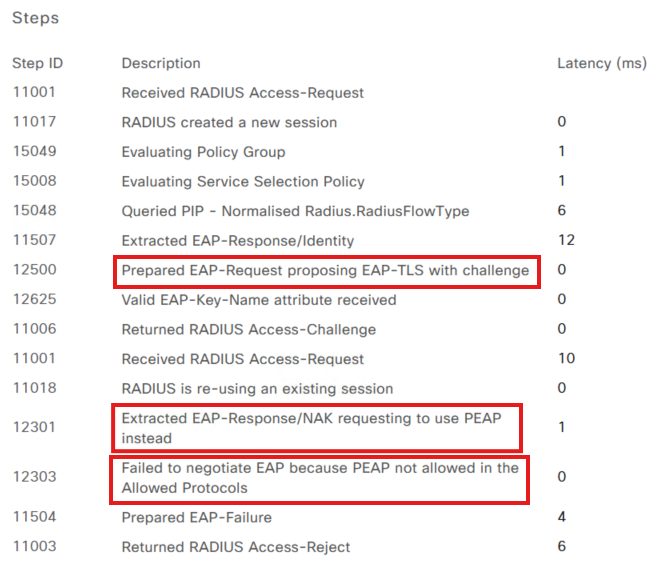
ISE Proposes:
Prepared EAP-Request proposing EAP-TLS with challenge(ISE wants a certificate).Client Rejects:
Extracted EAP-Response/NAK requesting to use PEAP instead(The client wants to use a username/password).ISE Denies:
Failed to negotiate EAP because PEAP not allowed in the Allowed Protocols(ISE security policy forbids PEAP).
Root Cause
There is a mismatch between the Allowed Protocols configured on Cisco ISE and the Supplicant configuration on the client device. ISE is enforcing a more secure method (EAP-TLS) than what the client is currently configured to provide.
Solution & Troubleshooting Steps
Verify Client Configuration: Check the client’s network adapter settings. If the organization requires certificates, ensure the client has a valid certificate and is set to use EAP-TLS.
Adjust ISE Policy (If Necessary): If PEAP is intended to be supported, you must enable it in the ISE policy settings:
Path:
Policy > Results > Authentication > Allowed ProtocolsLocate the Allowed Protocols Services List applied to your policy and ensure the box for Allow PEAP is checked.
Note: A “NAK” (Negative Acknowledgment) during negotiation isn’t always an error; it’s a standard part of EAP where the client asks, “Can we use this instead?” However, it becomes a hard failure if the client’s requested protocol is intentionally disabled on ISE for security reasons.
Scenario 5: TLS Handshake Issues (Certificate Trust)
Description: The secure tunnel between the client and the AAA server fails to establish. This usually happens during the TLS handshake phase when one side presents a certificate that the other side does not trust.
Case 1: ISE Does Not Trust Client Certificate (EAP-TLS)
In this case, the client sends its certificate, but ISE rejects it because it cannot validate the chain of authority.
| Field | Value |
|---|---|
| Event | 5400 Authentication failed |
| Failure Reason | 12514 EAP-TLS failed SSL/TLS handshake because of an unknown CA in the client certificates chain |
Root Cause
The Root Certificate Authority (CA) that issued the client’s certificate is missing from the Cisco ISE Trusted Certificate Store.
Solution
Import Root CA: Add the client’s Root CA certificate to ISE.
Path:
Administration > System > Certificates > Certificate Management > Trusted Certificates
Enable Trust: When importing, ensure you check the box: “Trust for client authentication and Syslog.” Without this specific usage tag, ISE will still reject the client certificates.
Case 2: Client Does Not Trust ISE Certificate (PEAP/TLS)
In this case, ISE presents its server certificate, but the client (supplicant) terminates the connection immediately.
| Field | Value |
|---|---|
| Event Log | 12817 TLS handshake failed |
| Failure Reason | 12321 PEAP failed SSL/TLS handshake because the client rejected the ISE local-certificate |
Root Cause
The client device does not recognize or trust the ISE certificate. This typically happens if the ISE “EAP Authentication” certificate is self-signed or issued by a private CA that hasn’t been deployed to the client’s Trusted Root Certification Authorities store.
Solution
Identify the CA: In ISE, go to the Trusted Certificates store and identify the Root CA used for the “EAP Authentication” certificate.
Export & Deploy: Export that Root CA and install it on the client device (via GPO, MDM, or manual installation).
Supplicant Update: Update the client’s Dot1x settings to “Verify the server’s identity” by selecting the newly installed Root CA in the authentication properties.
Important Note: Beyond simple trust, ensure the ISE certificate itself is valid and correctly formatted. Common “silent” killers include:
Subject Alternative Name (SAN): Ensure the SAN field includes the ISE FQDN and/or IP address.
Validity Dates: Verify the certificate is not expired and—crucially—that the “Valid From” date is not in the future.
Key Usage: The certificate must be specifically intended for Server Authentication.
Case 3: MTU Issue Causing TLS Handshake Failure (Fragmentation)
In this case, the TLS handshake begins, but the exchange is cut short. ISE sends its certificate, but because certificate packets are large, they get fragmented. If the network cannot handle these fragments, the client never receives the full certificate, and the session times out.
| Field | Value |
|---|---|
| Event | 5440 Endpoint abandoned EAP session and started new |
| Failure Reason | 5440 Endpoint abandoned EAP session and started new |
The Evidence: Latency & Missing Responses
In the ISE steps, look for a large jump in latency right before the failure:
Step Latency: Often shows high values (e.g.,
17504 ms).The “Silent” Error: You will see multiple
Prepared EAP-Request with another PEAP challengemessages, but the correspondingReceived RADIUS Access-Requestfrom the client is missing.
  Steps:

  12800 Extracted first TLS record; TLS handshake started
  12805 Extracted TLS ClientHello message
  12806 Prepared TLS ServerHello message
  12807 Prepared TLS Certificate message
  12808 Prepared TLS ServerKeyExchange message
  12810 Prepared TLS ServerDone message
  12305 Prepared EAP-Request with another PEAP challenge
  11006 Returned RADIUS Access-Challenge
  11001 Received RADIUS Access-Request
  11018 RADIUS is re-using an existing session
  12304 Extracted EAP-Response containing
  response
  12305 Prepared EAP-Request with another PEAP challenge
  11006 Returned RADIUS Access-Challenge
  11001 Received RADIUS Access-Request
  11018 RADIUS is re-using an existing session
  12304 Extracted EAP-Response containing
  response
  12305 Prepared EAP-Request with another PEAP challenge
  11006 Returned RADIUS Access-Challenge
  11001 Received RADIUS Access-Request
  11018 RADIUS is re-using an existing session
  12304 Extracted EAP-Response containing
  response
  12305 Prepared EAP-Request with another PEAP challenge
  11006 Returned RADIUS Access-Challenge
  11001 Received RADIUS Access-Request
  11018 RADIUS is re-using an existing session
  12304 Extracted EAP-Response containing
  response
  12305 Prepared EAP-Request with another PEAP challenge
  11006 Returned RADIUS Access-Challenge
  11001 Received RADIUS Access-Request
  11018 RADIUS is re-using an existing session
  12304 Extracted EAP-Response containing
  response
  12305 Prepared EAP-Request with another PEAP challenge
  11006 Returned RADIUS Access-Challenge

  <<< The next '11001 Received RADIUS Access-Request' is missing – TLS failed due to step latency. >>>

  5440 Endpoint abandoned EAP session an
  Step latency=17994 ms)
Pro-Tip: Decoding the “5440 Endpoint Abandoned” Error
While the
5440error is common, it is often a “symptom” rather than the root cause. You can narrow it down by looking at the pattern of the failure:
The MTU Signature (Consistent Failure): If EAP-TLS (certificates) consistently fails for all users at the exact same step (usually right after the server presents its certificate), but PEAP works perfectly, you are likely facing an MTU/Fragmentation issue. Large certificate packets are being dropped by the network because they exceed the path MTU.
The Network Drop Signature (Random Failure): If the authentication fails 1 out of 10 times and the ISE steps show the failure happening at different stages each time, this points to random packet drops or congestion. Unlike MTU issues, which are predictably “stuck” at one point, random drops will appear inconsistent across your logs.
The Supplicant Signature (Isolated Failure): If the failure is persistent but only affects a single device, the issue is likely a local supplicant or driver misconfiguration on that specific client.
The Bottom Line: If the “abandoned session” is widespread and predictable, check the MTU. If it’s sporadic and shifts around in the logs, look for network stability or interference issues.
Root Cause
The RADIUS/TLS packets are too large for the MTU (Maximum Transmission Unit) of the network path.
Fragmented Traffic: Large certificate packets (often >1500 bytes) are fragmented.
The Drop: If a network device or firewall between the WLC and ISE doesn’t support fragmentation (or if fragments arrive out of order, common in Azure environments), the packet is dropped.
Solution & Troubleshooting Steps
Perform an MTU Ping Test: From the WLC CLI, test the path to ISE using a large packet with the “Don’t Fragment” (DF) bit set:
ping <ISE-IP-Address> size 1500 df-bitIf the success rate is 0%, the MTU is too low.
Lower the size (e.g., 1400) until you find the “sweet spot” where pings pass.
Adjust WLC MTU: Reduce the MTU on the Catalyst 9800 WMI or radius source interface SVI.
Azure-Specific Fix: If hosting ISE or the 9800-CL in Azure, enable the
enable-udp-fragment-reorderingoption to prevent authentication failures caused by out-of-order UDP fragments.
Scenario 6: Username or Password Incorrect (PEAP Only)
Description: The client successfully negotiates the protocol and establishes a TLS tunnel, but the final authentication step fails because the credentials provided by the user (or stored in the supplicant) do not match the identity store.
| Field | Value |
|---|---|
| Event | 5440 Endpoint abandoned EAP session and started new |
| Failure Reason | 24408 User authentication against Active Directory failed... wrong password |
The Evidence: RPC Logon Error
In the ISE detailed report, the Steps section will show a successful identity resolution followed by a specific failure from the External Identity Store (Active Directory):
24323 Identity resolution detected single matching account
24344 RPC Logon request failed - STATUS_WRONG_PASSWORD
Root Cause
The credentials entered by the user (Username or Password) do not match the records in the ISE Internal User Store or the Active Directory forest. This can be caused by:
Manual typo by the user.
An expired Active Directory password.
The account being locked out due to too many failed attempts.
The client machine attempting to use old, cached credentials after a password change.
Solution & Troubleshooting Steps
Verify User Input: Confirm the user is typing the password correctly. If using a machine-based authentication, ensure the computer account is still active in the domain.
Check Identity Store:
Verify the account is not locked or disabled in Active Directory.
If using the Internal Store in ISE, reset the user’s password under
Administration > Identity Management > Identities.
Clear Cached Credentials: On Windows clients, users often need to “Forget” the network or update the stored credentials in the Credential Manager to stop the machine from sending an old password.
Test with a Known-Good Account: Use a test account to determine if the issue is specific to one user or a broader connectivity issue between ISE and the Domain Controller.
Scenario 7: Client Hitting the Wrong Policy (Policy Logic Error)
Description: The user is successfully authenticated (ISE knows who they are), but they are being denied access or receiving the wrong permissions. This happens because the request matched a policy rule higher up in the list than the one intended by the administrator.
| Field | Value |
|---|---|
| Event | 5400 Authentication failed |
| Failure Reason | 15039 Rejected per authorization profile |
| Authorization Policy | Wireless >> Default (Commonly the “DenyAccess” fall-through) |
Root Cause
Cisco ISE evaluates policies from top to bottom. If a client matches the conditions of a broad rule at the top of the list, ISE stops searching and applies that rule—even if a more specific, “perfect” rule exists further down.
Solution & Logical Troubleshooting
This is a configuration logic issue. To fix it, you must analyze why the client is misaligned with your Policy Sets.
1. Review the Policy Rule Order
If the correct rule is BELOW the current match: Your “catch-all” rules might be too broad. Reposition your most specific rules (e.g., CEO_Tablet_Access) at the very top, and more general rules (e.g., All_Wireless_Users) toward the bottom.
If the correct rule is ABOVE the current match: The client is failing to meet one or more conditions of the intended rule.
2. Inspect Policy Conditions
Open the RADIUS Live Logs and compare the attributes sent by the WLC against the conditions in your ISE rule:
Attribute Mismatch: Check if you are filtering by
Ssid,Device Type, orAD-Group. If the WLC sendsSSID: Corporatebut your rule looks forSSID: Corp_Secure, the rule will be skipped.Logical Operators: Double-check your AND/OR logic. A single “AND” condition that isn’t met will cause the entire rule to be ignored.
3. The “Default” Rule Trap
If the Live Log shows the Authorization Policy as Default, it means the client didn’t match any of your custom rules. This usually indicates a typo in the condition attributes or a missing certificate attribute.
Scenario 8: AAA Override Issue (VLAN/ACL Failure)
Description: The client successfully authenticates, and ISE sends an Access-Accept. However, the session is immediately terminated by the WLC. This happens because ISE is pushing an Attribute-Value Pair (AVP)—such as a specific VLAN or ACL—that the WLC does not have configured or cannot apply.
| Log Event | Meaning |
|---|---|
SANET_AUTHZ_FAILURE - VLAN Failure | The assigned VLAN ID/Name does not exist on the WLC. |
SANET_AUTHZ_FAILURE - ACL Failure | The pushed ACL name is missing from the WLC configuration. |
CO_CLIENT_DELETE_REASON_EXCLUDE_VLAN_FAIL | The WLC is kicking the client because the VLAN assignment failed. |
The Evidence: RA Traces
When reviewing the logs, look for the specific attribute ISE is sending in the RADIUS payload versus the WLC’s reaction:
VLAN Assignment:
Tunnel-Private-Group-Id[81] 6 "118"(ISE is trying to put the user in VLAN 118).The Failure:
Failed to get entry for vlan name-id table... during validating vlan-id.ACL Assignment:
Airespace-ACL-Name [6] 13 "WirelessACL"(ISE is pushing a filter called “WirelessACL”).The Failure:
Filter-Id : WirelessACL not present.
View Logs
WLC RA Trace [ACL/Vlan Issue]
  2025/05/05 19:37:51.272318807 {wncd_x_R0-0}{1}: [radius] [15206]: (info): RADIUS: Received from id 1812/7 10.10.10.24:0, Access-Accept, len 327
  2025/05/05 19:37:51.272341499 {wncd_x_R0-0}{1}: [radius] [15206]: (info): RADIUS:  authenticator 8d 9c 08 ef 8f 17 e7 db - 14 f8 d2 67 52 4b 98 15
  2025/05/05 19:37:51.272351698 {wncd_x_R0-0}{1}: [radius] [15206]: (info): RADIUS:  User-Name           [1]      8  "dyanev"
  2025/05/05 19:37:51.272355658 {wncd_x_R0-0}{1}: [radius] [15206]: (info): RADIUS:  Class               [25]    55  ...
  2025/05/05 19:37:51.272609754 {wncd_x_R0-0}{1}: [radius] [15206]: (info): 01:
  2025/05/05 19:37:51.272612812 {wncd_x_R0-0}{1}: [radius] [15206]: (info): RADIUS:  Tunnel-Type         [64]     6  VLAN                   [13]
  2025/05/05 19:37:51.272615262 {wncd_x_R0-0}{1}: [radius] [15206]: (info): 01:
  2025/05/05 19:37:51.272889727 {wncd_x_R0-0}{1}: [radius] [15206]: (info): RADIUS:  Tunnel-Medium-Type  [65]     6  ALL_802                [6]
  2025/05/05 19:37:51.272897021 {wncd_x_R0-0}{1}: [radius] [15206]: (info): RADIUS:  EAP-Message         [79]     6  ...
  2025/05/05 19:37:51.272905823 {wncd_x_R0-0}{1}: [radius] [15206]: (info): RADIUS:  Message-Authenticator[80]    18  ...
  2025/05/05 19:37:51.272925133 {wncd_x_R0-0}{1}: [radius] [15206]: (info): 01:
  2025/05/05 19:37:51.272926611 {wncd_x_R0-0}{1}: [radius] [15206]: (info): RADIUS:  Tunnel-Private-Group-Id[81]     6  "118"
  2025/05/05 19:37:51.272929662 {wncd_x_R0-0}{1}: [radius] [15206]: (info): RADIUS:  EAP-Key-Name        [102]   67  *
  2025/05/05 19:37:51.272936093 {wncd_x_R0-0}{1}: [radius] [15206]: (info): RADIUS:  Vendor, Microsoft   [26]    58
  2025/05/05 19:37:51.272938659 {wncd_x_R0-0}{1}: [radius] [15206]: (info): RADIUS:   MS-MPPE-Send-Key   [16]    52  *
  2025/05/05 19:37:51.272943959 {wncd_x_R0-0}{1}: [radius] [15206]: (info): RADIUS:  Vendor, Microsoft   [26]    58
  2025/05/05 19:37:51.272946189 {wncd_x_R0-0}{1}: [radius] [15206]: (info): RADIUS:   MS-MPPE-Recv-Key   [17]    52  *

  2025/05/05 19:37:51.276482963 {wncd_x_R0-0}{1}: [site-manager-ap] [15206]: (ERR): Failed to get first entry for vlan name-id table                 during validating vlan-id
  2025/05/05 19:37:51.276484772 {wncd_x_R0-0}{1}: [auth-mgr-feat_wireless] [15206]: (info): [0000.0000.0000:unknown] Vlan validation for vlanid 0 failed

  2025/05/05 19:37:51.278132953 {wncd_x_R0-0}{1}: [ewlc-infra-evq] [15206]: (ERR): SANET_AUTHZ_FAILURE - VLAN Failure, username dyanev, audit session id 0E0A0A0A00000059A14F7F6A

  2025/05/05 19:37:51.278516203 {wncd_x_R0-0}{1}: [client-orch-sm] [15206]: (info): MAC: fe3a.d380.e125  Deleting the client, reason: 120, CO_CLIENT_DELETE_REASON_EXCLUDE_VLAN_FAIL, Client state S_CO_L2_AUTH_IN_PROGRESS
  2025/05/05 19:37:51.278563849 {wncd_x_R0-0}{1}: [client-orch-sm] [15206]: (note): MAC: fe3a.d380.e125  Client delete initiated. Reason: CO_CLIENT_DELETE_REASON_EXCLUDE_VLAN_FAIL, details: , fsm-state transition 00|00|00|00|00|00|00|00|00|00|00|00|00|00|00|00|00|00|00|00|00|00|00|00|00|00|00|00|01|07|15|a2|
  2025/05/05 19:37:51.278754714 {wncd_x_R0-0}{1}: [client-orch-sm] [15206]: (note): MAC: fe3a.d380.e125  Delete mobile payload sent for BSSID: f4db.e657.af0f WTP mac: f4db.e657.af00 slot id: 1
  2025/05/05 19:37:51.278811413 {wncd_x_R0-0}{1}: [client-orch-state] [15206]: (note): MAC: fe3a.d380.e125  Client state transition: S_CO_L2_AUTH_IN_PROGRESS -> S_CO_DELETE_IN_PROGRESS

  2025/05/05 19:37:51.279679646 {wncd_x_R0-0}{1}: [client-auth] [15206]: (info): MAC: fe3a.d380.e125  Client auth-interface state transition: S_WAIT_FOR_CO_DELETE -> S_SANET_DELETE_IN_PROGRESS
  2025/05/05 19:37:51.279714168 {wncd_x_R0-0}{1}: [dot11] [15206]: (info): MAC: fe3a.d380.e125  Total length of Deauth/Disassoc: 13
  2025/05/05 19:37:51.279823419 {wncd_x_R0-0}{1}: [dot11] [15206]: (info): MAC: fe3a.d380.e125  Sent disassoc to client, disassoc reason: 250, CLIENT_DEAUTH_REASON_AUTHZ_FAIL delete reason: 120, CO_CLIENT_DELETE_REASON_EXCLUDE_VLAN_FAIL.
  2025/05/05 19:37:51.279828336 {wncd_x_R0-0}{1}: [dot11] [15206]: (info): MAC: fe3a.d380.e125  Total length of Deauth/Disassoc: 13
  2025/05/05 19:37:51.279937220 {wncd_x_R0-0}{1}: [dot11] [15206]: (info): MAC: fe3a.d380.e125  Sent deauth to client, deauth reason: 250, CLIENT_DEAUTH_REASON_AUTHZ_FAIL delete reason: 120, CO_CLIENT_DELETE_REASON_EXCLUDE_VLAN_FAIL.
  2025/05/05 19:37:51.280134007 {wncd_x_R0-0}{1}: [dot11] [15206]: (info): MAC: fe3a.d380.e125  DOT11 state transition: S_DOT11_ASSOCIATED -> S_DOT11_DELETED

  ACL version:

  2025/05/05 19:40:36.989073863 {wncd_x_R0-0}{1}: [radius] [15206]: (info): RADIUS: Received from id 1812/95 10.10.10.24:0, Access-Accept, len 327
  2025/05/05 19:40:36.989099388 {wncd_x_R0-0}{1}: [radius] [15206]: (info): RADIUS:  authenticator 91 aa 70 4b 19 34 49 c0 - 35 88 f3 3d f3 df 06 1c
  2025/05/05 19:40:36.989112155 {wncd_x_R0-0}{1}: [radius] [15206]: (info): RADIUS:  User-Name           [1]      8  "dyanev"

  ***

  2025/05/05 19:40:36.989270563 {wncd_x_R0-0}{1}: [radius] [15206]: (info): RADIUS:  Vendor, Airespace   [26]    19
  2025/05/05 19:40:36.989273793 {wncd_x_R0-0}{1}: [radius] [15206]: (info): RADIUS:  Airespace-ACL-Name [6]     13  "WirelessACL"

  2025/05/05 19:40:36.991688263 {wncd_x_R0-0}{1}: [epm-acl] [15206]: (info): [fe3a.d380.e125:capwap_90000005] Filter-Id : WirelessACL received
  2025/05/05 19:40:36.991721989 {wncd_x_R0-0}{1}: [epm-acl] [15206]: (info): [0000.0000.0000:unknown] Filter-Id : WirelessACL not present

  2025/05/05 19:40:36.992414828 {wncd_x_R0-0}{1}: [ewlc-infra-evq] [15206]: (ERR): SANET_AUTHZ_FAILURE - ACL Failure, username dyanev, audit session id 0E0A0A0A0000005AA15206C7

  2025/05/05 19:40:36.994173908 {wncd_x_R0-0}{1}: [client-orch-sm] [15206]: (info): MAC: fe3a.d380.e125  Deleting the client, reason: 121, CO_CLIENT_DELETE_REASON_EXCLUDE_ACL_FAIL, Client state S_CO_L2_AUTH_IN_PROGRESS
  2025/05/05 19:40:36.994217517 {wncd_x_R0-0}{1}: [client-orch-sm] [15206]: (note): MAC: fe3a.d380.e125  Client delete initiated. Reason: CO_CLIENT_DELETE_REASON_EXCLUDE_ACL_FAIL, details: , fsm-state transition 00|00|00|00|00|00|00|00|00|00|00|00|00|00|00|00|00|00|00|00|00|00|00|00|00|00|00|00|01|07|15|a2|
  2025/05/05 19:40:36.994391646 {wncd_x_R0-0}{1}: [client-orch-sm] [15206]: (note): MAC: fe3a.d380.e125  Delete mobile payload sent for BSSID: f4db.e657.af0f WTP mac: f4db.e657.af00 slot id: 1
  2025/05/05 19:40:36.994419255 {wncd_x_R0-0}{1}: [client-orch-state] [15206]: (note): MAC: fe3a.d380.e125  Client state transition: S_CO_L2_AUTH_IN_PROGRESS -> S_CO_DELETE_IN_PROGRESS

  2025/05/05 19:40:36.995126607 {wncd_x_R0-0}{1}: [dot11] [15206]: (info): MAC: fe3a.d380.e125  Total length of Deauth/Disassoc: 13
  2025/05/05 19:40:36.995215382 {wncd_x_R0-0}{1}: [dot11] [15206]: (info): MAC: fe3a.d380.e125  Sent disassoc to client, disassoc reason: 250, CLIENT_DEAUTH_REASON_AUTHZ_FAIL delete reason: 121, CO_CLIENT_DELETE_REASON_EXCLUDE_ACL_FAIL.
  2025/05/05 19:40:36.995219455 {wncd_x_R0-0}{1}: [dot11] [15206]: (info): MAC: fe3a.d380.e125  Total length of Deauth/Disassoc: 13
  2025/05/05 19:40:36.995293903 {wncd_x_R0-0}{1}: [dot11] [15206]: (info): MAC: fe3a.d380.e125  Sent deauth to client, deauth reason: 250, CLIENT_DEAUTH_REASON_AUTHZ_FAIL delete reason: 121, CO_CLIENT_DELETE_REASON_EXCLUDE_ACL_FAIL.
  2025/05/05 19:40:36.995442677 {wncd_x_R0-0}{1}: [dot11] [15206]: (info): MAC: fe3a.d380.e125  DOT11 state transition: S_DOT11_ASSOCIATED -> S_DOT11_DELETED
Root Cause
The WLC is receiving an instruction it cannot execute. This usually happens when:
Missing Configuration: The VLAN or ACL is defined in ISE but has not been created on the Catalyst 9800.
Case Sensitivity: ACL names are case-sensitive. If ISE pushes
WirelessACLbut the WLC haswirelessacl, it will fail.FlexConnect Issues: In FlexConnect local switching, the VLAN must exist on the Access Point or the Flex Profile, not just the WLC , same is for ACL as well.
Solution & Troubleshooting Steps
Identify the Culprit: Look at the
SANET_AUTHZ_FAILUREerror in the WLC traces. It will explicitly tell you if it’s a VLAN Failure or an ACL Failure.Sync Configurations:
For VLANs: Ensure the VLAN ID (e.g., 118) is created on the WLC under
Configuration > Layer2 > VLAN.For ACLs: Ensure the exact ACL name exists under
Configuration > Security > ACL.
Verify FlexConnect (If applicable): If you are using FlexConnect, ensure the VLAN is mapped in the Flex Profile and that the VLAN exists on the trunk ports of the switch where the AP is connected.
Check AAA Override Toggle: Ensure that AAA Override is enabled on the specific Policy Profile in the WLC (
Configuration > Tags & Profiles > Policy > [Profile Name] > Advanced).
Ready to dive deeper? To learn how to capture these traces and identify which scenario you’re hitting, check out my comprehensive guide: Mastering 802.1X Flow: A TAC-Level Deep Dive on Catalyst 9800 WLC. It covers exactly how to run debugs and interpret the outputs like a pro.